VB.NET Requires Chilkat v9.5.0.85+
VB.NET
Sign PDF with Timestamp from TSA (Timestamp Server Authority)
See more PDF Signatures Examples
This example demonstrates how to a sign a PDF that is both long-term validation (LTV) enabled and includes a validating timestamp from a TSA (Timestamp Server Authority).Chilkat VB.NET Downloads
Dim success As Boolean = False

'  This example requires the Chilkat API to have been previously unlocked.
'  See Global Unlock Sample for sample code.

Dim pdf As New Chilkat.Pdf

'  Load a PDF to be signed.
'  The "hello.pdf" is available at https://chilkatsoft.com/hello.pdf
success = pdf.LoadFile("qa_data/pdf/hello.pdf")
If (success = False) Then
    Debug.WriteLine(pdf.LastErrorText)
    Exit Sub
End If


'  Options for signing are specified in JSON.
Dim json As New Chilkat.JsonObject

'  In most cases, the signingCertificateV2 and signingTime attributes are required.
json.UpdateInt("signingCertificateV2",1)
json.UpdateInt("signingTime",1)

'  Tell Chilkat to create an LTV-enabled (long term validation) signature.
'  See PDF Long-Term Validation (LTV) Signature Example for more detailed comments about "ltvOcsp".
json.UpdateBool("ltvOcsp",True)

'  Tell Chilkat to request a timestamp from a TSA server and include the timestamp token (1.2.840.113549.1.9.16.2.14)
'  in the CMS signature's authentication attributes
json.UpdateBool("timestampToken.enabled",True)

'  In this example, we'll use a free TSA server (timestamp.digicert.com), but you may want to use your own timestamp authority server.
json.UpdateString("timestampToken.tsaUrl","http://timestamp.digicert.com")

'  If the timestamp server requires a username/password, do the following.  Otherwise omit the following few lines of code.
json.UpdateString("timestampToken.tsaUsername","the_tsa_username")
json.UpdateString("timestampToken.tsaPassword","the_tsa_password")

'  When requesting the timestamp token, ask the server to include its certificate in the timestamp token response.
'  This allows for the timestamp server's certificate to be included in the LTV validation (i.e. if the timestamp server
'  has an OCSP URL, then Chilkat will also do the OCSP request for the timestamp server's certificate.)
json.UpdateBool("timestampToken.requestTsaCert",True)

'  Define the appearance of the signature.
json.UpdateInt("page",1)
json.UpdateString("appearance.y","top")
json.UpdateString("appearance.x","left")
json.UpdateString("appearance.fontScale","10.0")
json.UpdateString("appearance.text[0]","Digitally signed by: cert_cn")
json.UpdateString("appearance.text[1]","current_dt")
json.UpdateString("appearance.text[2]","This is an LTV-enabled signature with a TSA timestamp.")

'  Load the signing certificate. (Use your own certificate.)
Dim cert As New Chilkat.Cert
success = cert.LoadPfxFile("qa_data/pfx/myPdfSigningCert.pfx","pfxPassword")
If (success = False) Then
    Debug.WriteLine(cert.LastErrorText)
    Exit Sub
End If


'  Tell the pdf object to use the certificate for signing.
success = pdf.SetSigningCert(cert)
If (success = False) Then
    Debug.WriteLine(pdf.LastErrorText)
    Exit Sub
End If


success = pdf.SignPdf(json,"qa_output/hello_ltv_signed_with_timestamp.pdf")
If (success = False) Then
    Debug.WriteLine(pdf.LastErrorText)
    Exit Sub
End If


Debug.WriteLine("The PDF has been successfully cryptographically signed with TSA timestamp and long-term validation.")

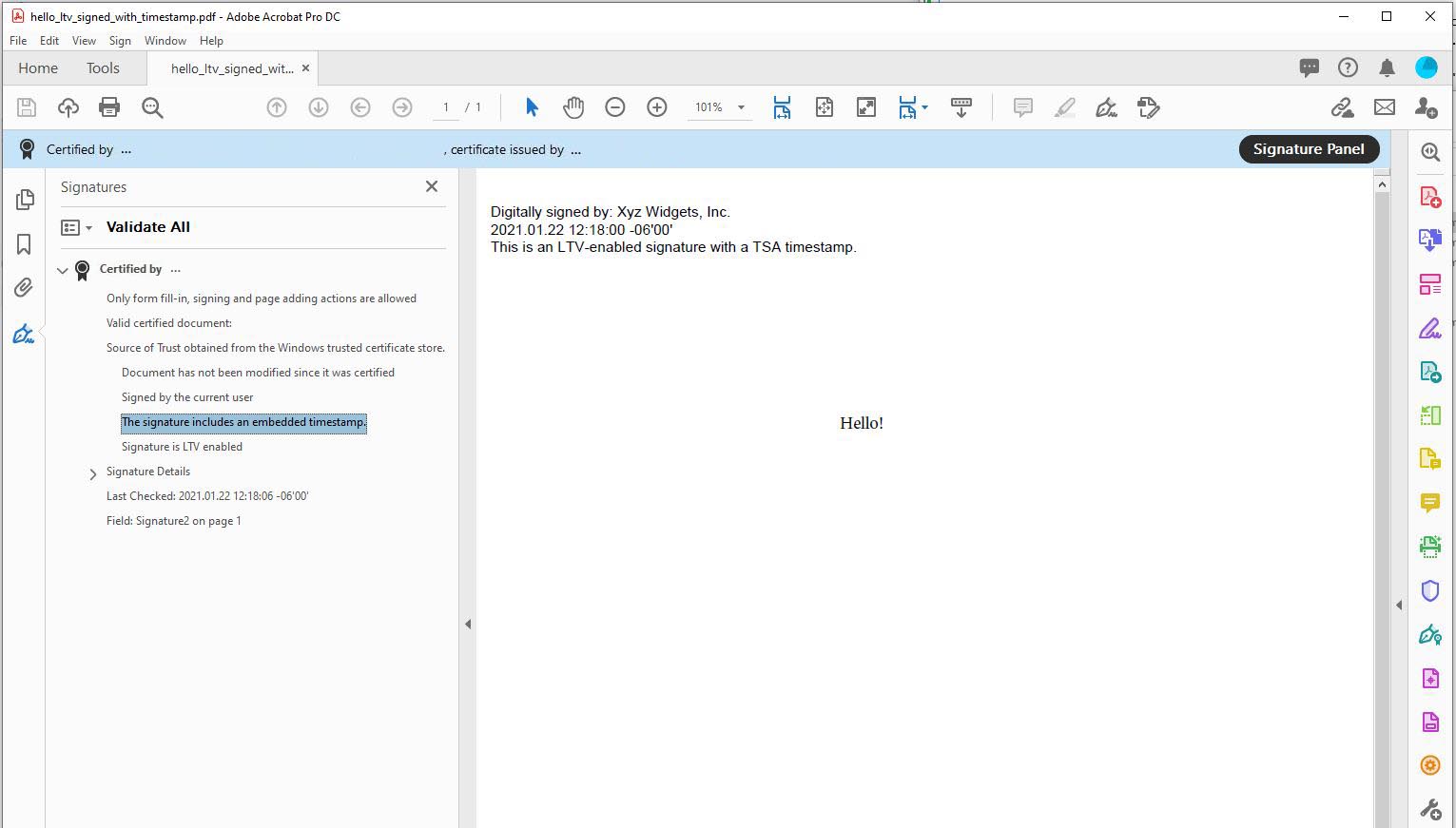
'  If you open the Signature Panel in Adobe Acrobat, it will indicate that the signature is LTV enabled
'  and contains an embedded timestamp:
'