VB.NET
VB.NET
Sign PDF with Long-Term Validation (LTV Enabled)
See more PDF Signatures Examples
This example demonstrates how to a sign a PDF with long-term validation (LTV) enabled.Note: This example requires Chilkat v9.5.0.85 or greater.
Chilkat VB.NET Downloads
Dim success As Boolean = False

'  This example requires the Chilkat API to have been previously unlocked.
'  See Global Unlock Sample for sample code.

Dim pdf As New Chilkat.Pdf

'  Load a PDF to be signed.
'  The "hello.pdf" is available at https://chilkatsoft.com/hello.pdf
success = pdf.LoadFile("qa_data/pdf/hello.pdf")
If (success = False) Then
    Debug.WriteLine(pdf.LastErrorText)
    Exit Sub
End If


'  Options for signing are specified in JSON.
Dim json As New Chilkat.JsonObject

'  In most cases, the signingCertificateV2 and signingTime attributes are required.
json.UpdateInt("signingCertificateV2",1)
json.UpdateInt("signingTime",1)

'  Add the "ltvOcsp" instruction to the JSON passed to SignPdf.
'  This is what causes Chilkat to create an LTV-enabled signature.
'
'  If we are signing a PDF that already has signatures, then the existing signatures
'  are automatically verified, and Chilkat will do OCSP certificate status checking (if possible)
'  for those certs in existing signatures (including certs in the certificate chains)
'  that do not yet have a valid OCSP response in the DSS (Document Security Store).
'  Chilkat will add the OCSP responses to the /OCSPs in the Document Security Store (/DSS).
'  Also, and certificates from existing signatures not yet in the DSS are added to the /Certs
'  in the DSS.
'
'  Also, the "ltvOcsp" causes Chilkat to add the pdfRevocationInfoArchival authenticated attribute
'  to the CMS signature.  The pdfRevocationInfoArchival attribute (1.2.840.113583.1.1.8)
'  contains OCSP responses and the CRL for the issuer of the signing certificate.
'  Therefore, Chilkat will send an OCSP request to the signing certificate's OCSP URl (if one exists)
'  and will download the CRL from the issuer certificate's CRL Distribution Point (if one exists).
json.UpdateBool("ltvOcsp",True)

'  -----------------------------------------------------------------------------------
'  Note: If Chilkat produces a signed PDF, but the signature is not LTV-enabled,
'  the cause might be related to a failure to download CRL's or OCSP requests.
'  See Possible Solution for Failure to Produce LTV-enabled PDF Signature
'  -----------------------------------------------------------------------------------
'  You can add the following to UncommonOptions to get detailed information about the CRL and OCSP requests
'  You shouldn't set the following logging options unless there is a need, because it adds a large amount of information to the LastErrorText.
pdf.UncommonOptions = "LOG_OCSP_HTTP,LOG_CRL_HTTP"

'  Define the appearance of the signature.
json.UpdateInt("page",1)
json.UpdateString("appearance.y","top")
json.UpdateString("appearance.x","left")
json.UpdateString("appearance.fontScale","10.0")
json.UpdateString("appearance.text[0]","Digitally signed by: cert_cn")
json.UpdateString("appearance.text[1]","current_dt")
json.UpdateString("appearance.text[2]","This is an LTV-enabled signature.")

'  Load the signing certificate. (Use your own certificate.)
Dim cert As New Chilkat.Cert
success = cert.LoadPfxFile("qa_data/pfx/myPdfSigningCert.pfx","pfxPassword")
If (success = False) Then
    Debug.WriteLine(cert.LastErrorText)
    Exit Sub
End If


'  Tell the pdf object to use the certificate for signing.
success = pdf.SetSigningCert(cert)
If (success = False) Then
    Debug.WriteLine(pdf.LastErrorText)
    Exit Sub
End If


success = pdf.SignPdf(json,"qa_output/hello_ltv_signed.pdf")
If (success = False) Then
    Debug.WriteLine(pdf.LastErrorText)
    Exit Sub
End If


Debug.WriteLine("The PDF has been successfully cryptographically signed with long-term validation.")

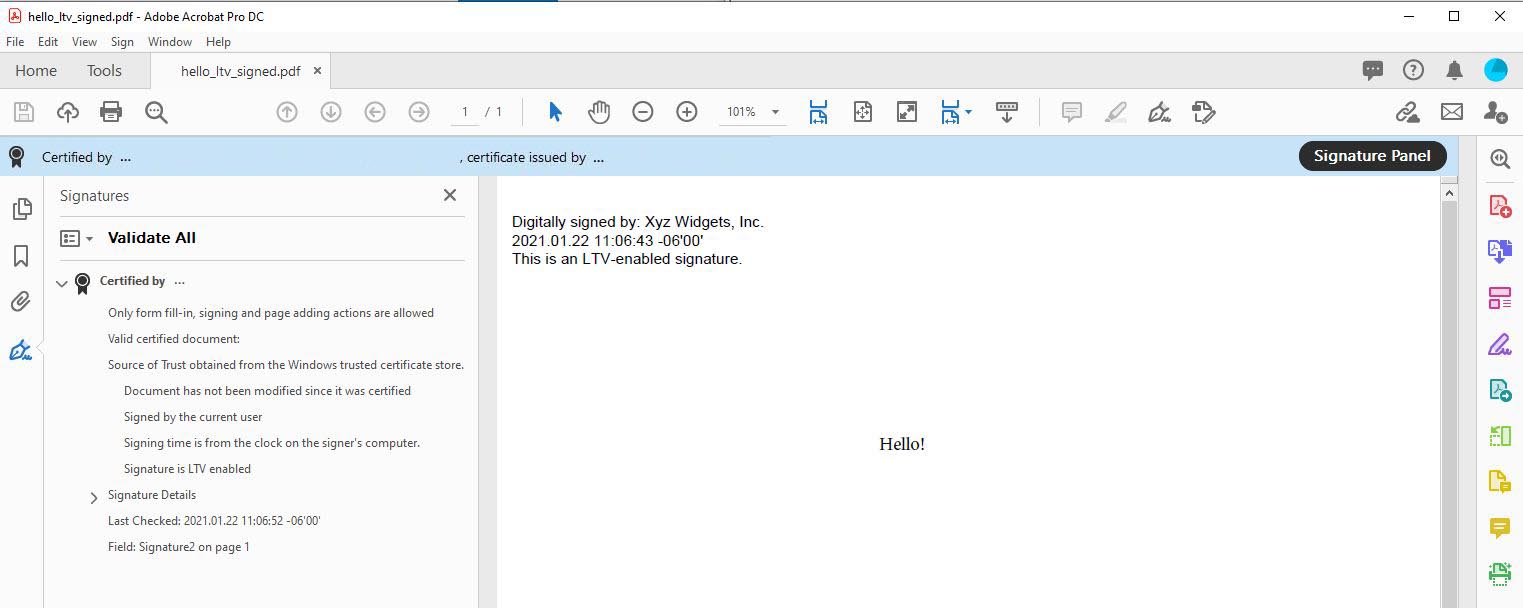
'  If you open the Signature Panel in Adobe Acrobat, it will indicate that the signature is LTV enabled
'  as shown here:
'