SQL Server
SQL Server
Office365 Refresh OAuth2 Access Token for SMTP, IMAP, POP
See more Office365 Examples
Demonstrates how to refresh an Office365 OAuth2 access token for use in the SMTP, IMAP, and POP3 protocols.Chilkat SQL Server Downloads
--
CREATE PROCEDURE ChilkatSample
AS
BEGIN
    DECLARE @hr int
    DECLARE @sTmp0 nvarchar(4000)
    DECLARE @success int
    SELECT @success = 0

    --  This example requires the Chilkat API to have been previously unlocked.
    --  See Global Unlock Sample for sample code.

    --  It is assumed we previously obtained an OAuth2 access token.
    --  This example loads the JSON access token file
    --  saved by this example: Get Office365 SMTP/IMAP/POP3 OAuth2 Access Token

    --  Note: Refreshing an access token does not require user-interaction.
    --  Only the act of getting the initial access token requires interactive authorization from the Office365 account owner
    --  (i.e. a browser is displayed and the account owner authorizes access by the app).

    --  Once you have the initial access token, it can be refreshed over and over again with no limits.
    --  A typical strategy is to write your application to automatically refresh the access token
    --  when authentication fails, and then retry the operation with the new access token.
    --  For example, see Auto-Refresh O365 Access Token when Sending Email

    DECLARE @jsonToken int
    EXEC @hr = sp_OACreate 'Chilkat.JsonObject', @jsonToken OUT
    IF @hr <> 0
    BEGIN
        PRINT 'Failed to create ActiveX component'
        RETURN
    END

    EXEC sp_OAMethod @jsonToken, 'LoadFile', @success OUT, 'qa_data/tokens/office365.json'
    IF @success <> 1
      BEGIN

        PRINT 'Failed to load office365.json'
        EXEC @hr = sp_OADestroy @jsonToken
        RETURN
      END

    --  The access token JSON looks like this:

    --  {
    --    "token_type": "Bearer",
    --    "scope": "IMAP.AccessAsUser.All openid POP.AccessAsUser.All profile SMTP.Send email",
    --    "expires_in": 3599,
    --    "ext_expires_in": 3599,
    --    "access_token": "...",
    --    "refresh_token": "...",
    --    "id_token": "...",
    --    "expires_on": "1592748507"
    --  }

    DECLARE @oauth2 int
    EXEC @hr = sp_OACreate 'Chilkat.OAuth2', @oauth2 OUT

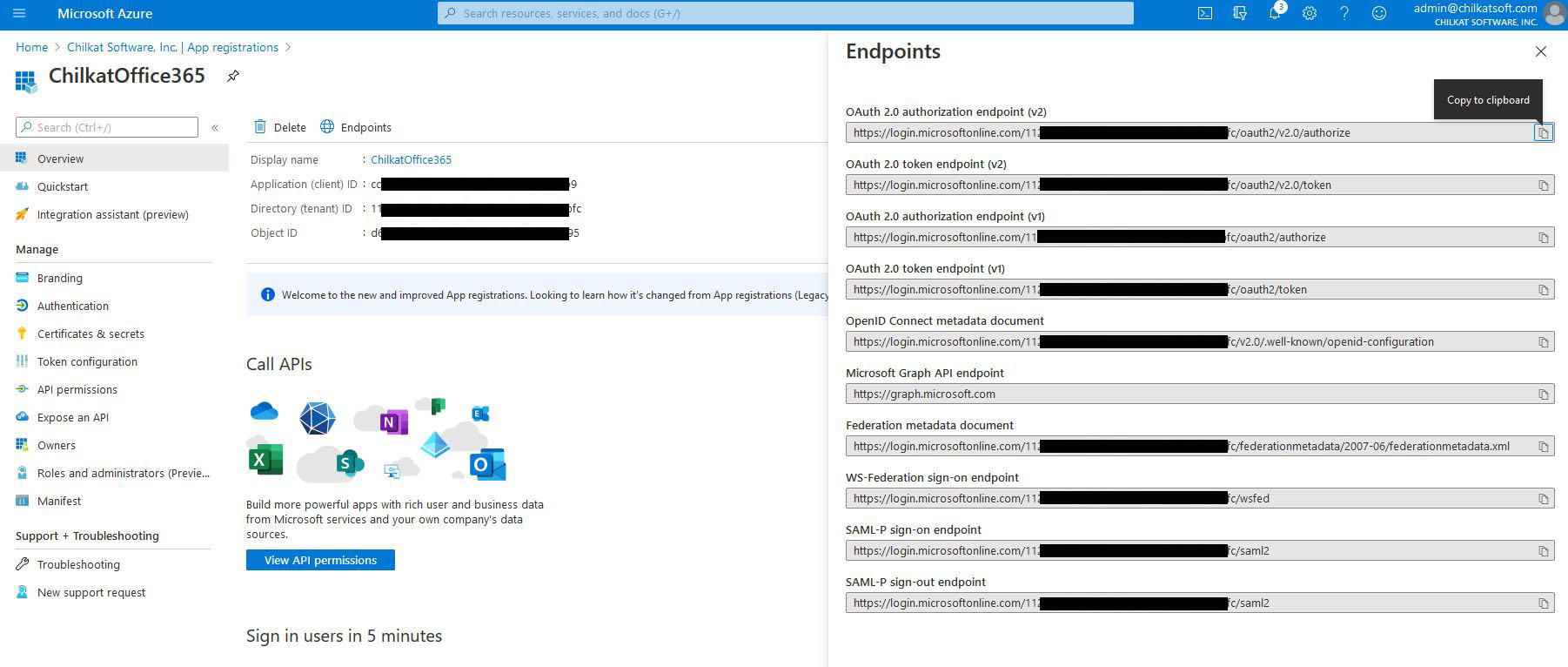
    --  Update to use your token endpoint.
    --  In the Azure Portal, in "App registrations", go to "Endpoints" (located to the right of the "+ New registration" link.)
    --     Find your endpoint for the "OAuth 2.0 token endpoint (v2)"
    --     See Office365 OAuth2 Endpoints

    EXEC sp_OASetProperty @oauth2, 'TokenEndpoint', 'https://login.microsoftonline.com/xxxxxxxxxx-71bf-4ebe-a866-738364321bf2/oauth2/v2.0/token'

    --  Replace these with actual values.
    EXEC sp_OASetProperty @oauth2, 'ClientId', 'CLIENT_ID'
    EXEC sp_OASetProperty @oauth2, 'ClientSecret', 'CLIENT_SECRET'

    --  Get the "refresh_token"
    EXEC sp_OAMethod @jsonToken, 'StringOf', @sTmp0 OUT, 'refresh_token'
    EXEC sp_OASetProperty @oauth2, 'RefreshToken', @sTmp0

    --  Send the HTTP POST to refresh the access token..
    EXEC sp_OAMethod @oauth2, 'RefreshAccessToken', @success OUT
    IF @success <> 1
      BEGIN
        EXEC sp_OAGetProperty @oauth2, 'LastErrorText', @sTmp0 OUT
        PRINT @sTmp0
        EXEC @hr = sp_OADestroy @jsonToken
        EXEC @hr = sp_OADestroy @oauth2
        RETURN
      END
    EXEC sp_OAGetProperty @oauth2, 'LastErrorText', @sTmp0 OUT
    PRINT @sTmp0


    EXEC sp_OAGetProperty @oauth2, 'AccessToken', @sTmp0 OUT
    PRINT 'New access token: ' + @sTmp0

    EXEC sp_OAGetProperty @oauth2, 'RefreshToken', @sTmp0 OUT
    PRINT 'New refresh token: ' + @sTmp0

    --  Update the JSON with the new tokens.
    EXEC sp_OAGetProperty @oauth2, 'AccessToken', @sTmp0 OUT
    EXEC sp_OAMethod @jsonToken, 'UpdateString', @success OUT, 'access_token', @sTmp0
    EXEC sp_OAGetProperty @oauth2, 'RefreshToken', @sTmp0 OUT
    EXEC sp_OAMethod @jsonToken, 'UpdateString', @success OUT, 'refresh_token', @sTmp0

    --  Save the new JSON access token response to a file.
    DECLARE @sbJson int
    EXEC @hr = sp_OACreate 'Chilkat.StringBuilder', @sbJson OUT

    EXEC sp_OASetProperty @jsonToken, 'EmitCompact', 0
    EXEC sp_OAMethod @jsonToken, 'EmitSb', @success OUT, @sbJson
    EXEC sp_OAMethod @sbJson, 'WriteFile', @success OUT, 'qa_data/tokens/office365.json', 'utf-8', 0


    PRINT 'OAuth2 authorization granted!'

    EXEC sp_OAGetProperty @oauth2, 'AccessToken', @sTmp0 OUT
    PRINT 'New Access Token = ' + @sTmp0

    EXEC @hr = sp_OADestroy @jsonToken
    EXEC @hr = sp_OADestroy @oauth2
    EXEC @hr = sp_OADestroy @sbJson


END
GO