Node.js
Node.js
Using the ASN.1 API to Create a Certificate Request (CSR)
See more ASN.1 Examples
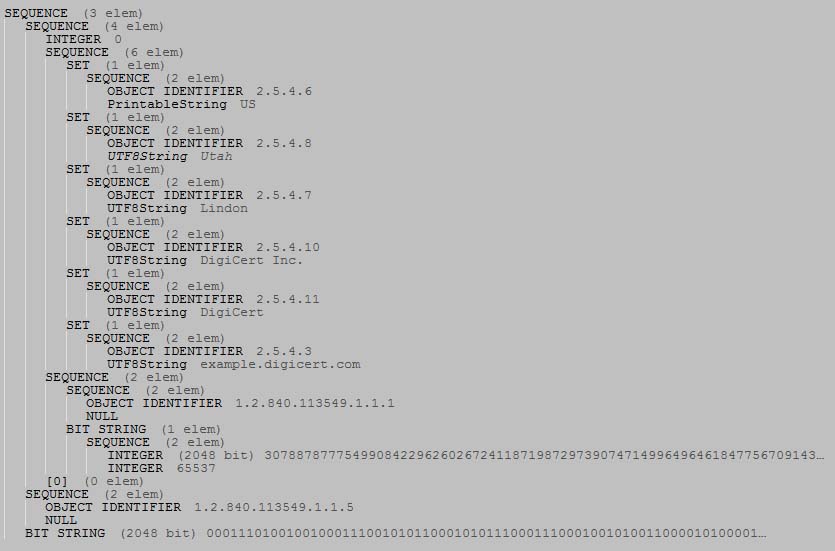
Note: This example requires Chilkat v9.5.0.50 or greater.This example demonstrates how to use the Chilkat ASN.1 API to create a certificate signing request. The purpose of this example is to show, in general, how to use the ASN.1 methods to create an ASN.1 document and save to DER. There may be more concise ways of creating a CSR rather than using the lower-level ASN.1 methods presented here. The hope is that this example will enable developers to create many different kinds of ASN.1 structures/documents for which no other means exist.
This example will create ASN.1 having this structure and content:
Chilkat Node.js Downloads
NODEJS_PRELUDE

function chilkatExample() {

    var success = false;

    //  This example assumes the Chilkat API to have been previously unlocked.
    //  See Global Unlock Sample for sample code.

    success = false;

    //  A new ASN.1 object is automatically a SEQUENCE.
    //  Given that the CSR's root item is a SEQUENCE, we can use
    //  this as the root of our CSR.
    var asnRoot = new chilkat.Asn();

    //  Beneath the root, we have a SEQUENCE (the certificate request info),
    //  another SEQUENCE (the algorithm identifier), and a BITSTRING (this signature data)

    success = asnRoot.AppendSequence();
    success = asnRoot.AppendSequence();
    success = asnRoot.AppendBits("1D2472B15C7129850E6C68C7435ED35508A92B03A8780BF979874D7270ADEE83849499C1BBC4B4E2B41B7F9DAF816CD755AE50DB79A9C2ECC796BCBA4E06E80287333BA12EC27B5D98E09905C6102A58438982DF24F7668086A485DBC3E88FDE598411781A40BD13C792C597FA2429B298C08A8D8B229638C8FB651FF0C5683F643191B39E71BA878B0C9FD94457FD6C8F8868251DD58ADF61C1C89771BCEC0BFEAF8F58570A910D3D150D5EEE2E0AA7DBD5C8D4FA5550D08F4069FDA7F797E90A3BBE90DA3F26D1B40D91ED72CA8D0685F685D678252ACB586F25A73D4053B6F7B39BD5A9691CFA19EE65A212E2708C13E28BA6BD33D1B7D27528DFD9418B5C","hex");

    //  ----------------------------------
    //  Build the Certificate Request Info
    //  ----------------------------------
    // asnCertReqInfo: Asn
    var asnCertReqInfo = asnRoot.GetSubItem(0);
    success = asnCertReqInfo.AppendInt(0);

    //  Build the Subject part of the Certificate Request Info
    // asnCertSubject: Asn
    var asnCertSubject = asnCertReqInfo.AppendSequenceR();

    //  Add each subject part..
    // asnTemp: Asn
    var asnTemp = asnCertSubject.AppendSetR();
    success = asnTemp.AppendSequence2();
    //  AppendSequence2 updates the internal reference to the newly appended SEQUENCE.
    //  The OID and printable string are added to the SEQUENCE.
    success = asnTemp.AppendOid("2.5.4.6");
    success = asnTemp.AppendString("printable","US");

    asnTemp = asnCertSubject.AppendSetR();
    success = asnTemp.AppendSequence2();
    success = asnTemp.AppendOid("2.5.4.8");
    success = asnTemp.AppendString("utf8","Utah");

    asnTemp = asnCertSubject.AppendSetR();
    success = asnTemp.AppendSequence2();
    success = asnTemp.AppendOid("2.5.4.7");
    success = asnTemp.AppendString("utf8","Lindon");

    asnTemp = asnCertSubject.AppendSetR();
    success = asnTemp.AppendSequence2();
    success = asnTemp.AppendOid("2.5.4.10");
    success = asnTemp.AppendString("utf8","DigiCert Inc.");

    asnTemp = asnCertSubject.AppendSetR();
    success = asnTemp.AppendSequence2();
    success = asnTemp.AppendOid("2.5.4.11");
    success = asnTemp.AppendString("utf8","DigiCert");

    asnTemp = asnCertSubject.AppendSetR();
    success = asnTemp.AppendSequence2();
    success = asnTemp.AppendOid("2.5.4.3");
    success = asnTemp.AppendString("utf8","example.digicert.com");

    //  Build the Public Key Info part of the Certificate Request Info
    // asnPubKeyInfo: Asn
    var asnPubKeyInfo = asnCertReqInfo.AppendSequenceR();

    // asnPubKeyAlgId: Asn
    var asnPubKeyAlgId = asnPubKeyInfo.AppendSequenceR();
    success = asnPubKeyAlgId.AppendOid("1.2.840.113549.1.1.1");
    success = asnPubKeyAlgId.AppendNull();

    //  The public key itself is a BIT STRING, but the bit string is composed of ASN.1
    //  for the RSA public key.  We'll first build the RSA ASN.1 for the public key
    //  (containing the 2048 bit modulus and exponent), and encoded it to DER, and then add
    //  the DER bytes as a BIT STRING (as a sub-item of asnPubKeyInfo)

    //  This is already a SEQUENCE..
    var asnRsaKey = new chilkat.Asn();

    //  The RSA modulus is a big integer.
    success = asnRsaKey.AppendBigInt("F3E4E8EDDFB690F59E06FFE8AD4DCB55B2700EB4906DE29A9829A8C29E5BA83C48C15DB4CEA45BEC03D438A62854414538442CE93EA02269C8A2585B887EA6E33819FC23EF5813A465CF9CD4FA36126BC1CFE003E6C05D4F993319003A35B5B264695DC51B6134B3ACD5E7CE85D9D616E848D7ADAA99C7E5829888583BB0AB80BD7FE62478984D9FD745E7EA309BC70E4260EB57C34D7624EA8A7F2ADEA6001C72515B6F209495026644D9C0869247A72B050F136D8344D1D73E09A6B70CE224CF510EB075B34F1FA7D3329FA9C6E05E2E03271F82D5B8E9B583D104F64BF0301E5AE03C79BB9D553E38C84A7CD86F7AFC681C7FB177DF13317B4C9CF976BAA3","hex");
    success = asnRsaKey.AppendInt(65537);

    var rsaKeyDerBase64 = asnRsaKey.GetEncodedDer("base64");

    //  Now add the RSA key DER as a BIT STRING.
    success = asnPubKeyInfo.AppendBits(rsaKeyDerBase64,"base64");

    //  The last part of the certificate request info is an empty context-specific constructed item
    //  with a tag equal to 0.
    success = asnCertReqInfo.AppendContextConstructed(0);

    //  ----------------------------------
    //  Finally, add the algorithm identifier, which is the 2nd sub-item under the root.
    //  ----------------------------------
    // asnAlgId: Asn
    var asnAlgId = asnRoot.GetSubItem(1);
    success = asnAlgId.AppendOid("1.2.840.113549.1.1.5");
    success = asnAlgId.AppendNull();

    //  Write the CSR to a DER encoded binary file:
    success = asnRoot.WriteBinaryDer("qa_output/csr.der");
    if (success !== true) {
        console.log(asnRoot.LastErrorText);
        return;
    }

    //  It is also possible to get the CSR in base64 format:
    var csrBase64 = asnRoot.GetEncodedDer("base64");

    console.log("Base64 CSR:");
    console.log(csrBase64);

    //  To emit as PEM:
    //  (Note: The pem.AddItem method was added in Chilkat v9.5.0.59)
    var pem = new chilkat.Pem();
    pem.AddItem("csr","base64",csrBase64);
    console.log("PEM:");
    console.log(pem.ToPem());

}

chilkatExample();