Visual FoxPro Requires Chilkat v11.2.0+
Visual FoxPro
Markdown to HTML - Full Document, Custom Theme with Code Syntax Highlighting
See more Markdown Examples
Demonstrates how to convert a complete Markdown document to HTML using your own custom theme with Cloudfare Prism's code syntax highlighting.Chilkat Visual FoxPro Downloads
LOCAL lnSuccess
LOCAL loOptions
LOCAL loSbHead
LOCAL lnBCrlf
LOCAL loSbMarkdown
LOCAL loSbHtml
lnSuccess = 0
lnSuccess = 0
loOptions = CreateObject('Chilkat.JsonObject')
* Instead of specifying a "theme", provide values for the HTML document parts.
loSbHead = CreateObject('Chilkat.StringBuilder')
lnBCrlf = 1
loSbHead.AppendLine("<head>",lnBCrlf)
loSbHead.AppendLine("<style>",lnBCrlf)
loSbHead.AppendLine("body {",lnBCrlf)
loSbHead.AppendLine(' font-family: "Segoe UI", Tahoma, Geneva, Verdana, sans-serif;',lnBCrlf)
loSbHead.AppendLine("}",lnBCrlf)
loSbHead.AppendLine("</style>",lnBCrlf)
loSbHead.AppendLine("</head>",lnBCrlf)
* Each HTML section can be set individually.
loOptions.UpdateString("docType","<!DOCTYPE html>")
loOptions.UpdateString("rootElement",'<html lang="en">')
loOptions.UpdateString("head",loSbHead.GetAsString())
loOptions.UpdateString("bodyStart",'<body>' + CHR(10) + '<div id="content"')
loOptions.UpdateString("bodyEnd","</div>" + CHR(10) + "</body>")
* We can add extra content to the bottom of the HTML head and body sections like this:
* Here we are using the Cloudfare Prism "coy" theme for code syntax higlighting.
loOptions.UpdateString("extraHead",'<link rel="stylesheet" href="https://cdnjs.cloudflare.com/ajax/libs/prism/1.29.0/themes/prism-coy.min.css" />')
loOptions.UpdateString("extraBody",'<script src="https://cdnjs.cloudflare.com/ajax/libs/prism/1.29.0/prism.min.js"></script><script src ="https://cdnjs.cloudflare.com/ajax/libs/prism/1.29.0/plugins/autoloader/prism-autoloader.min.js"></script>')
loSbMarkdown = CreateObject('Chilkat.StringBuilder')
loSbHtml = CreateObject('Chilkat.StringBuilder')
lnSuccess = loSbMarkdown.LoadFile("qa_data/markdown/test1.md","utf-8")
IF (lnSuccess = 0) THEN
? loSbMarkdown.LastErrorText
RELEASE loOptions
RELEASE loSbHead
RELEASE loSbMarkdown
RELEASE loSbHtml
CANCEL
ENDIF
loSbMarkdown.MarkdownToHtml(loOptions,loSbHtml)
loSbHtml.ToCRLF()
? loSbHtml.GetAsString()
* The sample markdown input for this example is identical to the one at Markdown to HTML - Full Document, Raw, where you can view it.
* Sample HTML output as viewed in a browser:
* 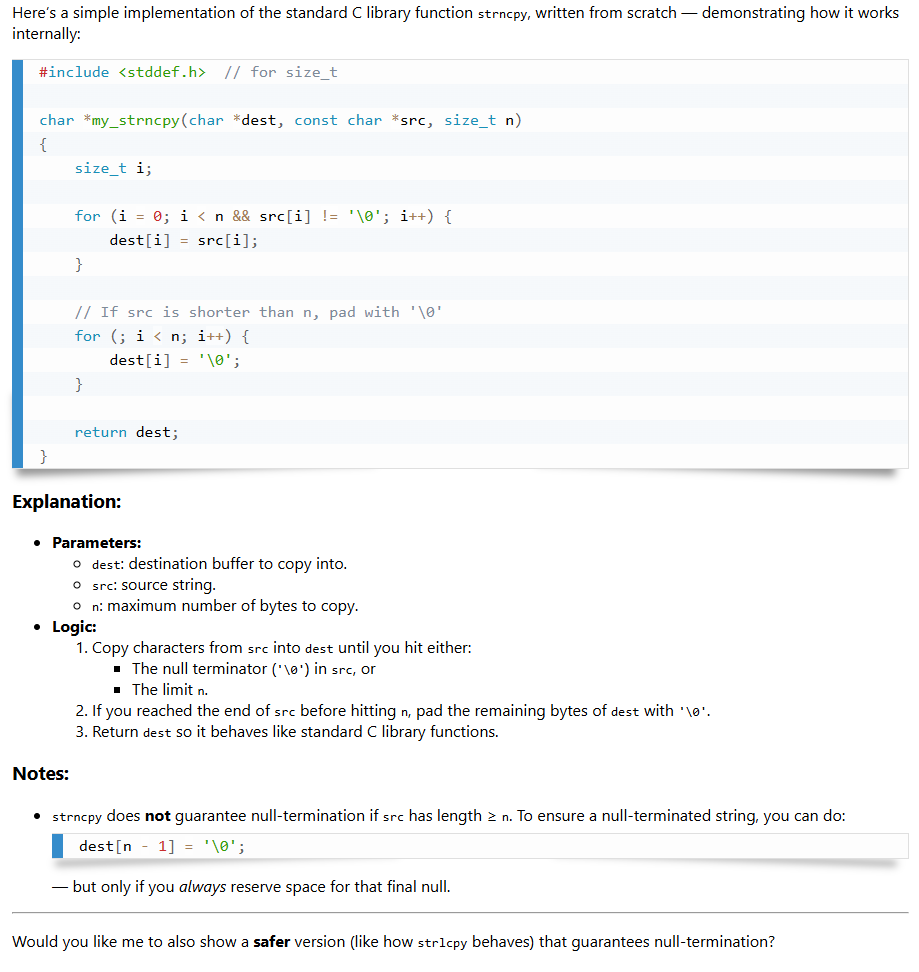 RELEASE loOptions
RELEASE loSbHead
RELEASE loSbMarkdown
RELEASE loSbHtml
RELEASE loOptions
RELEASE loSbHead
RELEASE loSbMarkdown
RELEASE loSbHtml