Zig
Zig
Sign PDF: Choosing RSASSA-PSS or PKCS1-v1_5 and Hash Algorithm
See more PDF Signatures Examples
This example demonstrates how to choose between RSASSA-PSS vs. PKCS1-v1_5 and the hash algorithm when signing a PDF.Chilkat Zig Downloads
const std = @import("std");
const chilkat = @import("chilkat");
pub fn main(init: std.process.Init) !void {
const alloc = init.arena.allocator();
// This example requires the Chilkat API to have been previously unlocked.
// See Global Unlock Sample for sample code.
const pdf = try chilkat.Pdf.init();
defer pdf.deinit();
// Load a PDF to be signed.
// The "hello.pdf" is available at https://chilkatsoft.com/hello.pdf
pdf.loadFile("qa_data/pdf/hello.pdf") catch {
std.debug.print("{s}\n", .{try pdf.getLastErrorText(alloc)});
return;
};
// Options for signing are specified in JSON.
const json = try chilkat.JsonObject.init();
defer json.deinit();
// In most cases, the signingCertificateV2 attribute is needed.
json.updateInt("signingCertificateV2", 1) catch {};
// ---------------------------------------------------------------------------------------------------------------------------
// This example is the same as the example at Sign a PDF (Simplest Example Possible)
// but with the following lines added to specify the signature scheme and hash algorithm.
// The signature schemes PKCS-v1_5 and RSASSA-PSS have differences.
// PKCSV1_5 is deterministic. The same message and key will produce an identical signature value each time.
// PSS is randomized and will produce a different signature value each time.
// To choose the hash algorithm:
// (The typical choices are sha1, sha256, sha384, and sha512.)
json.updateString("hashAlgorithm", "sha256") catch {};
// To choose PKCSV1_5:
json.updateString("signingAlgorithm", "pkcs") catch {};
// Alternatively, to choose RSASSA-PSS:
json.updateString("signingAlgorithm", "pss") catch {};
// If not specified, the default is SHA256 with PKCS-v1_5.
// The remainder of this example is the same as the example at Sign a PDF (Simplest Example Possible)
// ---------------------------------------------------------------------------------------------------------------------------
// Put the signature on page 1, top left
json.updateInt("page", 1) catch {};
json.updateString("appearance.y", "top") catch {};
json.updateString("appearance.x", "left") catch {};
// Use a font scale of 10.0
json.updateString("appearance.fontScale", "10.0") catch {};
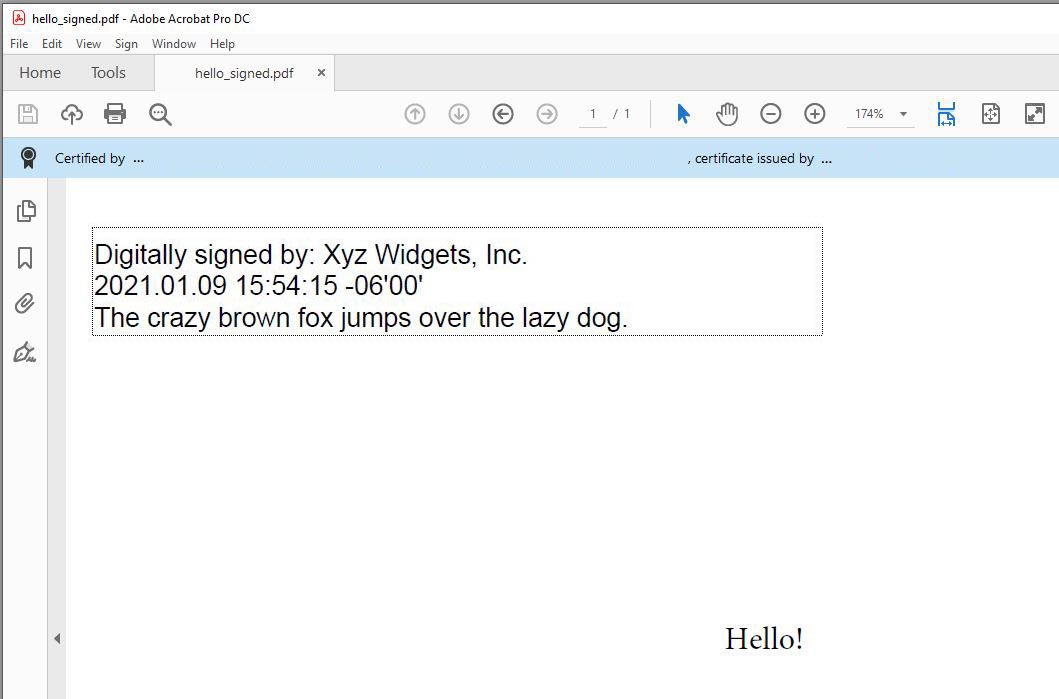
// In this example, the appearance of the digital signature will contain three lines:
// 1) The signing certificate's common name
// 2) The current date/time
// 3) Some arbitrary text.
// The keyword "cert_cn" is replaced with the Certificate's Subject Common Name.
// The keyword "current_dt" is replaced with the current date/time.
// Any number of appearance text lines can be added.
json.updateString("appearance.text[0]", "Digitally signed by: cert_cn") catch {};
json.updateString("appearance.text[1]", "current_dt") catch {};
json.updateString("appearance.text[2]", "The crazy brown fox jumps over the lazy dog.") catch {};
// Load the signing certificate. (Use your own certificate.)
const cert = try chilkat.Cert.init();
defer cert.deinit();
cert.loadPfxFile("qa_data/pfx/myPdfSigningCert.pfx", "secret") catch {
std.debug.print("{s}\n", .{try cert.getLastErrorText(alloc)});
return;
};
// Tell the pdf object to use the certificate for signing.
pdf.setSigningCert(cert) catch {
std.debug.print("{s}\n", .{try pdf.getLastErrorText(alloc)});
return;
};
pdf.signPdf(json, "qa_output/hello_signed.pdf") catch {
std.debug.print("{s}\n", .{try pdf.getLastErrorText(alloc)});
return;
};
std.debug.print("The PDF has been successfully cryptographically signed.\n", .{});
// The appearance of the signature appears in Adobe Acrobat as shown here:
//  }
}