Zig
Zig
Office365 Refresh OAuth2 Access Token for SMTP, IMAP, POP
See more Office365 Examples
Demonstrates how to refresh an Office365 OAuth2 access token for use in the SMTP, IMAP, and POP3 protocols.Chilkat Zig Downloads
const std = @import("std");
const chilkat = @import("chilkat");

pub fn main(init: std.process.Init) !void {
    const alloc = init.arena.allocator();

    // This example requires the Chilkat API to have been previously unlocked.
    // See Global Unlock Sample for sample code.

    // It is assumed we previously obtained an OAuth2 access token.
    // This example loads the JSON access token file
    // saved by this example: Get Office365 SMTP/IMAP/POP3 OAuth2 Access Token

    // Note: Refreshing an access token does not require user-interaction.
    // Only the act of getting the initial access token requires interactive authorization from the Office365 account owner
    // (i.e. a browser is displayed and the account owner authorizes access by the app).

    // Once you have the initial access token, it can be refreshed over and over again with no limits.
    // A typical strategy is to write your application to automatically refresh the access token
    // when authentication fails, and then retry the operation with the new access token.
    // For example, see Auto-Refresh O365 Access Token when Sending Email

    const json_token = try chilkat.JsonObject.init();
    defer json_token.deinit();
    json_token.loadFile("qa_data/tokens/office365.json") catch {
        std.debug.print("Failed to load office365.json\n", .{});
        return;
    };

    // The access token JSON looks like this:

    // {
    //   "token_type": "Bearer",
    //   "scope": "IMAP.AccessAsUser.All openid POP.AccessAsUser.All profile SMTP.Send email",
    //   "expires_in": 3599,
    //   "ext_expires_in": 3599,
    //   "access_token": "...",
    //   "refresh_token": "...",
    //   "id_token": "...",
    //   "expires_on": "1592748507"
    // }

    const oauth2 = try chilkat.OAuth2.init();
    defer oauth2.deinit();

    // Update to use your token endpoint.
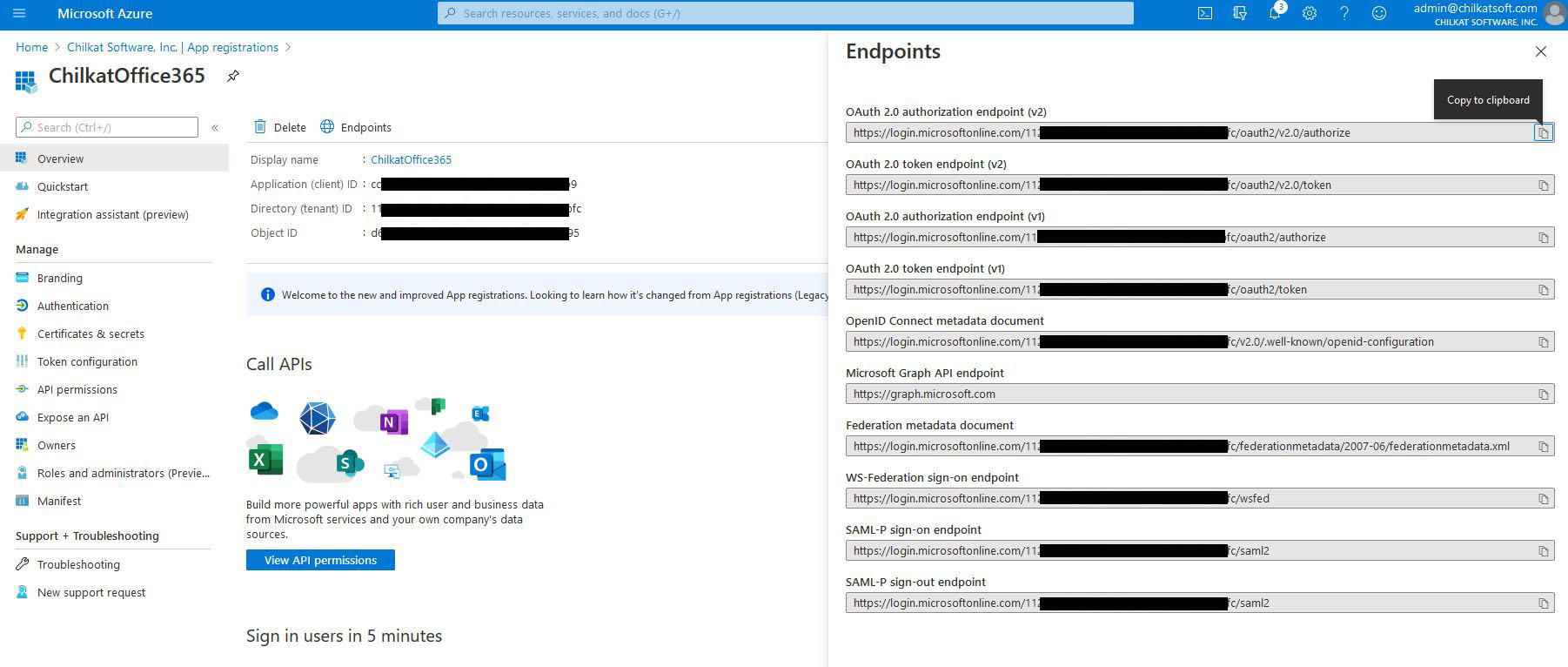
    // In the Azure Portal, in "App registrations", go to "Endpoints" (located to the right of the "+ New registration" link.)
    //    Find your endpoint for the "OAuth 2.0 token endpoint (v2)"
    //    See Office365 OAuth2 Endpoints

    oauth2.setTokenEndpoint("https://login.microsoftonline.com/xxxxxxxxxx-71bf-4ebe-a866-738364321bf2/oauth2/v2.0/token");

    // Replace these with actual values.
    oauth2.setClientId("CLIENT_ID");
    oauth2.setClientSecret("CLIENT_SECRET");

    // Get the "refresh_token"
    oauth2.setRefreshToken(try json_token.stringOf(alloc, "refresh_token"));

    // Send the HTTP POST to refresh the access token..
    oauth2.refreshAccessToken() catch {
        std.debug.print("{s}\n", .{try oauth2.getLastErrorText(alloc)});
        return;
    };

    std.debug.print("{s}\n", .{try oauth2.getLastErrorText(alloc)});

    std.debug.print("New access token: {s}\n", .{try oauth2.getAccessToken(alloc)});
    std.debug.print("New refresh token: {s}\n", .{try oauth2.getRefreshToken(alloc)});

    // Update the JSON with the new tokens.
    json_token.updateString("access_token", try oauth2.getAccessToken(alloc)) catch {};
    json_token.updateString("refresh_token", try oauth2.getRefreshToken(alloc)) catch {};

    // Save the new JSON access token response to a file.
    const sb_json = try chilkat.StringBuilder.init();
    defer sb_json.deinit();
    json_token.setEmitCompact(false);
    json_token.emitSb(sb_json) catch {};
    sb_json.writeFile("qa_data/tokens/office365.json", "utf-8", false) catch {};

    std.debug.print("OAuth2 authorization granted!\n", .{});
    std.debug.print("New Access Token = {s}\n", .{try oauth2.getAccessToken(alloc)});
}