Zig
Zig
Create CAdES p7m using AWS KMS to Sign in the Cloud
See more Signing in the Cloud Examples
Demonstrates how to create a CAdES p7m, using AWS KMS. The signing of the hash happens in the Cloud on AWS KMS. Everything else regarding the creation of CAdES happens locally within Chilkat.Note: This example requires Chilkat v9.5.0.96 or greater.
Chilkat Zig Downloads
const std = @import("std");
const chilkat = @import("chilkat");
pub fn main(init: std.process.Init) !void {
const alloc = init.arena.allocator();
// This example assumes the Chilkat API to have been previously unlocked.
// See Global Unlock Sample for sample code.
// Load the certificate used for signing. The certificate's private key is stored in AWS KMS
// However, we still need the certificate locally (without private key).
const cert = try chilkat.Cert.init();
defer cert.deinit();
cert.loadFromFile("qa_data/certs/myCert.cer") catch {
std.debug.print("{s}\n", .{try cert.getLastErrorText(alloc)});
return;
};
// Here's a screenshot showing the key ID of a private key in AWS KMS:
// 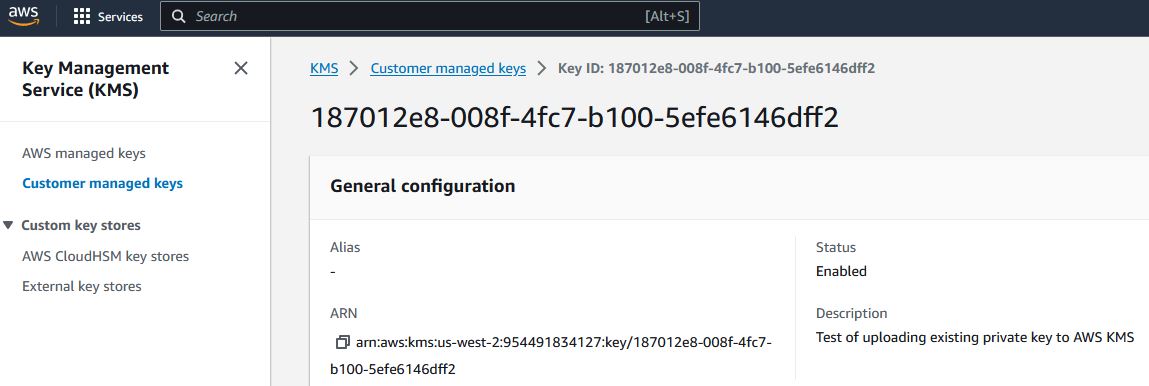 // To sign using AWS KMS,
// add the following lines of code to specify your AWS authentication credentials,
// and the ID of the KMS private key.
const json_aws_kms = try chilkat.JsonObject.init();
defer json_aws_kms.deinit();
// Set the "service" equal to "aws_kms" to tell Chilkat to use AWS KMS for signing.
json_aws_kms.updateString("service", "aws_kms") catch {};
json_aws_kms.updateString("access_key", "ACCESS_KEY") catch {};
json_aws_kms.updateString("secret_key", "SECRET_KEY") catch {};
// Make sure to specify the correct region for your case.
json_aws_kms.updateString("region", "us-west-2") catch {};
// In the above screenshot, our key ID is "187012e8-008f-4fc7-b100-5efe6146dff2". You will use your key ID.
json_aws_kms.updateString("key_id", "187012e8-008f-4fc7-b100-5efe6146dff2") catch {};
try cert.setCloudSigner(json_aws_kms);
const crypt = try chilkat.Crypt2.init();
defer crypt.deinit();
crypt.setSigningCert(cert) catch {
std.debug.print("{s}\n", .{try crypt.getLastErrorText(alloc)});
return;
};
// The CadesEnabled property applies to all methods that create PKCS7 signatures.
// To create a CAdES-BES signature, set this property equal to true.
crypt.setCadesEnabled(true);
crypt.setHashAlgorithm("sha256");
const signed_attrs = try chilkat.JsonObject.init();
defer signed_attrs.deinit();
signed_attrs.updateInt("contentType", 1) catch {};
signed_attrs.updateInt("signingTime", 1) catch {};
signed_attrs.updateInt("messageDigest", 1) catch {};
signed_attrs.updateInt("signingCertificateV2", 1) catch {};
crypt.setSigningAttributes(try signed_attrs.emit(alloc));
// You can sign any type of file..
const input_xml_path = "qa_data/e-Invoice.xml";
const output_p7m_path = "qa_output/signed.p7m";
// Create the CAdES-BES attached signature, which contains the original data.
// Chilkat will build the .p7m locally, but will (internally) use ARSS
// to do the RSA signing remotely.
crypt.createP7M(input_xml_path, output_p7m_path) catch {
std.debug.print("{s}\n", .{try crypt.getLastErrorText(alloc)});
return;
};
std.debug.print("Success.\n", .{});
}
// To sign using AWS KMS,
// add the following lines of code to specify your AWS authentication credentials,
// and the ID of the KMS private key.
const json_aws_kms = try chilkat.JsonObject.init();
defer json_aws_kms.deinit();
// Set the "service" equal to "aws_kms" to tell Chilkat to use AWS KMS for signing.
json_aws_kms.updateString("service", "aws_kms") catch {};
json_aws_kms.updateString("access_key", "ACCESS_KEY") catch {};
json_aws_kms.updateString("secret_key", "SECRET_KEY") catch {};
// Make sure to specify the correct region for your case.
json_aws_kms.updateString("region", "us-west-2") catch {};
// In the above screenshot, our key ID is "187012e8-008f-4fc7-b100-5efe6146dff2". You will use your key ID.
json_aws_kms.updateString("key_id", "187012e8-008f-4fc7-b100-5efe6146dff2") catch {};
try cert.setCloudSigner(json_aws_kms);
const crypt = try chilkat.Crypt2.init();
defer crypt.deinit();
crypt.setSigningCert(cert) catch {
std.debug.print("{s}\n", .{try crypt.getLastErrorText(alloc)});
return;
};
// The CadesEnabled property applies to all methods that create PKCS7 signatures.
// To create a CAdES-BES signature, set this property equal to true.
crypt.setCadesEnabled(true);
crypt.setHashAlgorithm("sha256");
const signed_attrs = try chilkat.JsonObject.init();
defer signed_attrs.deinit();
signed_attrs.updateInt("contentType", 1) catch {};
signed_attrs.updateInt("signingTime", 1) catch {};
signed_attrs.updateInt("messageDigest", 1) catch {};
signed_attrs.updateInt("signingCertificateV2", 1) catch {};
crypt.setSigningAttributes(try signed_attrs.emit(alloc));
// You can sign any type of file..
const input_xml_path = "qa_data/e-Invoice.xml";
const output_p7m_path = "qa_output/signed.p7m";
// Create the CAdES-BES attached signature, which contains the original data.
// Chilkat will build the .p7m locally, but will (internally) use ARSS
// to do the RSA signing remotely.
crypt.createP7M(input_xml_path, output_p7m_path) catch {
std.debug.print("{s}\n", .{try crypt.getLastErrorText(alloc)});
return;
};
std.debug.print("Success.\n", .{});
}