Xojo Plugin
 Xojo Plugin
Authorization Code Flow with PKCE for Native Apps
See more Okta OAuth/OIDC Examples
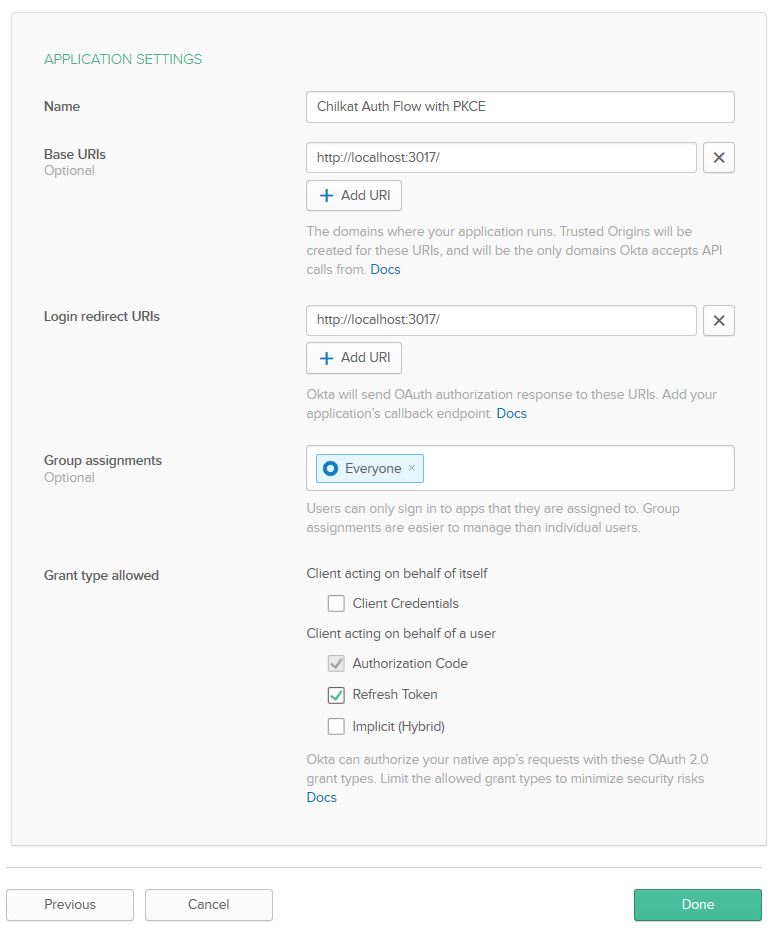
Demonstrates the authorization code flow with Proof Key for Code Exchange (PKCE) for native apps. In Okta, your app should be defined as shown:
Chilkat Xojo Plugin Downloads
Dim success As Boolean
success = False

// This example requires the Chilkat API to have been previously unlocked.
// See Global Unlock Sample for sample code.

Dim oauth2 As New Chilkat.OAuth2

// This should be the port in the Login redirect URI for your app.
// Your app's Login redirect URI should be "http://localhost:3017/" if the port number is 3017.
oauth2.ListenPort = 3017

oauth2.AuthorizationEndpoint = "https://{yourOktaDomain}/oauth2/default/v1/authorize"
oauth2.TokenEndpoint = "https://{yourOktaDomain}/oauth2/default/v1/token"

// Replace these with actual values.
oauth2.ClientId = "OKTA_CLIENT_ID"
oauth2.ClientSecret = "OKTA_CLIENT_SECRET"

oauth2.CodeChallenge = True
oauth2.IncludeNonce = True

// Make sure to include "offline_access" to get a refresh token included in the final JSON response.
// Add any additional needed scopes separated by space chars.
oauth2.Scope = "openid offline_access"

// Begin the OAuth2 three-legged flow.  This returns a URL that should be loaded in a browser.
Dim url As String
url = oauth2.StartAuth()
If (oauth2.LastMethodSuccess = False) Then
    System.DebugLog(oauth2.LastErrorText)
    Return
End If

System.DebugLog("URL to load in browser: " + url)

// Launch the system's default browser navigated to the URL.
success = oauth2.LaunchBrowser(url)
If (success = False) Then
    System.DebugLog(oauth2.LastErrorText)
    Return
End If

// Now wait for the authorization.
// We'll wait for a max of 60 seconds.
Dim numMsWaited As Int32
numMsWaited = 0
While (numMsWaited < 60000) And (oauth2.AuthFlowState < 3)
    oauth2.SleepMs 100
    numMsWaited = numMsWaited + 100
Wend

// If there was no response from the browser within 30 seconds, then
// the AuthFlowState will be equal to 1 or 2.
// 1: Waiting for Redirect. The OAuth2 background thread is waiting to receive the redirect HTTP request from the browser.
// 2: Waiting for Final Response. The OAuth2 background thread is waiting for the final access token response.
// In that case, cancel the background task started in the call to StartAuth.
If (oauth2.AuthFlowState < 3) Then
    success = oauth2.Cancel()
    System.DebugLog("No response from the browser!")
    Return
End If

// Check the AuthFlowState to see if authorization was granted, denied, or if some error occurred
// The possible AuthFlowState values are:
// 3: Completed with Success. The OAuth2 flow has completed, the background thread exited, and the successful JSON response is available in AccessTokenResponse property.
// 4: Completed with Access Denied. The OAuth2 flow has completed, the background thread exited, and the error JSON is available in AccessTokenResponse property.
// 5: Failed Prior to Completion. The OAuth2 flow failed to complete, the background thread exited, and the error information is available in the FailureInfo property.
If (oauth2.AuthFlowState = 5) Then
    System.DebugLog("OAuth2 failed to complete.")
    System.DebugLog(oauth2.FailureInfo)
    Return
End If

If (oauth2.AuthFlowState = 4) Then
    System.DebugLog("OAuth2 authorization was denied.")
    System.DebugLog(oauth2.AccessTokenResponse)
    Return
End If

If (oauth2.AuthFlowState <> 3) Then
    System.DebugLog("Unexpected AuthFlowState:" + Str(oauth2.AuthFlowState))
    Return
End If

System.DebugLog("OAuth2 authorization granted!")
System.DebugLog("Access Token = " + oauth2.AccessToken)

// Get the full JSON response:
Dim json As New Chilkat.JsonObject
success = json.Load(oauth2.AccessTokenResponse)
json.EmitCompact = False
System.DebugLog(json.Emit())

// The JSON response looks like this:

// {
//   "access_token": "eyJraWQi ... Kn4IiEfOw",
//   "token_type": "Bearer",
//   "expires_in": 3600,
//   "scope": "offline_access openid",
//   "refresh_token": "0jCqotuuUegdjNzB9uuSsfGM2Cu5HnCHUxoJ0yhZ4rs",
//   "id_token": "eyJraWQiO ... 09WGEq3dTRmQF86PzJg"
// }

// Save the JSON to a file for future requests.
Dim fac As New Chilkat.FileAccess
success = fac.WriteEntireTextFile("qa_data/tokens/okta.json",json.Emit(),"utf-8",False)