Xbase++ Requires Chilkat v10.1.2+
Xbase++
Yahoo Mail OAuth2 Access Token for Desktop App
See more Yahoo Mail Examples
Demonstrates how to get a Yahoo Email OAuth2 access token from a desktop application or script.Chilkat Xbase++ Downloads
LOCAL nSuccess
LOCAL oOauth2
LOCAL cUrl
LOCAL nNumMsWaited
LOCAL oSbJson
nSuccess := 0
// First, you must define your app in Yahoo Developer (https://developer.yahoo.com/apps/) like this:
// 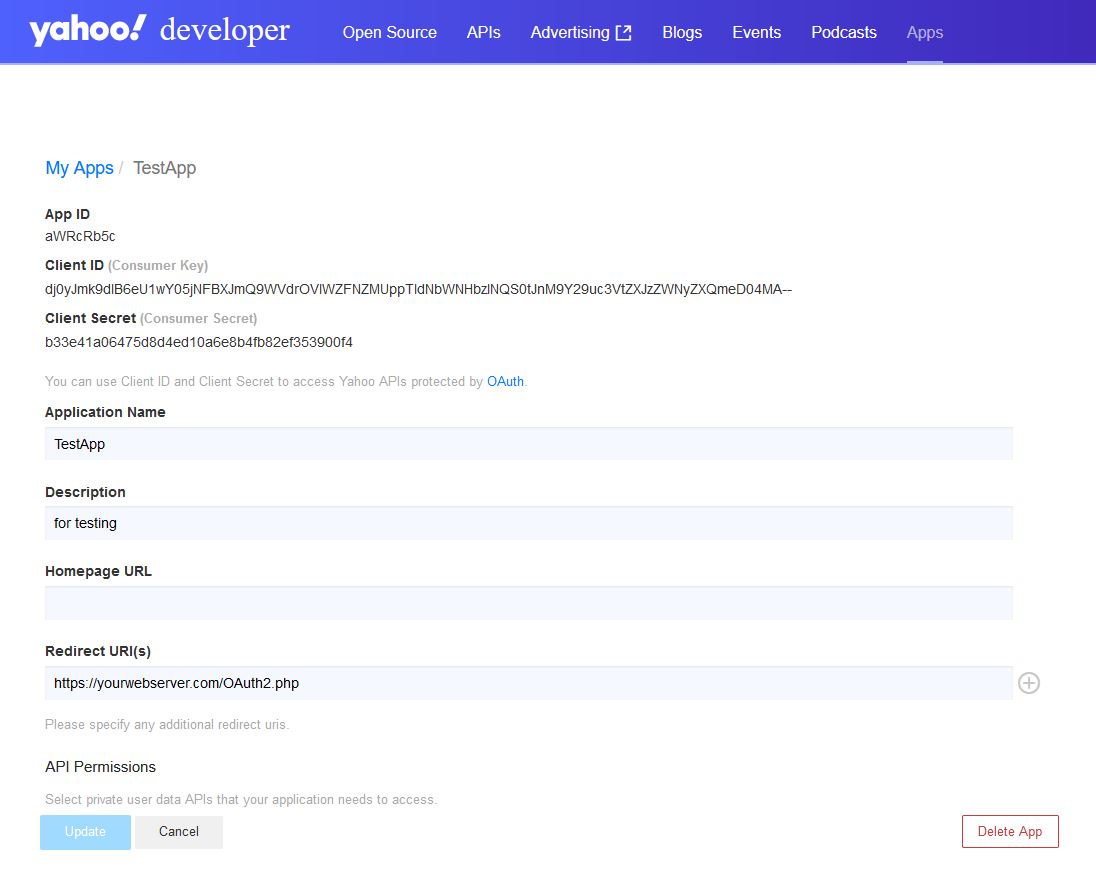 // This example requires the Chilkat API to have been previously unlocked.
// See Global Unlock Sample for sample code.
oOauth2 := CreateObject("Chilkat.OAuth2")
// Your applicaton must use your own public web server as an intermediate
// to receive and forward the redirect to localhost.
// See Using Your Web Server as an Intermediary for OAuth2 Redirect to localhost
oOauth2:AppCallbackUrl := "https://yourwebserver.com/oauth_redirect"
oOauth2:ListenPort := 3017
oOauth2:AuthorizationEndpoint := "https://api.login.yahoo.com/oauth2/request_auth"
oOauth2:TokenEndpoint := "https://api.login.yahoo.com/oauth2/get_token"
// Replace these with actual values.
oOauth2:ClientId := "CLIENT_ID"
oOauth2:ClientSecret := "CLIENT_SECRET"
// Do not send the "scope" query param for Yahoo OAuth2.
oOauth2:UncommonOptions := "NO_OAUTH2_SCOPE"
// Begin the OAuth2 Authorization code flow. This returns a URL that should be loaded in a browser.
cUrl := oOauth2:StartAuth()
IF (oOauth2:LastMethodSuccess == 0)
? oOauth2:LastErrorText
oOauth2:destroy()
RETURN
ENDIF
? "url = " + cUrl
// Launch the default browser on the system and navigate to the url.
// The LaunchBrowser method was added in Chilkat v10.1.2.
nSuccess := oOauth2:LaunchBrowser(cUrl)
IF (nSuccess == 0)
? oOauth2:LastErrorText
oOauth2:destroy()
RETURN
ENDIF
// Wait for the user to approve or deny authorization in the browser.
nNumMsWaited := 0
DO WHILE (nNumMsWaited < 90000) .AND. (oOauth2:AuthFlowState < 3)
oOauth2:SleepMs(100)
nNumMsWaited := nNumMsWaited + 100
ENDDO
// If the browser does not respond within the specified time, AuthFlowState will be:
//
// 1: Waiting for Redirect - The OAuth2 background thread is waiting for the browser's redirect request.
// 2: Waiting for Final Response - The thread is awaiting the final access token response.
// In either case, cancel the background task initiated by StartAuth.
IF (oOauth2:AuthFlowState < 3)
oOauth2:Cancel()
? "No response from the browser!"
oOauth2:destroy()
RETURN
ENDIF
// Check AuthFlowState to determine if authorization was granted, denied, or failed:
//
// 3: Success - OAuth2 flow completed, the background thread exited, and the successful response is in AccessTokenResponse.
// 4: Access Denied - OAuth2 flow completed, the background thread exited, and the error response is in AccessTokenResponse.
// 5: Failure - OAuth2 flow failed before completion, the background thread exited, and error details are in FailureInfo.
IF (oOauth2:AuthFlowState == 5)
? "OAuth2 failed to complete."
? oOauth2:FailureInfo
oOauth2:destroy()
RETURN
ENDIF
IF (oOauth2:AuthFlowState == 4)
? "OAuth2 authorization was denied."
? oOauth2:AccessTokenResponse
oOauth2:destroy()
RETURN
ENDIF
IF (oOauth2:AuthFlowState != 3)
? "Unexpected AuthFlowState:" + Str(oOauth2:AuthFlowState)
oOauth2:destroy()
RETURN
ENDIF
// Save the full JSON access token response to a file.
oSbJson := CreateObject("Chilkat.StringBuilder")
oSbJson:Append(oOauth2:AccessTokenResponse)
oSbJson:WriteFile("qa_data/tokens/yahooMail.json", "utf-8", 0)
// The saved JSON response looks like this:
// {
// "access_token": "kCVQdnOdul...LHucA--",
// "refresh_token": "AIenVXETSo0jklFBVkPS8vVm8E.Ej9ToRG.xDbDYmZ65WIs5t6CZhDrD",
// "expires_in": 3600,
// "token_type": "bearer",
// "xoauth_yahoo_guid": "HGDQCVF5JB4YDOWHITQJFBHCWA"
// }
? "OAuth2 authorization granted!"
? "Access Token: " + oOauth2:AccessToken
oOauth2:destroy()
oSbJson:destroy()
// This example requires the Chilkat API to have been previously unlocked.
// See Global Unlock Sample for sample code.
oOauth2 := CreateObject("Chilkat.OAuth2")
// Your applicaton must use your own public web server as an intermediate
// to receive and forward the redirect to localhost.
// See Using Your Web Server as an Intermediary for OAuth2 Redirect to localhost
oOauth2:AppCallbackUrl := "https://yourwebserver.com/oauth_redirect"
oOauth2:ListenPort := 3017
oOauth2:AuthorizationEndpoint := "https://api.login.yahoo.com/oauth2/request_auth"
oOauth2:TokenEndpoint := "https://api.login.yahoo.com/oauth2/get_token"
// Replace these with actual values.
oOauth2:ClientId := "CLIENT_ID"
oOauth2:ClientSecret := "CLIENT_SECRET"
// Do not send the "scope" query param for Yahoo OAuth2.
oOauth2:UncommonOptions := "NO_OAUTH2_SCOPE"
// Begin the OAuth2 Authorization code flow. This returns a URL that should be loaded in a browser.
cUrl := oOauth2:StartAuth()
IF (oOauth2:LastMethodSuccess == 0)
? oOauth2:LastErrorText
oOauth2:destroy()
RETURN
ENDIF
? "url = " + cUrl
// Launch the default browser on the system and navigate to the url.
// The LaunchBrowser method was added in Chilkat v10.1.2.
nSuccess := oOauth2:LaunchBrowser(cUrl)
IF (nSuccess == 0)
? oOauth2:LastErrorText
oOauth2:destroy()
RETURN
ENDIF
// Wait for the user to approve or deny authorization in the browser.
nNumMsWaited := 0
DO WHILE (nNumMsWaited < 90000) .AND. (oOauth2:AuthFlowState < 3)
oOauth2:SleepMs(100)
nNumMsWaited := nNumMsWaited + 100
ENDDO
// If the browser does not respond within the specified time, AuthFlowState will be:
//
// 1: Waiting for Redirect - The OAuth2 background thread is waiting for the browser's redirect request.
// 2: Waiting for Final Response - The thread is awaiting the final access token response.
// In either case, cancel the background task initiated by StartAuth.
IF (oOauth2:AuthFlowState < 3)
oOauth2:Cancel()
? "No response from the browser!"
oOauth2:destroy()
RETURN
ENDIF
// Check AuthFlowState to determine if authorization was granted, denied, or failed:
//
// 3: Success - OAuth2 flow completed, the background thread exited, and the successful response is in AccessTokenResponse.
// 4: Access Denied - OAuth2 flow completed, the background thread exited, and the error response is in AccessTokenResponse.
// 5: Failure - OAuth2 flow failed before completion, the background thread exited, and error details are in FailureInfo.
IF (oOauth2:AuthFlowState == 5)
? "OAuth2 failed to complete."
? oOauth2:FailureInfo
oOauth2:destroy()
RETURN
ENDIF
IF (oOauth2:AuthFlowState == 4)
? "OAuth2 authorization was denied."
? oOauth2:AccessTokenResponse
oOauth2:destroy()
RETURN
ENDIF
IF (oOauth2:AuthFlowState != 3)
? "Unexpected AuthFlowState:" + Str(oOauth2:AuthFlowState)
oOauth2:destroy()
RETURN
ENDIF
// Save the full JSON access token response to a file.
oSbJson := CreateObject("Chilkat.StringBuilder")
oSbJson:Append(oOauth2:AccessTokenResponse)
oSbJson:WriteFile("qa_data/tokens/yahooMail.json", "utf-8", 0)
// The saved JSON response looks like this:
// {
// "access_token": "kCVQdnOdul...LHucA--",
// "refresh_token": "AIenVXETSo0jklFBVkPS8vVm8E.Ej9ToRG.xDbDYmZ65WIs5t6CZhDrD",
// "expires_in": 3600,
// "token_type": "bearer",
// "xoauth_yahoo_guid": "HGDQCVF5JB4YDOWHITQJFBHCWA"
// }
? "OAuth2 authorization granted!"
? "Access Token: " + oOauth2:AccessToken
oOauth2:destroy()
oSbJson:destroy()