Xbase++
Xbase++
Sign a PDF (Simplest Possible Example)
See more PDF Signatures Examples
This example demonstrates how to a sign a PDF using mostly default options in the simplest way possible.Chilkat Xbase++ Downloads
LOCAL nSuccess
LOCAL oPdf
LOCAL oJson
LOCAL oCert
nSuccess := 0
// This example requires the Chilkat API to have been previously unlocked.
// See Global Unlock Sample for sample code.
oPdf := CreateObject("Chilkat.Pdf")
// Load a PDF to be signed.
// The "hello.pdf" is available at https://chilkatsoft.com/hello.pdf
nSuccess := oPdf:LoadFile("qa_data/pdf/hello.pdf")
IF (nSuccess == 0)
? oPdf:LastErrorText
oPdf:destroy()
RETURN
ENDIF
// Options for signing are specified in JSON.
oJson := CreateObject("Chilkat.JsonObject")
// In most cases, the signingCertificateV2 and signingTime attributes are required.
oJson:UpdateInt("signingCertificateV2", 1)
oJson:UpdateInt("signingTime", 1)
// Put the signature on page 1, top left
oJson:UpdateInt("page", 1)
oJson:UpdateString("appearance.y", "top")
oJson:UpdateString("appearance.x", "left")
// Use a font scale of 10.0
oJson:UpdateString("appearance.fontScale", "10.0")
// In this example, the appearance of the digital signature will contain three lines:
// 1) The signing certificate's common name
// 2) The current date/time
// 3) Some arbitrary text.
// The keyword "cert_cn" is replaced with the Certificate's Subject Common Name.
// The keyword "current_dt" is replaced with the current date/time.
// Any number of appearance text lines can be added.
oJson:UpdateString("appearance.text[0]", "Digitally signed by: cert_cn")
oJson:UpdateString("appearance.text[1]", "current_dt")
oJson:UpdateString("appearance.text[2]", "The crazy brown fox jumps over the lazy dog.")
// Load the signing certificate. (Use your own certificate.)
oCert := CreateObject("Chilkat.Cert")
nSuccess := oCert:LoadPfxFile("qa_data/pfx/myPdfSigningCert.pfx", "secret")
IF (nSuccess == 0)
? oCert:LastErrorText
oPdf:destroy()
oJson:destroy()
oCert:destroy()
RETURN
ENDIF
// Tell the pdf object to use the certificate for signing.
nSuccess := oPdf:SetSigningCert(oCert)
IF (nSuccess == 0)
? oPdf:LastErrorText
oPdf:destroy()
oJson:destroy()
oCert:destroy()
RETURN
ENDIF
nSuccess := oPdf:SignPdf(oJson, "qa_output/hello_signed.pdf")
IF (nSuccess == 0)
? oPdf:LastErrorText
oPdf:destroy()
oJson:destroy()
oCert:destroy()
RETURN
ENDIF
? "The PDF has been successfully cryptographically signed."
// The appearance of the signature appears in Adobe Acrobat as shown here:
// 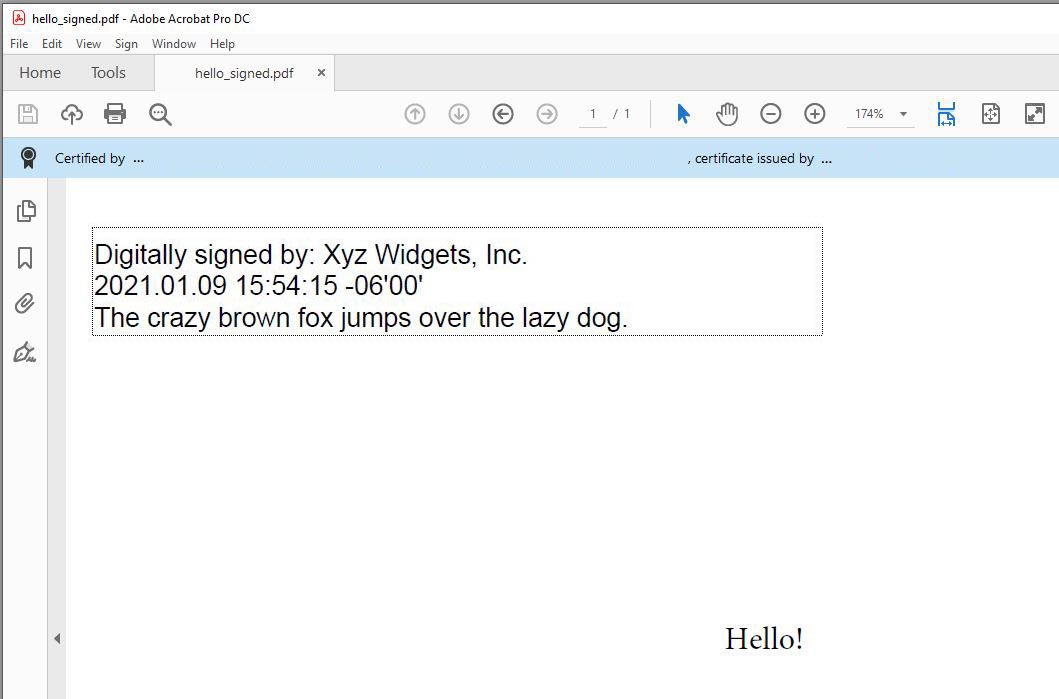 oPdf:destroy()
oJson:destroy()
oCert:destroy()
oPdf:destroy()
oJson:destroy()
oCert:destroy()