Xbase++
Xbase++
ScMinidriver - Import Private Key to Smart Card
See more ScMinidriver Examples
Demonstrates how to import a private key to the "signature" or "key exchange" location in the Nth key container on a smart card.Chilkat Xbase++ Downloads
LOCAL nSuccess
LOCAL oPrivKey
LOCAL oScmd
LOCAL cReaderName
LOCAL cPinId
LOCAL nRetval
nSuccess := 0
// This example requires the Chilkat API to have been previously unlocked.
// See Global Unlock Sample for sample code.
// Chilkat recommends the following free tool for interactively examining the contents of your smart card
// through the ScMinidriver interface: MGTEK Tool for Minidriver enabled Smart Cards
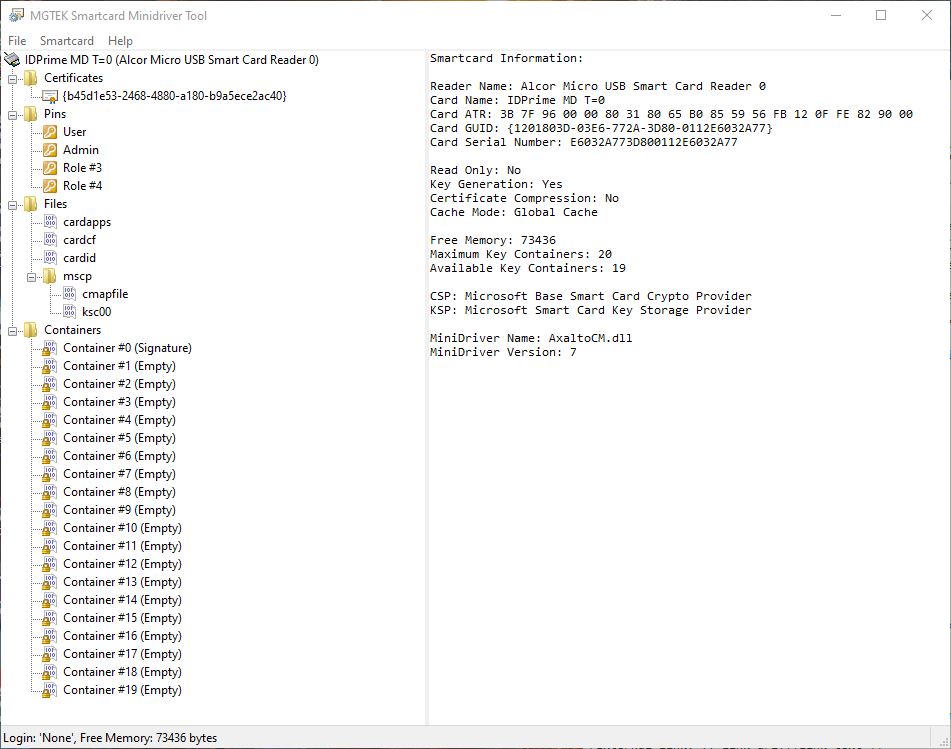
// Let's first look at our smart card before importing a private key.
// Here's the view of our Gemalto (Thales) IDPrime MD T=0 smart card in the MGTEK tool:
//  // First let's load a private key into the Chilkat private key object.
// (Chilkat provides the ability to load private keys from many different sources and formats.
// this example loads from a PEM file.)
oPrivKey := CreateObject("Chilkat.PrivateKey")
nSuccess := oPrivKey:LoadPemFile("qa_data/rsa/rsaPrivKey_pkcs8.pem")
IF (nSuccess == 0)
? oPrivKey:LastErrorText
oPrivKey:destroy()
RETURN
ENDIF
oScmd := CreateObject("Chilkat.ScMinidriver")
// First we need to acquire a context to the smart card in the reader where it is inserted.
// Reader names (smart card readers or USB tokens) can be discovered
// via List Readers or Find Smart Cards
cReaderName := "Alcor Micro USB Smart Card Reader 0"
nSuccess := oScmd:AcquireContext(cReaderName)
IF (nSuccess == 0)
? oScmd:LastErrorText
oPrivKey:destroy()
oScmd:destroy()
RETURN
ENDIF
// If successful, the name of the currently inserted smart card is available:
? "Card name: " + oScmd:CardName
// To import a private key, we'll need to be PIN authenticated.
// For more details about smart card PIN authentication, see the Smart Card PIN Authentication Example
cPinId := "user"
nRetval := oScmd:PinAuthenticate(cPinId, "0000")
IF (nRetval != 0)
? "PIN Authentication failed."
oScmd:DeleteContext()
oPrivKey:destroy()
oScmd:destroy()
RETURN
ENDIF
// Let's import into the "key exchange" position in key container #7.
nSuccess := oScmd:ImportKey(7, "kex", oPrivKey, "user")
IF (nSuccess == 0)
? "PIN Authentication failed."
oScmd:DeleteContext()
oPrivKey:destroy()
oScmd:destroy()
RETURN
ENDIF
oScmd:DeleteContext()
? "Success."
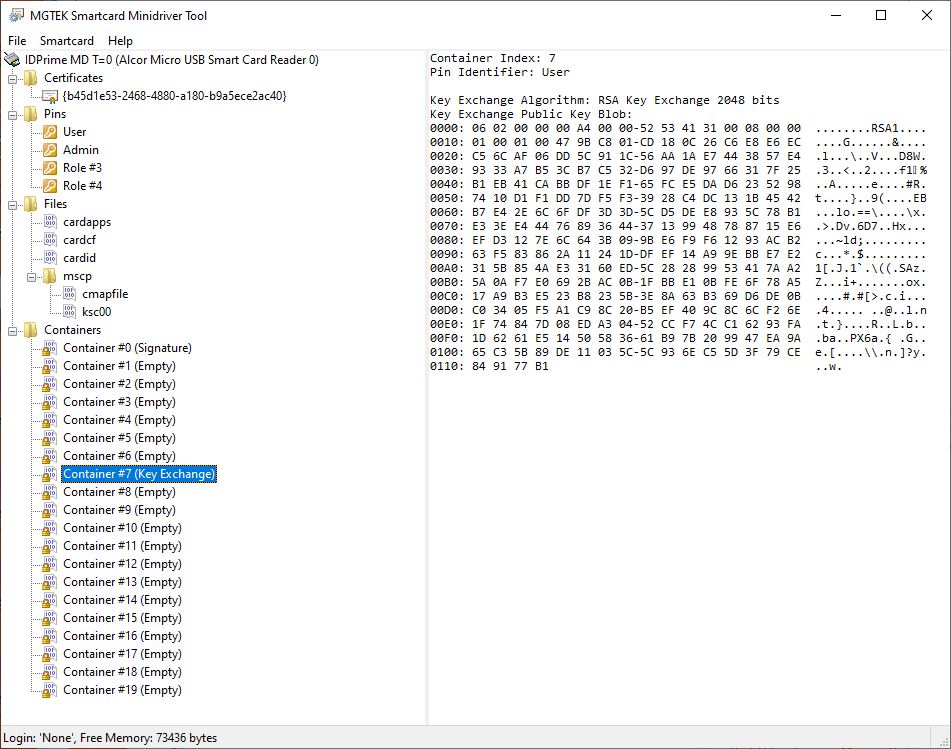
// Here's the MGTEK view of the smart card after importing the private key:
//
// First let's load a private key into the Chilkat private key object.
// (Chilkat provides the ability to load private keys from many different sources and formats.
// this example loads from a PEM file.)
oPrivKey := CreateObject("Chilkat.PrivateKey")
nSuccess := oPrivKey:LoadPemFile("qa_data/rsa/rsaPrivKey_pkcs8.pem")
IF (nSuccess == 0)
? oPrivKey:LastErrorText
oPrivKey:destroy()
RETURN
ENDIF
oScmd := CreateObject("Chilkat.ScMinidriver")
// First we need to acquire a context to the smart card in the reader where it is inserted.
// Reader names (smart card readers or USB tokens) can be discovered
// via List Readers or Find Smart Cards
cReaderName := "Alcor Micro USB Smart Card Reader 0"
nSuccess := oScmd:AcquireContext(cReaderName)
IF (nSuccess == 0)
? oScmd:LastErrorText
oPrivKey:destroy()
oScmd:destroy()
RETURN
ENDIF
// If successful, the name of the currently inserted smart card is available:
? "Card name: " + oScmd:CardName
// To import a private key, we'll need to be PIN authenticated.
// For more details about smart card PIN authentication, see the Smart Card PIN Authentication Example
cPinId := "user"
nRetval := oScmd:PinAuthenticate(cPinId, "0000")
IF (nRetval != 0)
? "PIN Authentication failed."
oScmd:DeleteContext()
oPrivKey:destroy()
oScmd:destroy()
RETURN
ENDIF
// Let's import into the "key exchange" position in key container #7.
nSuccess := oScmd:ImportKey(7, "kex", oPrivKey, "user")
IF (nSuccess == 0)
? "PIN Authentication failed."
oScmd:DeleteContext()
oPrivKey:destroy()
oScmd:destroy()
RETURN
ENDIF
oScmd:DeleteContext()
? "Success."
// Here's the MGTEK view of the smart card after importing the private key:
//  oPrivKey:destroy()
oScmd:destroy()
oPrivKey:destroy()
oScmd:destroy()