Xbase++
Xbase++
Dropbox: Access Your Own Account
See more Dropbox Examples
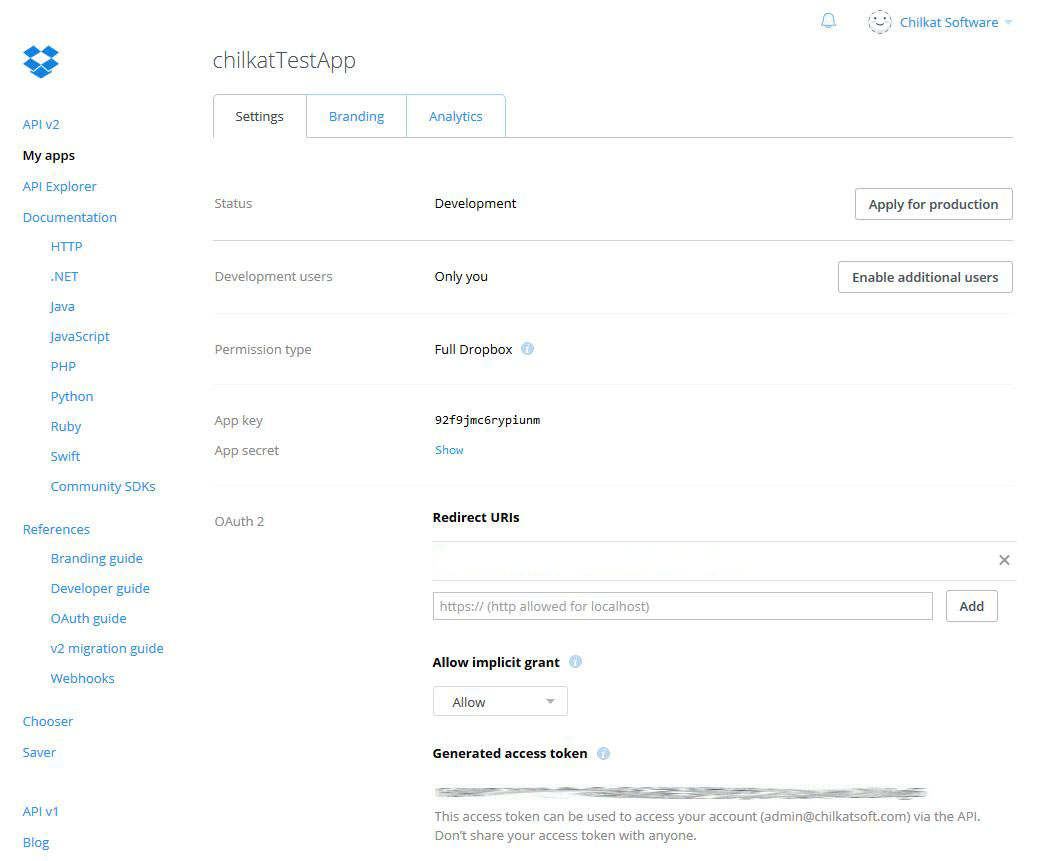
To programmatically interact with your own Dropbox account, such as for uploading, downloading, listing files, etc., go to the Dropbox app console and create an application. Then generate an access token in the online app console as shown in the screenshot below. The access token does not expire, and can be used to access your own account from your own non-web application.The example code, located below the screenshot, shows how to list the files in the root folder.
Chilkat Xbase++ Downloads
LOCAL nSuccess
LOCAL oRest
LOCAL nBTls
LOCAL nPort
LOCAL nBAutoReconnect
LOCAL oJson
LOCAL cResponseStr
LOCAL oJsonResponse
LOCAL oDt
LOCAL nNumEntries
LOCAL i
LOCAL oCkdt
LOCAL nBLocalDateTime

nSuccess := 0

//  This example requires the Chilkat API to have been previously unlocked.
//  See Global Unlock Sample for sample code.

oRest := CreateObject("Chilkat.Rest")

//  Connect to the www.dropbox.com endpoint.
nBTls := 1
nPort := 443
nBAutoReconnect := 1
nSuccess := oRest:Connect("api.dropboxapi.com", nPort, nBTls, nBAutoReconnect)
IF (nSuccess == 0)
    ? oRest:LastErrorText
    oRest:destroy()
    RETURN
ENDIF

oRest:AddHeader("Content-Type", "application/json")
oRest:AddHeader("Authorization", "Bearer DROPBOX-ACCESS-TOKEN")

oJson := CreateObject("Chilkat.JsonObject")
//  The root folder should be an empty string, not "/"
oJson:AppendString("path", "")
oJson:AppendBool("recursive", 0)
oJson:AppendBool("include_media_info", 0)
oJson:AppendBool("include_deleted", 0)
oJson:AppendBool("include_has_explicit_shared_members", 0)

cResponseStr := oRest:FullRequestString("POST", "/2/files/list_folder", oJson:Emit())
IF (oRest:LastMethodSuccess == 0)
    ? oRest:LastErrorText
    oRest:destroy()
    oJson:destroy()
    RETURN
ENDIF

//  Success is indicated by a 200 response status code.
IF (oRest:ResponseStatusCode != 200)
    //  Examine the request/response to see what happened.
    ? "response status code = " + Str(oRest:ResponseStatusCode)
    ? "response status text = " + oRest:ResponseStatusText
    ? "response header: " + oRest:ResponseHeader
    ? "response body (if any): " + cResponseStr
    ? "---"
    ? "LastRequestStartLine: " + oRest:LastRequestStartLine
    ? "LastRequestHeader: " + oRest:LastRequestHeader
    oRest:destroy()
    oJson:destroy()
    RETURN
ENDIF

oJsonResponse := CreateObject("Chilkat.JsonObject")
oJsonResponse:Load(cResponseStr)

oJsonResponse:EmitCompact := 0
? oJsonResponse:Emit()

//  A sample JSON response is shown at the end of this example.
//  The following code iterates over the entries.
oDt := CreateObject("Chilkat.DtObj")
nNumEntries := oJsonResponse:SizeOfArray("entries")
i := 0
DO WHILE i < nNumEntries
    oJsonResponse:I := i
    ? "----"
    ? "name: " + oJsonResponse:StringOf("entries[i].name")
    ? "path_lower: " + oJsonResponse:StringOf("entries[i].path_lower")
    ? "path_display: " + oJsonResponse:StringOf("entries[i].path_display")
    IF (oJsonResponse:HasMember("entries[i].sharing_info") == 1)
        ? "has sharing_info..."
        ? "read_only: " + oJsonResponse:StringOf("entries[i].sharing_info.read_only")
        ? "shared_folder_id: " + oJsonResponse:StringOf("entries[i].sharing_info.shared_folder_id")
    ENDIF

    IF (oJsonResponse:HasMember("entries[i].client_modified") == 1)
        //  Demonstrate how to parse a date/time:
        oCkdt := CreateObject("Chilkat.CkDateTime")
        nSuccess := oCkdt:SetFromTimestamp(oJsonResponse:StringOf("entries[i].client_modified"))
        //  The date/time can now be converted to many other formats, or the individual parts
        //  can be accessed.
        nBLocalDateTime := 1
        oCkdt:ToDtObj(nBLocalDateTime, oDt)

        ? Str(oDt:Year) + "-" + Str(oDt:Month) + "-" + Str(oDt:Day)
    ENDIF

    i := i + 1
ENDDO

? "Success."

//  {
//    "entries": [
//      {
//        ".tag": "folder",
//        "name": "chilkat Team Folder",
//        "path_lower": "/chilkat team folder",
//        "path_display": "/chilkat Team Folder",
//        "id": "id:2VqX9RLr-JAAAAAAAAAAAQ",
//        "shared_folder_id": "1210954290",
//        "sharing_info": {
//          "read_only": false,
//          "shared_folder_id": "1210954290"
//        }
//      },
//      {
//        ".tag": "file",
//        "name": "Get Started with Dropbox.pdf",
//        "path_lower": "/get started with dropbox.pdf",
//        "path_display": "/Get Started with Dropbox.pdf",
//        "id": "id:oxE2oMDqH4AAAAAAAAAAAQ",
//        "client_modified": "2016-05-07T11:47:47Z",
//        "server_modified": "2016-05-07T11:47:47Z",
//        "rev": "1483db13f",
//        "size": 692088
//      }
//    ],
//    "cursor": "AAEnZXciJyS4gzC_tlX6K2na4c8o7_09-dxmXKHpkPPyf3Kl0H4N-VYnz424nCrFOJuhMiM5_RgNAersumx9qe7NgCSdlppr80iFk0gf6vPlecM6SBtLcs6OYXL8ILWiZ62pfnOvgC3WKGlG6dqZ-VXH",
//    "has_more": false
//  }
//

oRest:destroy()
oJson:destroy()
oJsonResponse:destroy()
oDt:destroy()
oCkdt:destroy()