VB.NET
VB.NET
LinkedIn OAuth2 Access Token
See more OAuth2 Examples
Demonstrates how to get a LinkedIn OAuth2 access token from a desktop application or script.Note: This example requires Chilkat v10.1.2 or later.
Chilkat VB.NET Downloads
Dim success As Boolean = False

' To further clarify, see OAuth 2.0 Authorization Flow

Dim oauth2 As New Chilkat.OAuth2

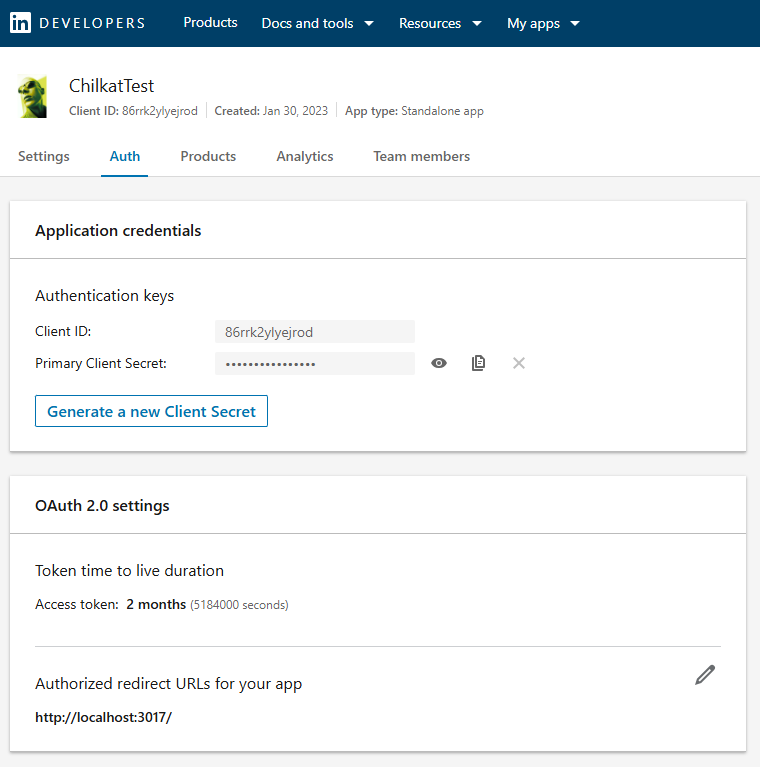
' The port should match the Authorized Redirect URL in your LinkedIn app,
' which would look like "http://localhost:3017/"
' See a screenshot below...
oauth2.ListenPort = 3017

oauth2.AuthorizationEndpoint = "https://www.linkedin.com/oauth/v2/authorization"
oauth2.TokenEndpoint = "https://www.linkedin.com/oauth/v2/accessToken"

' Replace these with actual values.
oauth2.ClientId = "CLIENT_ID"
oauth2.ClientSecret = "CLIENT_SECRET"
oauth2.Scope = "w_member_social"

' Begin the OAuth2 three-legged flow.  This returns a URL that should be loaded in a browser.
Dim url As String = oauth2.StartAuth()
If (oauth2.LastMethodSuccess <> True) Then
    Debug.WriteLine(oauth2.LastErrorText)
    Exit Sub
End If


' Launch the default browser on the system and navigate to the url.
' The LaunchBrowser method was added in Chilkat v10.1.2.
success = oauth2.LaunchBrowser(url)
If (success = False) Then
    Debug.WriteLine(oauth2.LastErrorText)
    Exit Sub
End If


' Wait for the interactive user to grant permission in the interactive browser session.
' We'll wait for a max of 90 seconds.
Dim numMsWaited As Integer = 0
While (numMsWaited < 90000) And (oauth2.AuthFlowState < 3)
    oauth2.SleepMs(100)
    numMsWaited = numMsWaited + 100
End While

' If there was no response from the browser within 90 seconds, then
' the AuthFlowState will be equal to 1 or 2.
' 1: Waiting for Redirect. The OAuth2 background thread is waiting to receive the redirect HTTP request from the browser.
' 2: Waiting for Final Response. The OAuth2 background thread is waiting for the final access token response.
' In that case, cancel the background task started in the call to StartAuth.
If (oauth2.AuthFlowState < 3) Then
    oauth2.Cancel()
    Debug.WriteLine("No response from the browser!")
    Exit Sub
End If


' Check the AuthFlowState to see if authorization was granted, denied, or if some error occurred
' The possible AuthFlowState values are:
' 3: Completed with Success. The OAuth2 flow has completed, the background thread exited, and the successful JSON response is available in AccessTokenResponse property.
' 4: Completed with Access Denied. The OAuth2 flow has completed, the background thread exited, and the error JSON is available in AccessTokenResponse property.
' 5: Failed Prior to Completion. The OAuth2 flow failed to complete, the background thread exited, and the error information is available in the FailureInfo property.
If (oauth2.AuthFlowState = 5) Then
    Debug.WriteLine("OAuth2 failed to complete.")
    Debug.WriteLine(oauth2.FailureInfo)
    Exit Sub
End If


If (oauth2.AuthFlowState = 4) Then
    Debug.WriteLine("OAuth2 authorization was denied.")
    Debug.WriteLine(oauth2.AccessTokenResponse)
    Exit Sub
End If


If (oauth2.AuthFlowState <> 3) Then
    Debug.WriteLine("Unexpected AuthFlowState:" & oauth2.AuthFlowState)
    Exit Sub
End If


Debug.WriteLine("OAuth2 authorization granted!")
Debug.WriteLine("Access Token = " & oauth2.AccessToken)

Debug.WriteLine("Full JSON Response = " & oauth2.AccessTokenResponse)

' Example JSON Response:
'
' {
'   "access_token": "AQU7C5zU8n....ggWyUA",
'   "expires_in": 5183999,
'   "scope": "w_member_social"
' }

' Save the full JSON access token response to a file.
Dim sbJson As New Chilkat.StringBuilder
sbJson.Append(oauth2.AccessTokenResponse)
sbJson.WriteFile("qa_data/tokens/_linkedIn.json","utf-8",False)

' Here is an example showing how to define your App in the LinkedIn developers console:
'