Unicode C
Unicode C
Gather Smartcard Debug Information for Chilkat
See more ScMinidriver Examples
This example demonstrates how to gather information to send to support@chilkatsoft.com about your smartcard.Chilkat Unicode C Downloads
#include <C_CkScMinidriverW.h>
#include <C_CkJsonObjectW.h>
void ChilkatSample(void)
{
BOOL success;
HCkScMinidriverW scmd;
const wchar_t *readerName;
HCkJsonObjectW json;
success = FALSE;
// This example requires the Chilkat API to have been previously unlocked.
// See Global Unlock Sample for sample code.
// First, Chilkat recommends downloading the MGTEK Smartcard Minidriver Tool to get information
// about your smartcard.
// The tool can be downloaded from https://www.mgtek.com/smartcard
// --------------------------------------------------------------------------------------------------------
// 1. Select the smartcard as shown below and send Chilkat a screenshot of the basic smartcard information.
// --------------------------------------------------------------------------------------------------------
//
// 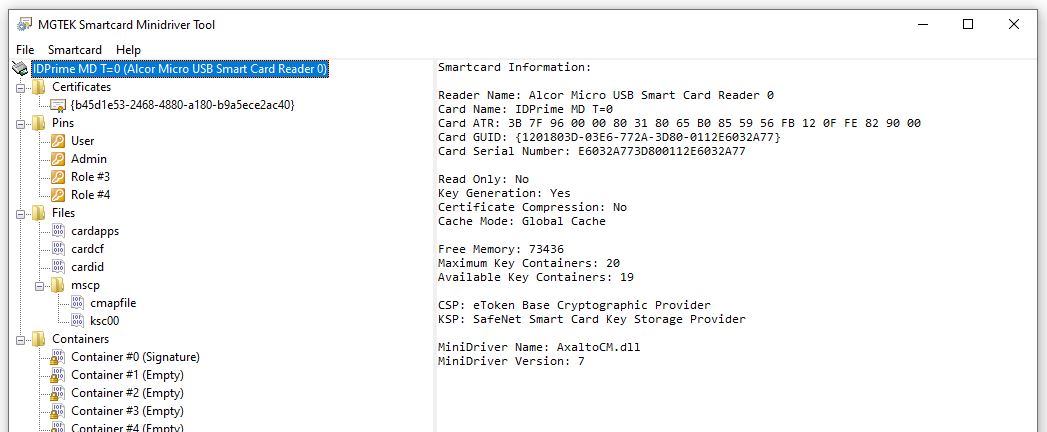 //
// --------------------------------------------------------------------------------------------------------
// 2. Select the cmapfile (if present) as shown below and send Chilkat a screenshot of the CSP container map
// --------------------------------------------------------------------------------------------------------
//
//
//
// --------------------------------------------------------------------------------------------------------
// 2. Select the cmapfile (if present) as shown below and send Chilkat a screenshot of the CSP container map
// --------------------------------------------------------------------------------------------------------
//
// 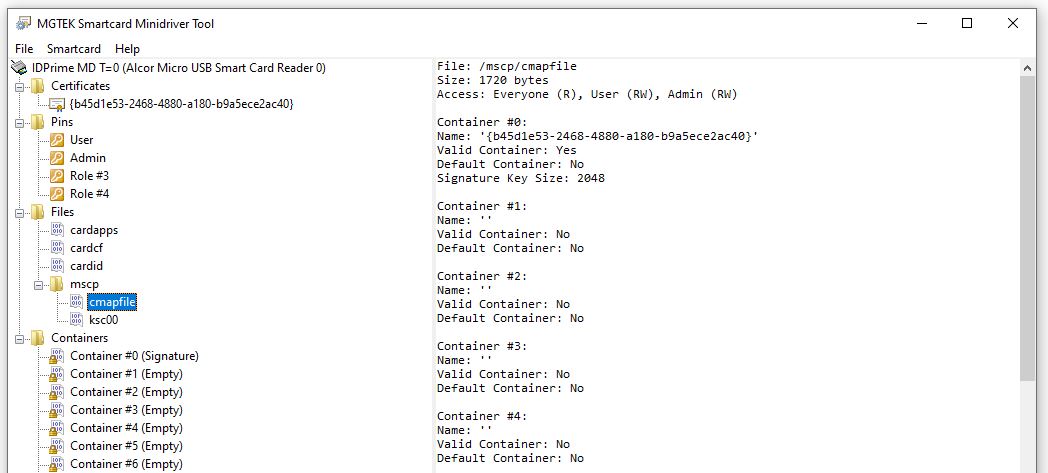 //
// ---------------------------------------------------------
// Chilkat provides functions to get information about the smartcard, and what it contains.
// Send Chilkat the output of the following source code:
scmd = CkScMinidriverW_Create();
// Reader names (smart card readers or USB tokens) can be discovered
// via PCSC List Readers or PCSC Find Smart Cards
readerName = L"Alcor Micro USB Smart Card Reader 0";
success = CkScMinidriverW_AcquireContext(scmd,readerName);
if (success == FALSE) {
wprintf(L"%s\n",CkScMinidriverW_lastErrorText(scmd));
CkScMinidriverW_Dispose(scmd);
return;
}
json = CkJsonObjectW_Create();
CkJsonObjectW_putEmitCompact(json,FALSE);
// ------------------------------------------------------
// 3. Send Chilkat the JSON returned by GetCardProperties
// ------------------------------------------------------
success = CkScMinidriverW_GetCardProperties(scmd,json);
if (success == FALSE) {
wprintf(L"%s\n",CkScMinidriverW_lastErrorText(scmd));
CkScMinidriverW_Dispose(scmd);
CkJsonObjectW_Dispose(json);
return;
}
wprintf(L"%s\n",CkJsonObjectW_emit(json));
// ------------------------------------------------------
// 4. Send Chilkat the JSON returned by GetCspContainerMap
// ------------------------------------------------------
CkJsonObjectW_Clear(json);
success = CkScMinidriverW_GetCspContainerMap(scmd,json);
if (success == FALSE) {
wprintf(L"%s\n",CkScMinidriverW_lastErrorText(scmd));
CkScMinidriverW_Dispose(scmd);
CkJsonObjectW_Dispose(json);
return;
}
wprintf(L"%s\n",CkJsonObjectW_emit(json));
CkScMinidriverW_Dispose(scmd);
CkJsonObjectW_Dispose(json);
}
//
// ---------------------------------------------------------
// Chilkat provides functions to get information about the smartcard, and what it contains.
// Send Chilkat the output of the following source code:
scmd = CkScMinidriverW_Create();
// Reader names (smart card readers or USB tokens) can be discovered
// via PCSC List Readers or PCSC Find Smart Cards
readerName = L"Alcor Micro USB Smart Card Reader 0";
success = CkScMinidriverW_AcquireContext(scmd,readerName);
if (success == FALSE) {
wprintf(L"%s\n",CkScMinidriverW_lastErrorText(scmd));
CkScMinidriverW_Dispose(scmd);
return;
}
json = CkJsonObjectW_Create();
CkJsonObjectW_putEmitCompact(json,FALSE);
// ------------------------------------------------------
// 3. Send Chilkat the JSON returned by GetCardProperties
// ------------------------------------------------------
success = CkScMinidriverW_GetCardProperties(scmd,json);
if (success == FALSE) {
wprintf(L"%s\n",CkScMinidriverW_lastErrorText(scmd));
CkScMinidriverW_Dispose(scmd);
CkJsonObjectW_Dispose(json);
return;
}
wprintf(L"%s\n",CkJsonObjectW_emit(json));
// ------------------------------------------------------
// 4. Send Chilkat the JSON returned by GetCspContainerMap
// ------------------------------------------------------
CkJsonObjectW_Clear(json);
success = CkScMinidriverW_GetCspContainerMap(scmd,json);
if (success == FALSE) {
wprintf(L"%s\n",CkScMinidriverW_lastErrorText(scmd));
CkScMinidriverW_Dispose(scmd);
CkJsonObjectW_Dispose(json);
return;
}
wprintf(L"%s\n",CkJsonObjectW_emit(json));
CkScMinidriverW_Dispose(scmd);
CkJsonObjectW_Dispose(json);
}