Unicode C
Unicode C
PDF Signature Appearance Text Substitution Keywords
See more PDF Signatures Examples
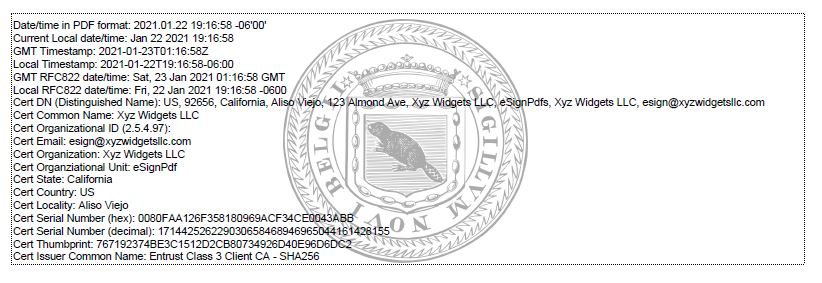
This example demonstrates the text substitution keywords that can be used in the PDF signature's appearance text.Note: This example requires Chilkat v9.5.0.85 or greater.
Chilkat Unicode C Downloads
#include <C_CkPdfW.h>
#include <C_CkJsonObjectW.h>
#include <C_CkBinDataW.h>
#include <C_CkCertW.h>
void ChilkatSample(void)
{
BOOL success;
HCkPdfW pdf;
HCkJsonObjectW json;
HCkBinDataW jpgData;
HCkCertW cert;
success = FALSE;
// This example requires the Chilkat API to have been previously unlocked.
// See Global Unlock Sample for sample code.
pdf = CkPdfW_Create();
// Load a PDF to be signed.
success = CkPdfW_LoadFile(pdf,L"qa_data/pdf/empty.pdf");
if (success == FALSE) {
wprintf(L"%s\n",CkPdfW_lastErrorText(pdf));
CkPdfW_Dispose(pdf);
return;
}
// Options for signing are specified in JSON.
json = CkJsonObjectW_Create();
// In most cases, the signingCertificateV2 and signingTime attributes are required.
CkJsonObjectW_UpdateInt(json,L"signingCertificateV2",1);
CkJsonObjectW_UpdateInt(json,L"signingTime",1);
// Put the signature on page 1, top left
CkJsonObjectW_UpdateInt(json,L"page",1);
CkJsonObjectW_UpdateString(json,L"appearance.y",L"top");
CkJsonObjectW_UpdateString(json,L"appearance.x",L"left");
// Use a font scale of 7.0
CkJsonObjectW_UpdateString(json,L"appearance.fontScale",L"7.0");
// The appearance of the PDF signature can contain any number of text lines.
// Chilkat has defined a number of special keywords that can be used in any text line.
// Each keyword is replaced with the actual value.
// For example, "cert_cn" is replaced with the certificate subject's common name (CN).
// Here we are creating a signature with many lines of text, to demonstrate each
// keyword.
CkJsonObjectW_UpdateString(json,L"appearance.text[0]",L"Date/time in PDF format: current_dt");
CkJsonObjectW_UpdateString(json,L"appearance.text[1]",L"Current Local date/time: current_datetime");
CkJsonObjectW_UpdateString(json,L"appearance.text[2]",L"GMT Timestamp: current_timestamp_gmt");
CkJsonObjectW_UpdateString(json,L"appearance.text[3]",L"Local Timestamp: current_timestamp_local");
CkJsonObjectW_UpdateString(json,L"appearance.text[4]",L"GMT RFC822 date/time: current_rfc822_dt_gmt");
CkJsonObjectW_UpdateString(json,L"appearance.text[5]",L"Local RFC822 date/time: current_rfc822_dt_local");
CkJsonObjectW_UpdateString(json,L"appearance.text[6]",L"Cert DN (Distinguished Name): cert_dn");
CkJsonObjectW_UpdateString(json,L"appearance.text[7]",L"Cert Common Name: cert_cn");
CkJsonObjectW_UpdateString(json,L"appearance.text[8]",L"Cert Organizational ID (2.5.4.97): cert_org_id");
CkJsonObjectW_UpdateString(json,L"appearance.text[9]",L"Cert Email: cert_email");
CkJsonObjectW_UpdateString(json,L"appearance.text[10]",L"Cert Organization: cert_organization");
CkJsonObjectW_UpdateString(json,L"appearance.text[11]",L"Cert Organziational Unit: cert_ou");
CkJsonObjectW_UpdateString(json,L"appearance.text[12]",L"Cert State: cert_state");
CkJsonObjectW_UpdateString(json,L"appearance.text[13]",L"Cert Country: cert_country");
CkJsonObjectW_UpdateString(json,L"appearance.text[14]",L"Cert Locality: cert_locality");
CkJsonObjectW_UpdateString(json,L"appearance.text[15]",L"Cert Serial Number (hex): cert_serial_hex");
CkJsonObjectW_UpdateString(json,L"appearance.text[16]",L"Cert Serial Number (decimal): cert_serial_dec");
CkJsonObjectW_UpdateString(json,L"appearance.text[17]",L"Cert Thumbprint: cert_thumbprint");
CkJsonObjectW_UpdateString(json,L"appearance.text[18]",L"Cert Issuer Common Name: cert_issuer_cn");
jpgData = CkBinDataW_Create();
success = CkBinDataW_LoadFile(jpgData,L"qa_data/jpg/seal1.jpg");
if (success == FALSE) {
wprintf(L"Failed to load the JPG image.\n");
CkPdfW_Dispose(pdf);
CkJsonObjectW_Dispose(json);
CkBinDataW_Dispose(jpgData);
return;
}
success = CkPdfW_SetSignatureJpeg(pdf,jpgData);
if (success == FALSE) {
wprintf(L"%s\n",CkPdfW_lastErrorText(pdf));
CkPdfW_Dispose(pdf);
CkJsonObjectW_Dispose(json);
CkBinDataW_Dispose(jpgData);
return;
}
// Specify that we want to display the JPG image in the center with 33% opacity.
CkJsonObjectW_UpdateString(json,L"appearance.image",L"custom-jpg");
CkJsonObjectW_UpdateString(json,L"appearance.imagePlacement",L"center");
CkJsonObjectW_UpdateString(json,L"appearance.imageOpacity",L"33");
// Load the signing certificate. (Use your own certificate.)
cert = CkCertW_Create();
success = CkCertW_LoadPfxFile(cert,L"qa_data/pfx/myPdfSigningCert.pfx",L"pfx_password");
if (success == FALSE) {
wprintf(L"%s\n",CkCertW_lastErrorText(cert));
CkPdfW_Dispose(pdf);
CkJsonObjectW_Dispose(json);
CkBinDataW_Dispose(jpgData);
CkCertW_Dispose(cert);
return;
}
// Tell the pdf object to use the certificate for signing.
success = CkPdfW_SetSigningCert(pdf,cert);
if (success == FALSE) {
wprintf(L"%s\n",CkPdfW_lastErrorText(pdf));
CkPdfW_Dispose(pdf);
CkJsonObjectW_Dispose(json);
CkBinDataW_Dispose(jpgData);
CkCertW_Dispose(cert);
return;
}
success = CkPdfW_SignPdf(pdf,json,L"qa_output/hello_signed.pdf");
if (success == FALSE) {
wprintf(L"%s\n",CkPdfW_lastErrorText(pdf));
CkPdfW_Dispose(pdf);
CkJsonObjectW_Dispose(json);
CkBinDataW_Dispose(jpgData);
CkCertW_Dispose(cert);
return;
}
wprintf(L"The PDF has been successfully cryptographically signed.\n");
// The appearance of the signature appears in Adobe Acrobat as shown here:
//  CkPdfW_Dispose(pdf);
CkJsonObjectW_Dispose(json);
CkBinDataW_Dispose(jpgData);
CkCertW_Dispose(cert);
}
CkPdfW_Dispose(pdf);
CkJsonObjectW_Dispose(json);
CkBinDataW_Dispose(jpgData);
CkCertW_Dispose(cert);
}