Unicode C
Unicode C
Create CAdES p7m using AWS KMS to Sign in the Cloud
See more Signing in the Cloud Examples
Demonstrates how to create a CAdES p7m, using AWS KMS. The signing of the hash happens in the Cloud on AWS KMS. Everything else regarding the creation of CAdES happens locally within Chilkat.Note: This example requires Chilkat v9.5.0.96 or greater.
Chilkat Unicode C Downloads
#include <C_CkCertW.h>
#include <C_CkJsonObjectW.h>
#include <C_CkCrypt2W.h>
void ChilkatSample(void)
{
BOOL success;
HCkCertW cert;
HCkJsonObjectW jsonAwsKms;
HCkCrypt2W crypt;
HCkJsonObjectW signedAttrs;
const wchar_t *inputXmlPath;
const wchar_t *outputP7mPath;
success = FALSE;
// This example assumes the Chilkat API to have been previously unlocked.
// See Global Unlock Sample for sample code.
// Load the certificate used for signing. The certificate's private key is stored in AWS KMS
// However, we still need the certificate locally (without private key).
cert = CkCertW_Create();
success = CkCertW_LoadFromFile(cert,L"qa_data/certs/myCert.cer");
if (success == FALSE) {
wprintf(L"%s\n",CkCertW_lastErrorText(cert));
CkCertW_Dispose(cert);
return;
}
// Here's a screenshot showing the key ID of a private key in AWS KMS:
// 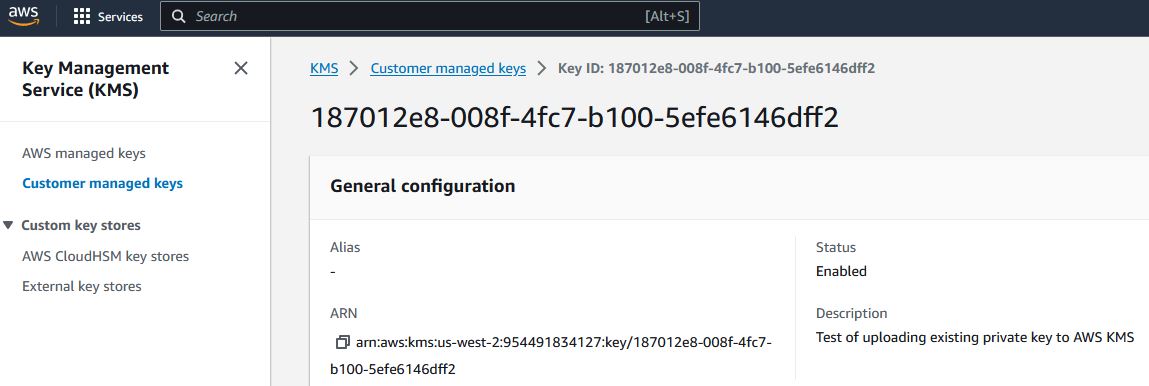 // To sign using AWS KMS,
// add the following lines of code to specify your AWS authentication credentials,
// and the ID of the KMS private key.
jsonAwsKms = CkJsonObjectW_Create();
// Set the "service" equal to "aws_kms" to tell Chilkat to use AWS KMS for signing.
CkJsonObjectW_UpdateString(jsonAwsKms,L"service",L"aws_kms");
CkJsonObjectW_UpdateString(jsonAwsKms,L"access_key",L"ACCESS_KEY");
CkJsonObjectW_UpdateString(jsonAwsKms,L"secret_key",L"SECRET_KEY");
// Make sure to specify the correct region for your case.
CkJsonObjectW_UpdateString(jsonAwsKms,L"region",L"us-west-2");
// In the above screenshot, our key ID is "187012e8-008f-4fc7-b100-5efe6146dff2". You will use your key ID.
CkJsonObjectW_UpdateString(jsonAwsKms,L"key_id",L"187012e8-008f-4fc7-b100-5efe6146dff2");
success = CkCertW_SetCloudSigner(cert,jsonAwsKms);
crypt = CkCrypt2W_Create();
success = CkCrypt2W_SetSigningCert(crypt,cert);
if (success == FALSE) {
wprintf(L"%s\n",CkCrypt2W_lastErrorText(crypt));
CkCertW_Dispose(cert);
CkJsonObjectW_Dispose(jsonAwsKms);
CkCrypt2W_Dispose(crypt);
return;
}
// The CadesEnabled property applies to all methods that create PKCS7 signatures.
// To create a CAdES-BES signature, set this property equal to true.
CkCrypt2W_putCadesEnabled(crypt,TRUE);
CkCrypt2W_putHashAlgorithm(crypt,L"sha256");
signedAttrs = CkJsonObjectW_Create();
CkJsonObjectW_UpdateInt(signedAttrs,L"contentType",1);
CkJsonObjectW_UpdateInt(signedAttrs,L"signingTime",1);
CkJsonObjectW_UpdateInt(signedAttrs,L"messageDigest",1);
CkJsonObjectW_UpdateInt(signedAttrs,L"signingCertificateV2",1);
CkCrypt2W_putSigningAttributes(crypt,CkJsonObjectW_emit(signedAttrs));
// You can sign any type of file..
inputXmlPath = L"qa_data/e-Invoice.xml";
outputP7mPath = L"qa_output/signed.p7m";
// Create the CAdES-BES attached signature, which contains the original data.
// Chilkat will build the .p7m locally, but will (internally) use ARSS
// to do the RSA signing remotely.
success = CkCrypt2W_CreateP7M(crypt,inputXmlPath,outputP7mPath);
if (success == FALSE) {
wprintf(L"%s\n",CkCrypt2W_lastErrorText(crypt));
CkCertW_Dispose(cert);
CkJsonObjectW_Dispose(jsonAwsKms);
CkCrypt2W_Dispose(crypt);
CkJsonObjectW_Dispose(signedAttrs);
return;
}
wprintf(L"Success.\n");
CkCertW_Dispose(cert);
CkJsonObjectW_Dispose(jsonAwsKms);
CkCrypt2W_Dispose(crypt);
CkJsonObjectW_Dispose(signedAttrs);
}
// To sign using AWS KMS,
// add the following lines of code to specify your AWS authentication credentials,
// and the ID of the KMS private key.
jsonAwsKms = CkJsonObjectW_Create();
// Set the "service" equal to "aws_kms" to tell Chilkat to use AWS KMS for signing.
CkJsonObjectW_UpdateString(jsonAwsKms,L"service",L"aws_kms");
CkJsonObjectW_UpdateString(jsonAwsKms,L"access_key",L"ACCESS_KEY");
CkJsonObjectW_UpdateString(jsonAwsKms,L"secret_key",L"SECRET_KEY");
// Make sure to specify the correct region for your case.
CkJsonObjectW_UpdateString(jsonAwsKms,L"region",L"us-west-2");
// In the above screenshot, our key ID is "187012e8-008f-4fc7-b100-5efe6146dff2". You will use your key ID.
CkJsonObjectW_UpdateString(jsonAwsKms,L"key_id",L"187012e8-008f-4fc7-b100-5efe6146dff2");
success = CkCertW_SetCloudSigner(cert,jsonAwsKms);
crypt = CkCrypt2W_Create();
success = CkCrypt2W_SetSigningCert(crypt,cert);
if (success == FALSE) {
wprintf(L"%s\n",CkCrypt2W_lastErrorText(crypt));
CkCertW_Dispose(cert);
CkJsonObjectW_Dispose(jsonAwsKms);
CkCrypt2W_Dispose(crypt);
return;
}
// The CadesEnabled property applies to all methods that create PKCS7 signatures.
// To create a CAdES-BES signature, set this property equal to true.
CkCrypt2W_putCadesEnabled(crypt,TRUE);
CkCrypt2W_putHashAlgorithm(crypt,L"sha256");
signedAttrs = CkJsonObjectW_Create();
CkJsonObjectW_UpdateInt(signedAttrs,L"contentType",1);
CkJsonObjectW_UpdateInt(signedAttrs,L"signingTime",1);
CkJsonObjectW_UpdateInt(signedAttrs,L"messageDigest",1);
CkJsonObjectW_UpdateInt(signedAttrs,L"signingCertificateV2",1);
CkCrypt2W_putSigningAttributes(crypt,CkJsonObjectW_emit(signedAttrs));
// You can sign any type of file..
inputXmlPath = L"qa_data/e-Invoice.xml";
outputP7mPath = L"qa_output/signed.p7m";
// Create the CAdES-BES attached signature, which contains the original data.
// Chilkat will build the .p7m locally, but will (internally) use ARSS
// to do the RSA signing remotely.
success = CkCrypt2W_CreateP7M(crypt,inputXmlPath,outputP7mPath);
if (success == FALSE) {
wprintf(L"%s\n",CkCrypt2W_lastErrorText(crypt));
CkCertW_Dispose(cert);
CkJsonObjectW_Dispose(jsonAwsKms);
CkCrypt2W_Dispose(crypt);
CkJsonObjectW_Dispose(signedAttrs);
return;
}
wprintf(L"Success.\n");
CkCertW_Dispose(cert);
CkJsonObjectW_Dispose(jsonAwsKms);
CkCrypt2W_Dispose(crypt);
CkJsonObjectW_Dispose(signedAttrs);
}