Unicode C++
Unicode C++
Firebase DELETE - Removing Data
See more Firebase Examples
Uses the DELETE method to delete data. The data used in this example is at Chilkat Firebase Pigs Database, and is shown here: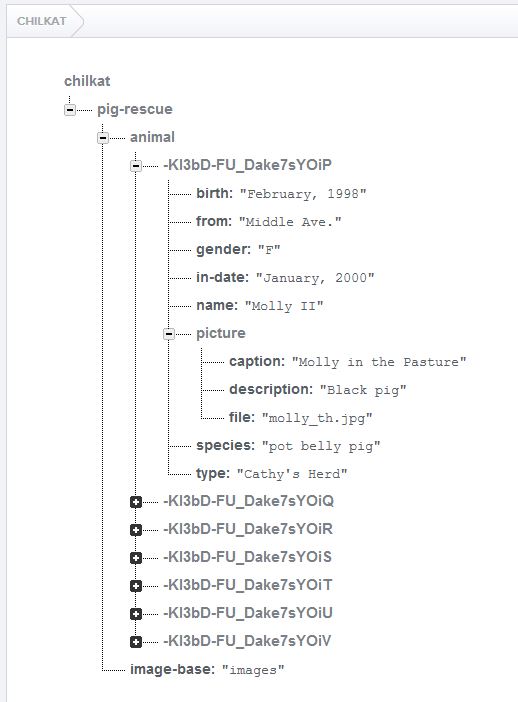
Chilkat Unicode C++ Downloads
#include <CkFileAccessW.h>
#include <CkRestW.h>
#include <CkAuthGoogleW.h>

void ChilkatSample(void)
    {
    bool success = false;

    //  Uses the DELETE method to delete a Firebase record.

    //  This example requires the Chilkat API to have been previously unlocked.
    //  See Global Unlock Sample for sample code.

    //  This example assumes a JWT authentication token, if required, has been previously obtained.
    //  See Get Firebase Access Token from JSON Service Account Private Key for sample code.

    //  Load the previously obtained Firebase access token into a string.
    CkFileAccessW fac;
    const wchar_t *accessToken = fac.readEntireTextFile(L"qa_data/tokens/firebaseToken.txt",L"utf-8");
    if (fac.get_LastMethodSuccess() != true) {
        wprintf(L"%s\n",fac.lastErrorText());
        return;
    }

    CkRestW rest;

    //  Make the initial connection (without sending a request yet).
    //  Once connected, any number of requests may be sent.  It is not necessary to explicitly
    //  call Connect before each request.
    success = rest.Connect(L"chilkat.firebaseio.com",443,true,true);
    if (success != true) {
        wprintf(L"%s\n",rest.lastErrorText());
        return;
    }

    CkAuthGoogleW authGoogle;
    authGoogle.put_AccessToken(accessToken);
    rest.SetAuthGoogle(authGoogle);

    //  Chilkat's sample data (pig-rescue data) is publicly readable at: https://chilkat.firebaseio.com/.json
    //  This data is publicly readable, but not writable.  You'll need to
    //  run against your own database..

    //  We're going to delete a pig we previously added.  The push ID of that pig was -KI3pT33wKauiMxY4QTB,
    //  so the path will be "/pig-rescue/animal/-KI3pT33wKauiMxY4QTB.json"

    const wchar_t *jsonResponse = rest.fullRequestNoBody(L"DELETE",L"/pig-rescue/animal/-KI3pT33wKauiMxY4QTB.json");
    if (rest.get_LastMethodSuccess() != true) {
        //  Something happened in the communications (either no request was sent, or no response was received.
        //  (The Chilkat REST API also has lower-level methods where an app can send the request in one call,
        //  and then receive the response in another call.)
        wprintf(L"%s\n",rest.lastErrorText());
        return;
    }

    //  Check the response status code.   A 200 response status indicates success.
    if (rest.get_ResponseStatusCode() != 200) {
        wprintf(L"%s\n",rest.responseStatusText());
        wprintf(L"%s\n",jsonResponse);
        wprintf(L"Failed.\n");
        return;
    }

    wprintf(L"Success.\n");
    }