Tcl
Tcl
Send HTML Email with Image to iPhone
Demonstrates how to compose an HTML email with an embedded image that will display correctly on an iPhone. This example produces an email that looks like this on the iPhone: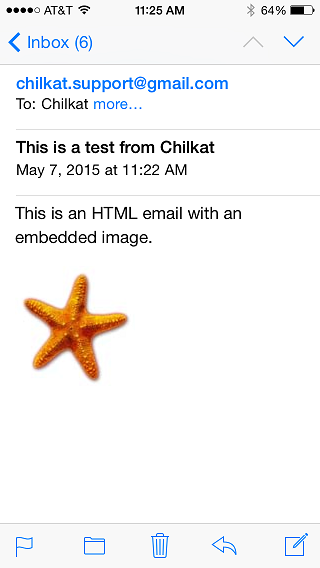
Chilkat Tcl Downloads
load ./chilkat.dll

set success 0

# This example requires the Chilkat API to have been previously unlocked.
# See Global Unlock Sample for sample code.

# The mailman object is used for sending and receiving email.
set mailman [new_CkMailMan]

# Use your SMTP server hostname.  This example uses office365, but it could be any SMTP server..
CkMailMan_put_SmtpHost $mailman "outlook.office365.com"
CkMailMan_put_SmtpPort $mailman 587
CkMailMan_put_StartTLS $mailman 1

# Set the SMTP login/password
CkMailMan_put_SmtpUsername $mailman "OFFICE365-SMTP-LOGIN"
CkMailMan_put_SmtpPassword $mailman "OFFICE365-SMTP-PASSWORD"

# Create a new email object
set email [new_CkEmail]

CkEmail_put_Subject $email "Testing for Chilkat SMTP API..."
CkEmail_put_Body $email "Testing for Chilkat SMTP API..."
CkEmail_put_From $email "Chilkat Support <my-office365-user@mydomain.com>"
CkEmail_AddTo $email "Chilkat Support" "support@chilkatsoft.com"

# For whatever reason, the iPhone's email program requires
# images in HTML to be referenced by Content-ID.  Therefore,
# we must add the image like this:
set contentIdStarfish [CkEmail_addRelatedFile $email "qa_data/jpg/starfish.jpg"]
if {[CkEmail_get_LastMethodSuccess $email] != 1} then {
    puts [CkEmail_lastErrorText $email]
    delete_CkMailMan $mailman
    delete_CkEmail $email
    exit
}

# The src attribute for the image tag is set to the contentIdStarfish:
set sbHtml [new_CkStringBuilder]

CkStringBuilder_Append $sbHtml "<html><body><p>This is an HTML email with an embedded image.</p>"
CkStringBuilder_Append $sbHtml "<p><img src=\"cid:CONTENT_ID_STARFISH\" /></p></body></html>"
set numReplacements [CkStringBuilder_Replace $sbHtml "CONTENT_ID_STARFISH" $contentIdStarfish]

CkEmail_SetHtmlBody $email [CkStringBuilder_getAsString $sbHtml]

set success [CkMailMan_SendEmail $mailman $email]
if {$success != 1} then {
    puts [CkMailMan_lastErrorText $mailman]
} else {
    puts "Mail Sent!"
}


delete_CkMailMan $mailman
delete_CkEmail $email
delete_CkStringBuilder $sbHtml