Tcl Requires Chilkat v11.2.0+
Tcl
Markdown to HTML - Full Document, Custom Theme with Code Syntax Highlighting
See more Markdown Examples
Demonstrates how to convert a complete Markdown document to HTML using your own custom theme with Cloudfare Prism's code syntax highlighting.Chilkat Tcl Downloads
load ./chilkat.dll
set success 0
set success 0
set options [new_CkJsonObject]
# Instead of specifying a "theme", provide values for the HTML document parts.
set sbHead [new_CkStringBuilder]
set bCrlf 1
CkStringBuilder_AppendLine $sbHead "<head>" $bCrlf
CkStringBuilder_AppendLine $sbHead "<style>" $bCrlf
CkStringBuilder_AppendLine $sbHead "body {" $bCrlf
CkStringBuilder_AppendLine $sbHead " font-family: \"Segoe UI\", Tahoma, Geneva, Verdana, sans-serif;" $bCrlf
CkStringBuilder_AppendLine $sbHead "}" $bCrlf
CkStringBuilder_AppendLine $sbHead "</style>" $bCrlf
CkStringBuilder_AppendLine $sbHead "</head>" $bCrlf
# Each HTML section can be set individually.
CkJsonObject_UpdateString $options "docType" "<!DOCTYPE html>"
CkJsonObject_UpdateString $options "rootElement" "<html lang=\"en\">"
CkJsonObject_UpdateString $options "head" [CkStringBuilder_getAsString $sbHead]
CkJsonObject_UpdateString $options "bodyStart" "<body>\n<div id=\"content\""
CkJsonObject_UpdateString $options "bodyEnd" "</div>\n</body>"
# We can add extra content to the bottom of the HTML head and body sections like this:
# Here we are using the Cloudfare Prism "coy" theme for code syntax higlighting.
CkJsonObject_UpdateString $options "extraHead" "<link rel=\"stylesheet\" href=\"https://cdnjs.cloudflare.com/ajax/libs/prism/1.29.0/themes/prism-coy.min.css\" />"
CkJsonObject_UpdateString $options "extraBody" "<script src=\"https://cdnjs.cloudflare.com/ajax/libs/prism/1.29.0/prism.min.js\"></script><script src =\"https://cdnjs.cloudflare.com/ajax/libs/prism/1.29.0/plugins/autoloader/prism-autoloader.min.js\"></script>"
set sbMarkdown [new_CkStringBuilder]
set sbHtml [new_CkStringBuilder]
set success [CkStringBuilder_LoadFile $sbMarkdown "qa_data/markdown/test1.md" "utf-8"]
if {$success == 0} then {
puts [CkStringBuilder_lastErrorText $sbMarkdown]
delete_CkJsonObject $options
delete_CkStringBuilder $sbHead
delete_CkStringBuilder $sbMarkdown
delete_CkStringBuilder $sbHtml
exit
}
CkStringBuilder_MarkdownToHtml $sbMarkdown $options $sbHtml
CkStringBuilder_ToCRLF $sbHtml
puts [CkStringBuilder_getAsString $sbHtml]
# The sample markdown input for this example is identical to the one at Markdown to HTML - Full Document, Raw, where you can view it.
# Sample HTML output as viewed in a browser:
# 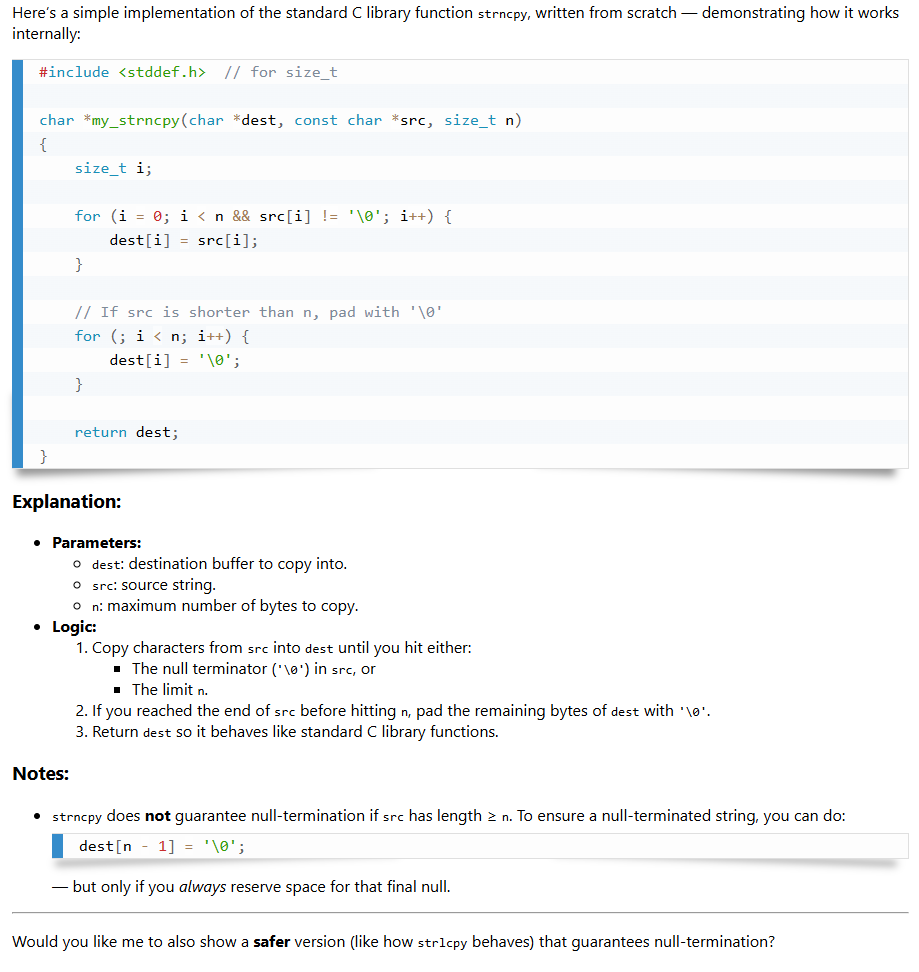 delete_CkJsonObject $options
delete_CkStringBuilder $sbHead
delete_CkStringBuilder $sbMarkdown
delete_CkStringBuilder $sbHtml
delete_CkJsonObject $options
delete_CkStringBuilder $sbHead
delete_CkStringBuilder $sbMarkdown
delete_CkStringBuilder $sbHtml