Tcl
Tcl
Google Cloud Storage OAuth2 Access Token (Authorization Code Flow)
See more Google Cloud Storage Examples
Gets the initial OAuth2 access token with the scope needed for Google Cloud Storage operations. This uses the authorization code flow and is NOT for a Google service account.Your Google App client ID should be created as shown below. Set the application type as a "Web Application" even though it's not really a web application. The reason is that when you call StartAuth, Chilkat runs a background thread to act as a temporary web browser to receive the redirect from your local web browser.
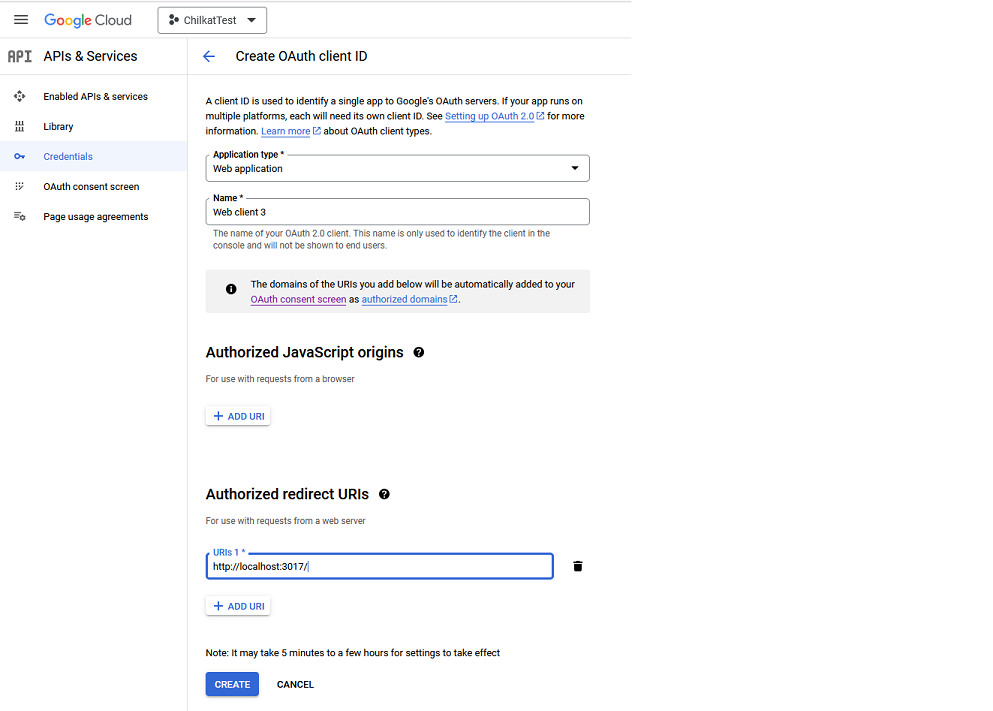
Chilkat Tcl Downloads
load ./chilkat.dll

set success 0

# This example requires the Chilkat API to have been previously unlocked.
# See Global Unlock Sample for sample code.

set oauth2 [new_CkOAuth2]

# For Google OAuth2, set the listen port equal to the port used
# in the Authorized Redirect URL for the Client ID.
# For example, in this case the Authorized Redirect URL would be http://localhost:3017/
# Your app should choose a port not likely not used by any other application.
CkOAuth2_put_ListenPort $oauth2 3017

CkOAuth2_put_AuthorizationEndpoint $oauth2 "https://accounts.google.com/o/oauth2/v2/auth"
CkOAuth2_put_TokenEndpoint $oauth2 "https://www.googleapis.com/oauth2/v4/token"

# Replace these with actual values.
CkOAuth2_put_ClientId $oauth2 "GOOGLE-CLIENT-ID"
CkOAuth2_put_ClientSecret $oauth2 "GOOGLE-CLIENT-SECRET"

CkOAuth2_put_CodeChallenge $oauth2 1
CkOAuth2_put_CodeChallengeMethod $oauth2 "S256"

CkOAuth2_put_Scope $oauth2 "https://www.googleapis.com/auth/devstorage.full_control"

# Begin the OAuth2 three-legged flow.  This returns a URL that should be loaded in a browser.
set url [CkOAuth2_startAuth $oauth2]
if {[CkOAuth2_get_LastMethodSuccess $oauth2] == 0} then {
    puts [CkOAuth2_lastErrorText $oauth2]
    delete_CkOAuth2 $oauth2
    exit
}

# Launch the system's default browser navigated to the URL.
set success [CkOAuth2_LaunchBrowser $oauth2 $url]
if {$success == 0} then {
    puts [CkOAuth2_lastErrorText $oauth2]
    delete_CkOAuth2 $oauth2
    exit
}

# Now wait for the authorization.
# We'll wait for a max of 30 seconds.
set numMsWaited 0
while {expr [$numMsWaited < 30000]  &&  [[CkOAuth2_get_AuthFlowState $oauth2] < 3]} {
    CkOAuth2_SleepMs $oauth2 100
    set numMsWaited [expr $numMsWaited + 100]
}

# If there was no response from the browser within 30 seconds, then
# the AuthFlowState will be equal to 1 or 2.
# 1: Waiting for Redirect. The OAuth2 background thread is waiting to receive the redirect HTTP request from the browser.
# 2: Waiting for Final Response. The OAuth2 background thread is waiting for the final access token response.
# In that case, cancel the background task started in the call to StartAuth.
if {[CkOAuth2_get_AuthFlowState $oauth2] < 3} then {
    CkOAuth2_Cancel $oauth2
    puts "No response from the browser!"
    delete_CkOAuth2 $oauth2
    exit
}

# Check the AuthFlowState to see if authorization was granted, denied, or if some error occurred
# The possible AuthFlowState values are:
# 3: Completed with Success. The OAuth2 flow has completed, the background thread exited, and the successful JSON response is available in AccessTokenResponse property.
# 4: Completed with Access Denied. The OAuth2 flow has completed, the background thread exited, and the error JSON is available in AccessTokenResponse property.
# 5: Failed Prior to Completion. The OAuth2 flow failed to complete, the background thread exited, and the error information is available in the FailureInfo property.
if {[CkOAuth2_get_AuthFlowState $oauth2] == 5} then {
    puts "OAuth2 failed to complete."
    puts [CkOAuth2_failureInfo $oauth2]
    delete_CkOAuth2 $oauth2
    exit
}

if {[CkOAuth2_get_AuthFlowState $oauth2] == 4} then {
    puts "OAuth2 authorization was denied."
    puts [CkOAuth2_accessTokenResponse $oauth2]
    delete_CkOAuth2 $oauth2
    exit
}

if {[CkOAuth2_get_AuthFlowState $oauth2] != 3} then {
    puts "Unexpected AuthFlowState:[CkOAuth2_get_AuthFlowState $oauth2]"
    delete_CkOAuth2 $oauth2
    exit
}

# Save the full JSON access token response to a file.
set sbJson [new_CkStringBuilder]

CkStringBuilder_Append $sbJson [CkOAuth2_accessTokenResponse $oauth2]
CkStringBuilder_WriteFile $sbJson "qa_data/tokens/googleCloudStorage.json" "utf-8" 0

# The saved JSON response looks like this:

# 	{
# 	 "access_token": "ya39.Ci-XA_C5bGgRDC3UaD-h0_NeL-DVIQnI2gHtBBBHkZzrwlARkwX6R3O0PCDEzRlfaQ",
# 	 "token_type": "Bearer",
# 	 "expires_in": 3600,
# 	 "refresh_token": "1/r_2c_7jddspcdfesrrfKqfXtqo08D6Q-gUU0DsdfVMsx0c"
# 	}
#
puts "OAuth2 authorization granted!"
puts "Access Token = [CkOAuth2_accessToken $oauth2]"

delete_CkOAuth2 $oauth2
delete_CkStringBuilder $sbJson