Swift Requires Chilkat v10.1.2+
Swift
HMRC OAuth2 Access Token
See more OAuth2 Examples
Demonstrates how to get an HMRC OAuth2 access token from a desktop (installed) application or script. This example gets an HMRC MTD VAT read/write access token.Chilkat Swift Downloads
func chilkatTest() {
    var success: Bool = false

    //  To further clarify, see OAuth 2.0 Authorization Flow

    let oauth2 = CkoOAuth2()!

    //  This should be the port in the localhost callback URL for your app.
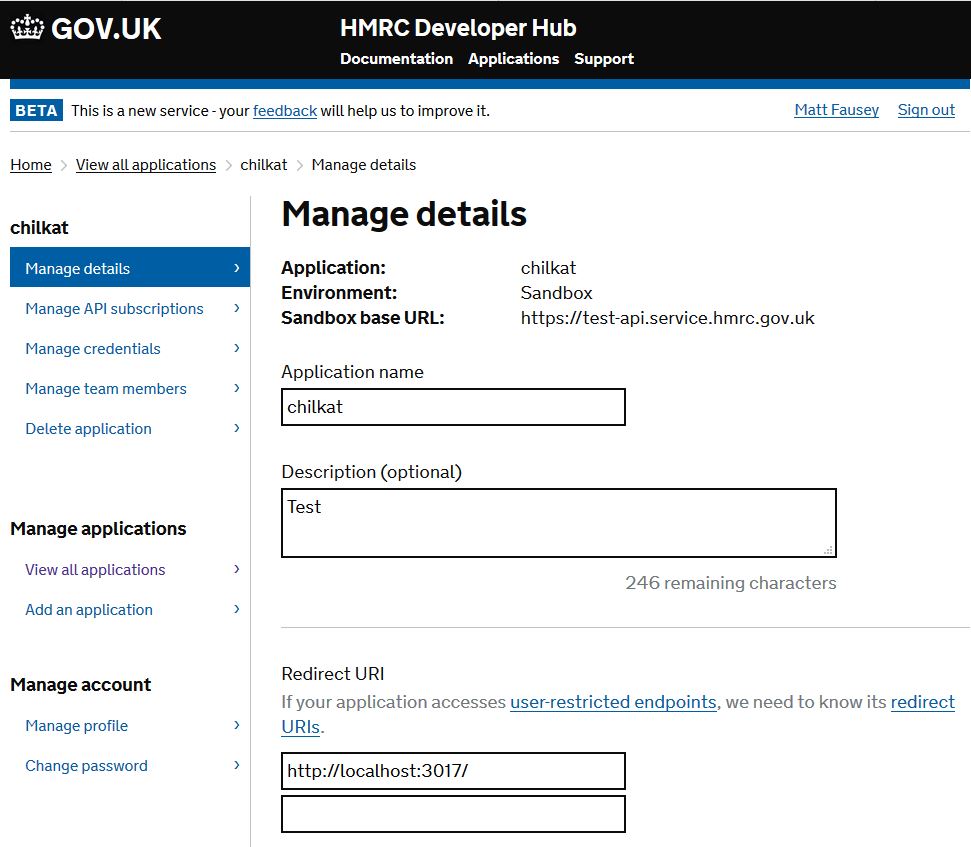
    //  Important: Make sure the callback URI in your HMRC developer app
    //  is exactly "http://localhost:3017/".  Don't forget the ending "/" char.
    //  The callback URL would look like "http://localhost:3017/" if the port number is 3017.

    //  IMPORTANT: Don't forget to setup your HMRC application to use the Redirect URI "http://localhost:3017/" as shown
    //  here: Configure Redirect URI for HMRC application
    oauth2.listenPort = 3017

    oauth2.authorizationEndpoint = "https://test-api.service.hmrc.gov.uk/oauth/authorize"
    oauth2.tokenEndpoint = "https://test-api.service.hmrc.gov.uk/oauth/token"

    //  Replace with your actual client ID
    oauth2.clientId = "HMRC-CLIENT-ID"

    //  The scopes are documented in the HMRC reference documentation for each API.
    //  This example gets a read/write access token for the HMRC MTD VAT API.
    oauth2.scope = "read:vat write:vat"

    //  Begin the OAuth2 Authorization code flow.  This returns a URL that should be loaded in a browser.
    var url: String? = oauth2.startAuth()
    if oauth2.lastMethodSuccess != true {
        print("\(oauth2.lastErrorText!)")
        return
    }

    //  Launch the default browser on the system and navigate to the url.
    //  The LaunchBrowser method was added in Chilkat v10.1.2.
    success = oauth2.launchBrowser(url: url)
    if success == false {
        print("\(oauth2.lastErrorText!)")
        return
    }

    //  Wait for the user to approve or deny authorization in the browser.
    var numMsWaited: Int = 0
    while (numMsWaited < 90000) && (oauth2.authFlowState.intValue < 3) {
        oauth2.sleepMs(millisec: 100)
        numMsWaited = numMsWaited + 100
    }

    //  If the browser does not respond within the specified time, AuthFlowState will be:
    //
    //  1: Waiting for Redirect – The OAuth2 background thread is waiting for the browser's redirect request.
    //  2: Waiting for Final Response – The thread is awaiting the final access token response.
    //  In either case, cancel the background task initiated by StartAuth.

    if oauth2.authFlowState.intValue < 3 {
        oauth2.cancel()
        print("No response from the browser!")
        return
    }

    //  Check AuthFlowState to determine if authorization was granted, denied, or failed:
    //
    //  3: Success – OAuth2 flow completed, the background thread exited, and the successful response is in AccessTokenResponse.
    //  4: Access Denied – OAuth2 flow completed, the background thread exited, and the error response is in AccessTokenResponse.
    //  5: Failure – OAuth2 flow failed before completion, the background thread exited, and error details are in FailureInfo.

    if oauth2.authFlowState.intValue == 5 {
        print("OAuth2 failed to complete.")
        print("\(oauth2.failureInfo!)")
        return
    }

    if oauth2.authFlowState.intValue == 4 {
        print("OAuth2 authorization was denied.")
        print("\(oauth2.accessTokenResponse!)")
        return
    }

    if oauth2.authFlowState.intValue != 3 {
        print("Unexpected AuthFlowState:\(oauth2.authFlowState.intValue)")
        return
    }

    print("OAuth2 authorization granted!")
    print("Access Token = \(oauth2.accessToken!)")

    //  Get the full JSON response:
    let json = CkoJsonObject()!
    json.load(json: oauth2.accessTokenResponse)
    json.emitCompact = false
    print("\(json.emit()!)")

    //  The JSON response looks like this:

    //  {
    //    "token_type": "Bearer",
    //    "scope": "user_impersonation",
    //    "expires_in": "3599",
    //    "ext_expires_in": "0",
    //    "expires_on": "1524783438",
    //    "not_before": "1524779538",
    //    "resource": "https://mydomain.api.crm.dynamics.com",
    //    "access_token": "...",
    //    "refresh_token": "...",
    //    "id_token": "..."
    //  }

    //  If an "expires_on" member does not exist, then add the JSON member by
    //  getting the current system date/time and adding the "expires_in" seconds.
    //  This way we'll know when the token expires.
    if json.hasMember(jsonPath: "expires_on") != true {
        let dtExpire = CkoDateTime()!
        dtExpire.setFromCurrentSystemTime()
        dtExpire.addSeconds(numSeconds: json.int(of: "expires_in").intValue)
        json.appendString(name: "expires_on", value: dtExpire.get(asUnixTimeStr: false))
    }

    print("\(json.emit()!)")

    //  Save the JSON to a file for future requests.
    let fac = CkoFileAccess()!
    fac.writeEntireTextFile(path: "qa_data/tokens/hmrc.json", fileData: json.emit(), charset: "utf-8", includePreamble: false)

}