SQL Server Requires Chilkat v11.0.0+
SQL Server
ETrade OAuth1 Authorization (3-legged) Step 1
See more ETrade Examples
Demonstrates the first step in 3-legged OAuth1 authorization for the ETrade REST API. This example sends an HTTP request to the "request token URL" to get a request token that begins the OAuth1 process. (See https://apisb.etrade.com/docs/api/authorization/request_token.html )This example uses the sandbox request token URL. The live request token URL would be "https://api.etrade.com/oauth/request_token".
Chilkat SQL Server Downloads
-- Important: See this note about string length limitations for strings returned by sp_OAMethod calls.
--
CREATE PROCEDURE ChilkatSample
AS
BEGIN
DECLARE @hr int
DECLARE @sTmp0 nvarchar(4000)
DECLARE @success int
SELECT @success = 0
-- This requires the Chilkat API to have been previously unlocked.
-- See Global Unlock Sample for sample code.
DECLARE @consumerKey nvarchar(4000)
SELECT @consumerKey = 'ETRADE_CONSUMER_KEY'
DECLARE @consumerSecret nvarchar(4000)
SELECT @consumerSecret = 'ETRADE_CONSUMER_SECRET'
-- Note: This example uses the sandbox request token URL.
-- The live Get Request Token Request URL is:
-- https://api.etrade.com/oauth/request_token
-- This example will use the Sandbox Token Request URL:
DECLARE @requestTokenUrl nvarchar(4000)
SELECT @requestTokenUrl = 'https://apisb.etrade.com/oauth/request_token'
DECLARE @http int
EXEC @hr = sp_OACreate 'Chilkat.Http', @http OUT
IF @hr <> 0
BEGIN
PRINT 'Failed to create ActiveX component'
RETURN
END
SELECT @success = 1
EXEC sp_OASetProperty @http, 'OAuth1', 1
EXEC sp_OASetProperty @http, 'OAuthConsumerKey', @consumerKey
EXEC sp_OASetProperty @http, 'OAuthConsumerSecret', @consumerSecret
EXEC sp_OASetProperty @http, 'OAuthCallback', 'oob'
DECLARE @resp int
EXEC @hr = sp_OACreate 'Chilkat.HttpResponse', @resp OUT
EXEC sp_OAMethod @http, 'HttpNoBody', @success OUT, 'GET', @requestTokenUrl, @resp
IF @success = 0
BEGIN
EXEC sp_OAGetProperty @http, 'LastErrorText', @sTmp0 OUT
PRINT @sTmp0
EXEC @hr = sp_OADestroy @http
EXEC @hr = sp_OADestroy @resp
RETURN
END
-- If successful, the resp.BodyStr contains something like this:
-- oauth_token=-Wa_KwAAAAAAxfEPAAABV8Qar4Q&oauth_token_secret=OfHY4tZBX2HK4f7yIw76WYdvnl99MVGB&oauth_callback_confirmed=true
EXEC sp_OAGetProperty @resp, 'BodyStr', @sTmp0 OUT
PRINT @sTmp0
DECLARE @hashTab int
EXEC @hr = sp_OACreate 'Chilkat.Hashtable', @hashTab OUT
EXEC sp_OAGetProperty @resp, 'BodyStr', @sTmp0 OUT
EXEC sp_OAMethod @hashTab, 'AddQueryParams', @success OUT, @sTmp0
DECLARE @requestToken nvarchar(4000)
EXEC sp_OAMethod @hashTab, 'LookupStr', @requestToken OUT, 'oauth_token'
DECLARE @requestTokenSecret nvarchar(4000)
EXEC sp_OAMethod @hashTab, 'LookupStr', @requestTokenSecret OUT, 'oauth_token_secret'
EXEC sp_OASetProperty @http, 'OAuthTokenSecret', @requestTokenSecret
PRINT 'oauth_token = ' + @requestToken
PRINT 'oauth_token_secret = ' + @requestTokenSecret
-- Save this request token for the next step..
DECLARE @json int
EXEC @hr = sp_OACreate 'Chilkat.JsonObject', @json OUT
EXEC sp_OAMethod @json, 'AppendString', @success OUT, 'oauth_token', @requestToken
EXEC sp_OAMethod @json, 'AppendString', @success OUT, 'oauth_token_secret', @requestTokenSecret
DECLARE @fac int
EXEC @hr = sp_OACreate 'Chilkat.FileAccess', @fac OUT
EXEC sp_OAMethod @json, 'Emit', @sTmp0 OUT
EXEC sp_OAMethod @fac, 'WriteEntireTextFile', @success OUT, 'qa_data/tokens/etrade_request_token.json', @sTmp0, 'utf-8', 0
-- ---------------------------------------------------------------------------
-- The next step is to form a URL to send to the authorizeUrl
-- This is an HTTP GET that we load into a popup browser.
DECLARE @authorizeUrl nvarchar(4000)
SELECT @authorizeUrl = 'https://us.etrade.com/e/t/etws/authorize'
DECLARE @sbUrlForBrowser int
EXEC @hr = sp_OACreate 'Chilkat.StringBuilder', @sbUrlForBrowser OUT
EXEC sp_OAMethod @sbUrlForBrowser, 'Append', @success OUT, @authorizeUrl
EXEC sp_OAMethod @sbUrlForBrowser, 'Append', @success OUT, '?key='
EXEC sp_OAMethod @sbUrlForBrowser, 'Append', @success OUT, @consumerKey
EXEC sp_OAMethod @sbUrlForBrowser, 'Append', @success OUT, '&token='
EXEC sp_OAMethod @sbUrlForBrowser, 'Append', @success OUT, @requestToken
DECLARE @url nvarchar(4000)
EXEC sp_OAMethod @sbUrlForBrowser, 'GetAsString', @url OUT
-- Launch the system's default browser navigated to the URL.
DECLARE @oauth2 int
EXEC @hr = sp_OACreate 'Chilkat.OAuth2', @oauth2 OUT
EXEC sp_OAMethod @oauth2, 'LaunchBrowser', @success OUT, @url
IF @success = 0
BEGIN
EXEC sp_OAGetProperty @oauth2, 'LastErrorText', @sTmp0 OUT
PRINT @sTmp0
EXEC @hr = sp_OADestroy @http
EXEC @hr = sp_OADestroy @resp
EXEC @hr = sp_OADestroy @hashTab
EXEC @hr = sp_OADestroy @json
EXEC @hr = sp_OADestroy @fac
EXEC @hr = sp_OADestroy @sbUrlForBrowser
EXEC @hr = sp_OADestroy @oauth2
RETURN
END
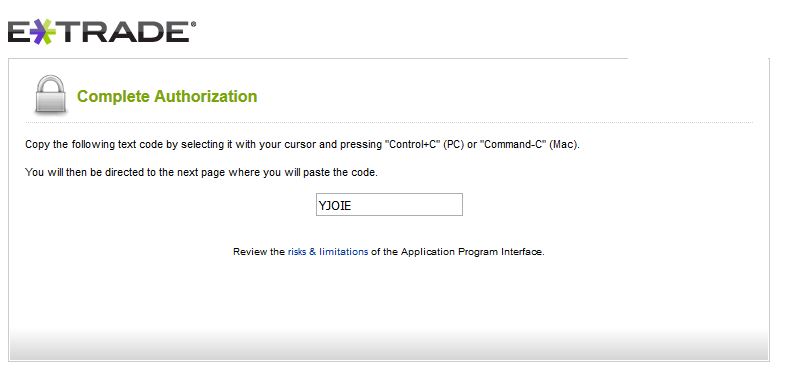
-- The ETrade account owner will login and grant access to the application.
-- A short verifier code will be displayed (as shown below), and this must be copy-and-pasted
-- into the next step to Complete the 3-legged OAuth1 Authorization
-- Note: The browser will NOT automatically direct you to the next page.
-- You should copy the verifier code, close the browser, and then paste the verifier
-- code into your application.
--  EXEC @hr = sp_OADestroy @http
EXEC @hr = sp_OADestroy @resp
EXEC @hr = sp_OADestroy @hashTab
EXEC @hr = sp_OADestroy @json
EXEC @hr = sp_OADestroy @fac
EXEC @hr = sp_OADestroy @sbUrlForBrowser
EXEC @hr = sp_OADestroy @oauth2
END
GO
EXEC @hr = sp_OADestroy @http
EXEC @hr = sp_OADestroy @resp
EXEC @hr = sp_OADestroy @hashTab
EXEC @hr = sp_OADestroy @json
EXEC @hr = sp_OADestroy @fac
EXEC @hr = sp_OADestroy @sbUrlForBrowser
EXEC @hr = sp_OADestroy @oauth2
END
GO