Ruby
Ruby
AWS Secrets Manager - Create or Update a JSON Secret
See more Secrets Examples
Demonstrates how to create or update a JSON secret stored in the AWS Secrets Manager.Note: This example requires Chilkat v10.1.0 or later.
Chilkat Ruby Downloads
require 'chilkat'

success = false

# This example requires the Chilkat API to have been previously unlocked.
# See Global Unlock Sample for sample code.

# The bootstrap secret will contain the following information:

# AWS Region
# AWS Access Key
# AWS Secret Key

# See following examples for setting up a bootstrap secret in memory,
# or in the local manager (Windows Credentials Manager or Apple Keychain)
# Setup Bootstrap Secret in Local Manager
# Setup Bootstrap Secret in Memory
bootstrap = Chilkat::CkSecrets.new()

# Set the location of the bootstrap secret.
# Can be "local_manager" or "memory", depending on how you setup the bootstrap secret.
# ---------------------------------------------------------------------------------------------
# If your operating system is NOT Windows or MacOS/iOS, then change "local_manager" to "memory"
# You can also, if desired, use "memory" on Windows and MacOS/iOS if your bootstrap secret was previously setup in memory.
# ---------------------------------------------------------------------------------------------
bootstrap.put_Location("local_manager")

# Specify the bootstrap secret to be used.
bsId = Chilkat::CkJsonObject.new()
bsId.UpdateString("appName","AWS")
bsId.UpdateString("service","Example")
bsId.UpdateString("username","Joe")

# ----------------------------------------------------
secrets = Chilkat::CkSecrets.new()

# Setup for the AWS Secrets Manager
secrets.put_Location("aws_secrets_manager")
success = secrets.SetBootstrapSecret(bsId,bootstrap)
if (success == false)
    print secrets.lastErrorText() + "\n";
    exit
end

# ----
# Specify the name of the secret.
# service and username are required.
# appName and domain are optional.
# Note: The values are arbitrary and can be anything you want.
json = Chilkat::CkJsonObject.new()
json.UpdateString("appName","MyApp")
json.UpdateString("service","OAuth2")
json.UpdateString("domain","onedrive")
json.UpdateString("username","matt")

# Get the secret to be stored.
jsonSecret = Chilkat::CkJsonObject.new()
success = jsonSecret.LoadFile("qa_data/tokens/oneDrive.json")
if (success == false)
    print jsonSecret.lastErrorText() + "\n";
    exit
end

# Create or update the secret.
success = secrets.UpdateSecretJson(json,jsonSecret)
if (success == false)
    print secrets.lastErrorText() + "\n";
    exit
end

print "Success." + "\n";

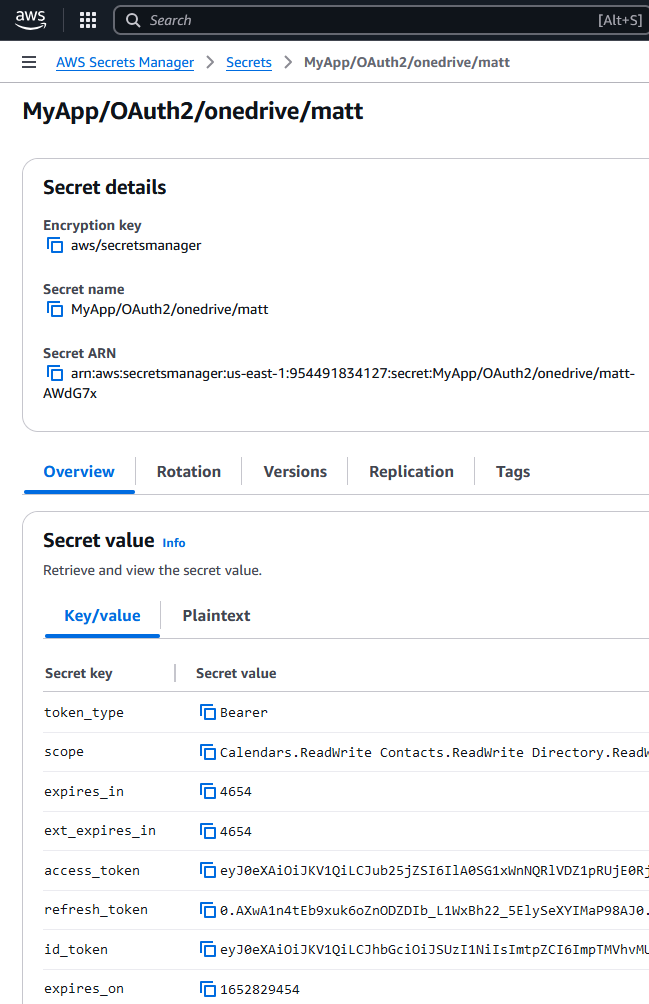
# Here you can see the secret that was created:

#