React Native Requires Chilkat v11.0.0+
React Native
ETrade OAuth1 Authorization (3-legged) Step 1
See more ETrade Examples
Demonstrates the first step in 3-legged OAuth1 authorization for the ETrade REST API. This example sends an HTTP request to the "request token URL" to get a request token that begins the OAuth1 process. (See https://apisb.etrade.com/docs/api/authorization/request_token.html )This example uses the sandbox request token URL. The live request token URL would be "https://api.etrade.com/oauth/request_token".
Chilkat React Native Downloads
import { FileAccess, Hashtable, Http, HttpResponse, JsonObject, OAuth2, StringBuilder } from '@chilkat/react-native'
async function chilkatExample() {
// This requires the Chilkat API to have been previously unlocked.
// See Global Unlock Sample for sample code.
const consumerKey = 'ETRADE_CONSUMER_KEY';
const consumerSecret = 'ETRADE_CONSUMER_SECRET';
// Note: This example uses the sandbox request token URL.
// The live Get Request Token Request URL is:
// https://api.etrade.com/oauth/request_token
// This example will use the Sandbox Token Request URL:
const requestTokenUrl = 'https://apisb.etrade.com/oauth/request_token';
const http = new Http();
http.oAuth1 = true;
http.oAuthConsumerKey = consumerKey;
http.oAuthConsumerSecret = consumerSecret;
http.oAuthCallback = 'oob';
const resp = new HttpResponse();
try {
await http.httpNoBodyAsync('GET', requestTokenUrl, resp);
} catch {
console.log(http.lastErrorText);
return;
}
// If successful, the resp.BodyStr contains something like this:
// oauth_token=-Wa_KwAAAAAAxfEPAAABV8Qar4Q&oauth_token_secret=OfHY4tZBX2HK4f7yIw76WYdvnl99MVGB&oauth_callback_confirmed=true
console.log(resp.bodyStr);
const hashTab = new Hashtable();
hashTab.addQueryParams(resp.bodyStr);
const requestToken = hashTab.lookupStr('oauth_token');
const requestTokenSecret = hashTab.lookupStr('oauth_token_secret');
http.oAuthTokenSecret = requestTokenSecret;
console.log(`oauth_token = ${requestToken}`);
console.log(`oauth_token_secret = ${requestTokenSecret}`);
// Save this request token for the next step..
const json = new JsonObject();
json.appendString('oauth_token', requestToken);
json.appendString('oauth_token_secret', requestTokenSecret);
const fac = new FileAccess();
fac.writeEntireTextFile('qa_data/tokens/etrade_request_token.json', json.emit(), 'utf-8', false);
// ---------------------------------------------------------------------------
// The next step is to form a URL to send to the authorizeUrl
// This is an HTTP GET that we load into a popup browser.
const authorizeUrl = 'https://us.etrade.com/e/t/etws/authorize';
const sbUrlForBrowser = new StringBuilder();
sbUrlForBrowser.append(authorizeUrl);
sbUrlForBrowser.append('?key=');
sbUrlForBrowser.append(consumerKey);
sbUrlForBrowser.append('&token=');
sbUrlForBrowser.append(requestToken);
const url = sbUrlForBrowser.getAsString();
// Launch the system's default browser navigated to the URL.
const oauth2 = new OAuth2();
try {
oauth2.launchBrowser(url);
} catch {
console.log(oauth2.lastErrorText);
return;
}
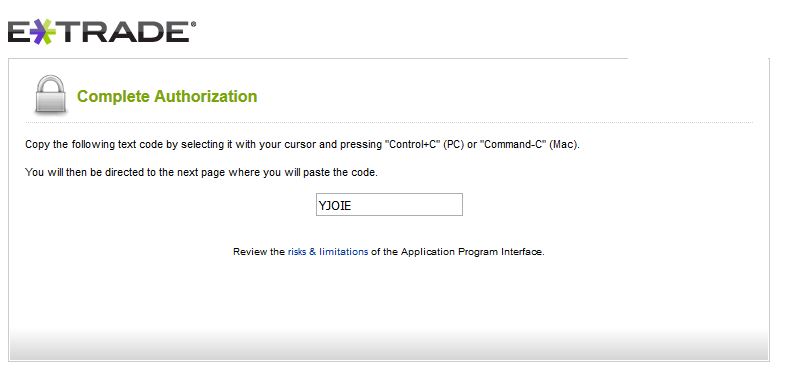
// The ETrade account owner will login and grant access to the application.
// A short verifier code will be displayed (as shown below), and this must be copy-and-pasted
// into the next step to Complete the 3-legged OAuth1 Authorization
// Note: The browser will NOT automatically direct you to the next page.
// You should copy the verifier code, close the browser, and then paste the verifier
// code into your application.
//  }
}