React Native
React Native
Sign XML (XAdES) in the Cloud using Azure Key Vault
See more Signing in the Cloud Examples
Demonstrates how to sign XML using Azure Key Vault. The signing of the hash happens in the Cloud on Azure Key Vault. Everything else involving the updating the XML to add the signature happens locally within Chilkat.Note: This example requires Chilkat v9.5.0.96 or greater.
Chilkat React Native Downloads
import { Cert, JsonObject, StringBuilder, XmlDSigGen } from '@chilkat/react-native'
async function chilkatExample() {
// This example requires the Chilkat API to have been previously unlocked.
// See Global Unlock Sample for sample code.
// Create the XML to be signed.
const sbXml = new StringBuilder();
const bCrlf = true;
sbXml.appendLine('<?xml version="1.0" encoding="UTF-8" standalone="no" ?>', bCrlf);
sbXml.appendLine('<SOAP-ENV:Envelope xmlns:SOAP-ENV="http://schemas.xmlsoap.org/soap/envelope/">', bCrlf);
sbXml.appendLine(' <SOAP-ENV:Header>', bCrlf);
sbXml.appendLine(' <wsse:Security xmlns:wsse="http://docs.oasis-open.org/wss/2004/01/oasis-200401-wss-wssecurity-secext-1.0.xsd" SOAP-ENV:mustUnderstand="1"></wsse:Security>', bCrlf);
sbXml.appendLine(' </SOAP-ENV:Header>', bCrlf);
sbXml.appendLine(' <SOAP-ENV:Body xmlns:SOAP-SEC="http://schemas.xmlsoap.org/soap/security/2000-12" SOAP-SEC:id="Body">', bCrlf);
sbXml.appendLine(' <z:FooBar xmlns:z="http://example.com" />', bCrlf);
sbXml.appendLine(' </SOAP-ENV:Body>', bCrlf);
sbXml.appendLine('</SOAP-ENV:Envelope>', bCrlf);
// Load the certificate used for signing. The certificate's private key is stored in
// the Azure Key Vault.
// However, we still need the certificate locally (without private key).
const cert = new Cert();
try {
cert.loadFromFile('qa_data/certs/myCert.cer');
} catch {
console.log(cert.lastErrorText);
return;
}
// Here's a screenshot of our certificate with private key on Azure Key Vault:
// 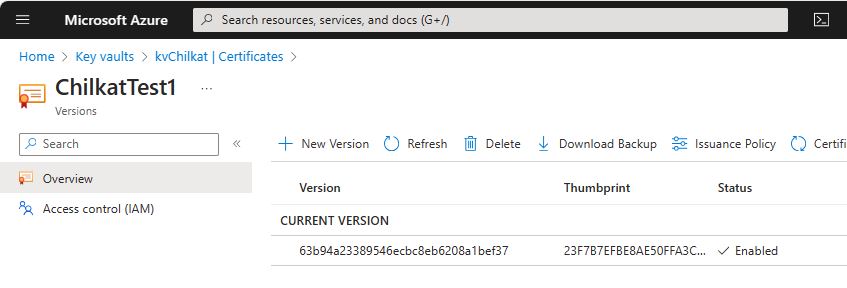 // To sign using the Azure Key Vault,
// add the following lines of code to specify your authentication credentials,
// and the name of the certificate w/ private key on the Azure server to be used.
const jsonAzure = new JsonObject();
// Set the "service" equal to "azure_keyvault" to tell Chilkat to use Azure Key Vault for signing.
jsonAzure.updateString('service', 'azure_keyvault');
jsonAzure.updateString('client_id', 'APP_ID');
jsonAzure.updateString('client_secret', 'APP_PASSWORD');
jsonAzure.updateString('tenant_id', 'TENANT_ID');
// In the above screenshot, our vault name is "kvchilkat". You will use your vault name.
jsonAzure.updateString('vault_name', 'VAULT_NAME');
// In the above screenshot, our cert name is "ChilkatTest1". You will use your cert name.
jsonAzure.updateString('cert_name', 'CERT_NAME');
// In the above screenshot, our cert version is "63b94a23389546ecbc8eb6208a1bef37". You will use your cert version.
jsonAzure.updateString('cert_version', 'CERT_VERSION');
await cert.setCloudSignerAsync(jsonAzure);
// Prepare for signing...
const gen = new XmlDSigGen();
// Indicate where the Signature will be inserted.
gen.sigLocation = 'SOAP-ENV:Envelope|SOAP-ENV:Header|wsse:Security';
// Add a reference to the fragment of the XML to be signed.
// Note: "Body" refers to the XML element having an "id" equal to "Body", where "id" is case insensitive
// and where any namespace might qualify the attribute. In this case, the SOAP-ENV:Body fragment is signed
// NOT because the tag = "Body", but because it has SOAP-SEC:id="Body"
gen.addSameDocRef('Body', 'sha1', 'EXCL_C14N', '', '');
// (You can read about the SignedInfoPrefixList in the online reference documentation. It's optional..)
gen.signedInfoPrefixList = 'wsse SOAP-ENV';
gen.keyInfoType = 'X509Data';
gen.x509Type = 'IssuerSerial';
const bUsePrivateKey = true;
try {
gen.setX509Cert(cert, bUsePrivateKey);
} catch {
console.log(gen.lastErrorText);
return;
}
// Everything's specified. Now create and insert the Signature
// (The actual signing of the hash will happen on the Aruba server.)
try {
await gen.createXmlDSigSbAsync(sbXml);
} catch {
console.log(gen.lastErrorText);
return;
}
// Examine the XML with the digital signature inserted
console.log(sbXml.getAsString());
// --------------------------------------------------------------------------------
// Also see Chilkat's Online WSDL Code Generator
// to generate code and SOAP Request and Response XML for each operation in a WSDL.
// --------------------------------------------------------------------------------
}
// To sign using the Azure Key Vault,
// add the following lines of code to specify your authentication credentials,
// and the name of the certificate w/ private key on the Azure server to be used.
const jsonAzure = new JsonObject();
// Set the "service" equal to "azure_keyvault" to tell Chilkat to use Azure Key Vault for signing.
jsonAzure.updateString('service', 'azure_keyvault');
jsonAzure.updateString('client_id', 'APP_ID');
jsonAzure.updateString('client_secret', 'APP_PASSWORD');
jsonAzure.updateString('tenant_id', 'TENANT_ID');
// In the above screenshot, our vault name is "kvchilkat". You will use your vault name.
jsonAzure.updateString('vault_name', 'VAULT_NAME');
// In the above screenshot, our cert name is "ChilkatTest1". You will use your cert name.
jsonAzure.updateString('cert_name', 'CERT_NAME');
// In the above screenshot, our cert version is "63b94a23389546ecbc8eb6208a1bef37". You will use your cert version.
jsonAzure.updateString('cert_version', 'CERT_VERSION');
await cert.setCloudSignerAsync(jsonAzure);
// Prepare for signing...
const gen = new XmlDSigGen();
// Indicate where the Signature will be inserted.
gen.sigLocation = 'SOAP-ENV:Envelope|SOAP-ENV:Header|wsse:Security';
// Add a reference to the fragment of the XML to be signed.
// Note: "Body" refers to the XML element having an "id" equal to "Body", where "id" is case insensitive
// and where any namespace might qualify the attribute. In this case, the SOAP-ENV:Body fragment is signed
// NOT because the tag = "Body", but because it has SOAP-SEC:id="Body"
gen.addSameDocRef('Body', 'sha1', 'EXCL_C14N', '', '');
// (You can read about the SignedInfoPrefixList in the online reference documentation. It's optional..)
gen.signedInfoPrefixList = 'wsse SOAP-ENV';
gen.keyInfoType = 'X509Data';
gen.x509Type = 'IssuerSerial';
const bUsePrivateKey = true;
try {
gen.setX509Cert(cert, bUsePrivateKey);
} catch {
console.log(gen.lastErrorText);
return;
}
// Everything's specified. Now create and insert the Signature
// (The actual signing of the hash will happen on the Aruba server.)
try {
await gen.createXmlDSigSbAsync(sbXml);
} catch {
console.log(gen.lastErrorText);
return;
}
// Examine the XML with the digital signature inserted
console.log(sbXml.getAsString());
// --------------------------------------------------------------------------------
// Also see Chilkat's Online WSDL Code Generator
// to generate code and SOAP Request and Response XML for each operation in a WSDL.
// --------------------------------------------------------------------------------
}