React Native
React Native
Load PEM ASN.1 and Convert to XML
See more ASN.1 Examples
Loads a CSR (Certificate Signing Request) from PEM and converts the ASN.1 to XML format. The purpose of this example is to compare the ASN.1 format with the corresponding XML. One means for accessing a particular piece of information within any ASN.1 document is to convert to XML, and then use any XML API to extract the required data.The PEM used in this example may be downloaded here: Sample CSR PEM
It contains ASN.1 with this format:
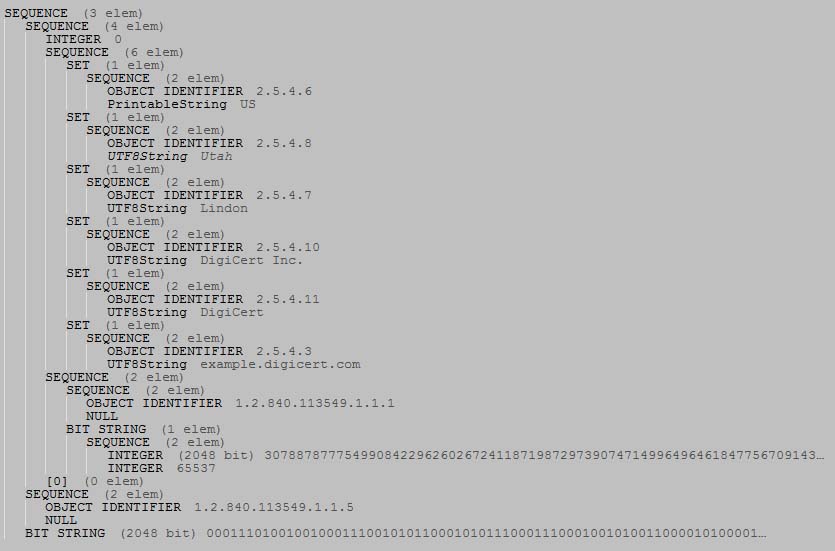
After converting, the XML looks like this:
<?xml version="1.0" encoding="utf-8" ?>
<sequence>
    <sequence>
        <int>00</int>
        <sequence>
            <set>
                <sequence>
                    <oid>2.5.4.6</oid>
                    <printable>US</printable>
                </sequence>
            </set>
            <set>
                <sequence>
                    <oid>2.5.4.8</oid>
                    <utf8>Utah</utf8>
                </sequence>
            </set>
            <set>
                <sequence>
                    <oid>2.5.4.7</oid>
                    <utf8>Lindon</utf8>
                </sequence>
            </set>
            <set>
                <sequence>
                    <oid>2.5.4.10</oid>
                    <utf8>DigiCert Inc.</utf8>
                </sequence>
            </set>
            <set>
                <sequence>
                    <oid>2.5.4.11</oid>
                    <utf8>DigiCert</utf8>
                </sequence>
            </set>
            <set>
                <sequence>
                    <oid>2.5.4.3</oid>
                    <utf8>example.digicert.com</utf8>
                </sequence>
            </set>
        </sequence>
        <sequence>
            <sequence>
                <oid>1.2.840.113549.1.1.1</oid>
                <null />
            </sequence>
            <bits n="2160">3082010A0282010... </bits>
        </sequence>
        <contextSpecific tag="0" constructed="1" />
    </sequence>
    <sequence>
        <oid>1.2.840.113549.1.1.5</oid>
        <null />
    </sequence>
    <bits n="2048">1D2472B15C7129850E6...  </bits>
</sequence>
Chilkat React Native Downloads
import { Asn, Pem, Xml } from '@chilkat/react-native'

function chilkatExample() {
  // This example assumes the Chilkat API to have been previously unlocked.
  // See Global Unlock Sample for sample code.

  const pem = new Pem();

  // Load the PEM file.  The password is ignored because it is not an encrypted PEM.
  const password = 'notRequired';
  pem.loadPemFile('qa_data/asn/sampleCsr.pem', password);

  // Get the CSR in base64 format:
  const itemType = 'csr';
  const itemSubType = '';
  const encoding = 'base64';
  const index = 0;
  const csrBase64 = pem.getEncodedItem(itemType, itemSubType, encoding, index);

  // Load the CSR base64 string into the ASN object
  const asnRoot = new Asn();

  try {
    asnRoot.loadEncoded(csrBase64, 'base64');
  } catch {
    console.log(asnRoot.lastErrorText);
    return;
  }

  // Get the ASN.1 in (Chilkat's) XML format:
  let asnXml = asnRoot.asnToXml();

  // The XML returned by AsnToXml is one long difficult-to-read string
  // with no linebreaks.  It is meant to be compact.
  // To get the XML in pretty, human-readable, indented form,
  // load into the Chilkat XML object an then retrieve:
  const xmlObj = new Xml();
  xmlObj.loadXml(asnXml);
  asnXml = xmlObj.getXml();

  console.log(asnXml);
}