PureBasic
PureBasic
Sign PDF in the Cloud using AWS KMS
See more Signing in the Cloud Examples
Demonstrates how to sign a PDF using the AWS Key Management Service. The signing of the hash happens in the Cloud on AWS KMS. Everything else involving the updating the PDF to add the signature happens locally within Chilkat.Chilkat PureBasic Downloads
IncludeFile "CkCert.pb"
IncludeFile "CkJsonObject.pb"
IncludeFile "CkPdf.pb"
Procedure ChilkatExample()
success.i = 0
; This example requires the Chilkat API to have been previously unlocked.
; See Global Unlock Sample for sample code.
pdf.i = CkPdf::ckCreate()
If pdf.i = 0
Debug "Failed to create object."
ProcedureReturn
EndIf
; Load a PDF to be signed.
success = CkPdf::ckLoadFile(pdf,"qa_data/pdf/helloWorld.pdf")
If success = 0
Debug CkPdf::ckLastErrorText(pdf)
CkPdf::ckDispose(pdf)
ProcedureReturn
EndIf
; Options for signing are specified in JSON.
json.i = CkJsonObject::ckCreate()
If json.i = 0
Debug "Failed to create object."
ProcedureReturn
EndIf
; Optionally create an LTV-enabled signature
CkJsonObject::ckUpdateBool(json,"ltvOcsp",1)
; Define the appearance of the signature.
CkJsonObject::ckUpdateInt(json,"page",1)
CkJsonObject::ckUpdateString(json,"appearance.y","top")
CkJsonObject::ckUpdateString(json,"appearance.x","left")
CkJsonObject::ckUpdateString(json,"appearance.fontScale","10.0")
CkJsonObject::ckUpdateString(json,"appearance.text[0]","Digitally signed by: cert_cn")
CkJsonObject::ckUpdateString(json,"appearance.text[1]","current_dt")
CkJsonObject::ckUpdateString(json,"appearance.text[2]","This is an LTV-enabled signature.")
; Load the certificate used for signing. The certificate's private key is stored in AWS KMS
; However, we still need the certificate locally (without private key).
cert.i = CkCert::ckCreate()
If cert.i = 0
Debug "Failed to create object."
ProcedureReturn
EndIf
success = CkCert::ckLoadFromFile(cert,"qa_data/certs/myCert.cer")
If success = 0
Debug CkCert::ckLastErrorText(cert)
CkPdf::ckDispose(pdf)
CkJsonObject::ckDispose(json)
CkCert::ckDispose(cert)
ProcedureReturn
EndIf
; Here's a screenshot of our private key AWS KMS:
; 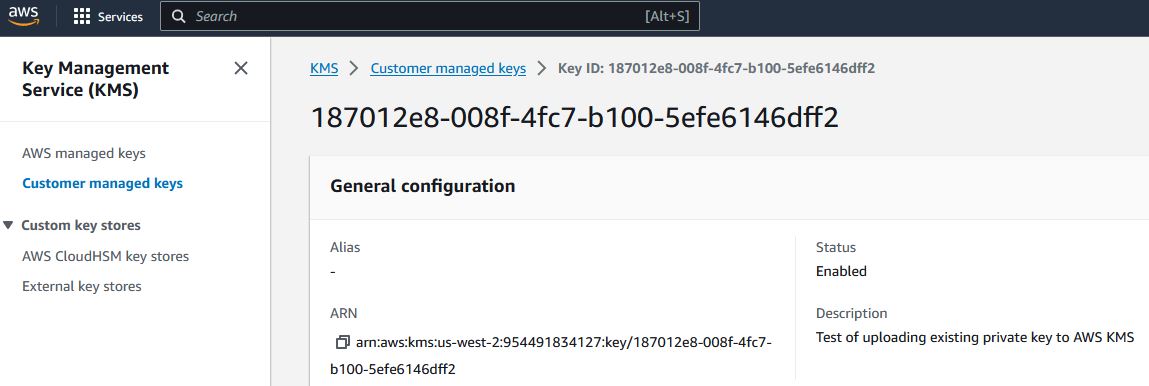 ; To sign using AWS KMS,
; add the following lines of code to specify your AWS authentication credentials,
; and the ID of the KMS private key.
jsonAwsKms.i = CkJsonObject::ckCreate()
If jsonAwsKms.i = 0
Debug "Failed to create object."
ProcedureReturn
EndIf
; Set the "service" equal to "aws_kms" to tell Chilkat to use AWS KMS for signing.
CkJsonObject::ckUpdateString(jsonAwsKms,"service","aws_kms")
CkJsonObject::ckUpdateString(jsonAwsKms,"access_key","ACCESS_KEY")
CkJsonObject::ckUpdateString(jsonAwsKms,"secret_key","SECRET_KEY")
; Make sure to specify the correct region for your case.
CkJsonObject::ckUpdateString(jsonAwsKms,"region","us-west-2")
; In the above screenshot, our key ID is "187012e8-008f-4fc7-b100-5efe6146dff2". You will use your key ID.
CkJsonObject::ckUpdateString(jsonAwsKms,"key_id","187012e8-008f-4fc7-b100-5efe6146dff2")
success = CkCert::ckSetCloudSigner(cert,jsonAwsKms)
; Tell the pdf object to use the certificate for signing (and for AWS KMS to do the actual signing of the hash).
success = CkPdf::ckSetSigningCert(pdf,cert)
If success = 0
Debug CkPdf::ckLastErrorText(pdf)
CkPdf::ckDispose(pdf)
CkJsonObject::ckDispose(json)
CkCert::ckDispose(cert)
CkJsonObject::ckDispose(jsonAwsKms)
ProcedureReturn
EndIf
; Chilkat will build the signed PDF locally, but will (internally) use AWS KMS
; to do the RSA (or EC) sign hash operation.
success = CkPdf::ckSignPdf(pdf,json,"qa_output/hello_ltv_signed.pdf")
If success = 0
Debug CkPdf::ckLastErrorText(pdf)
CkPdf::ckDispose(pdf)
CkJsonObject::ckDispose(json)
CkCert::ckDispose(cert)
CkJsonObject::ckDispose(jsonAwsKms)
ProcedureReturn
EndIf
Debug "PDF Cloud Signing using AWS KMS Successful."
CkPdf::ckDispose(pdf)
CkJsonObject::ckDispose(json)
CkCert::ckDispose(cert)
CkJsonObject::ckDispose(jsonAwsKms)
ProcedureReturn
EndProcedure
; To sign using AWS KMS,
; add the following lines of code to specify your AWS authentication credentials,
; and the ID of the KMS private key.
jsonAwsKms.i = CkJsonObject::ckCreate()
If jsonAwsKms.i = 0
Debug "Failed to create object."
ProcedureReturn
EndIf
; Set the "service" equal to "aws_kms" to tell Chilkat to use AWS KMS for signing.
CkJsonObject::ckUpdateString(jsonAwsKms,"service","aws_kms")
CkJsonObject::ckUpdateString(jsonAwsKms,"access_key","ACCESS_KEY")
CkJsonObject::ckUpdateString(jsonAwsKms,"secret_key","SECRET_KEY")
; Make sure to specify the correct region for your case.
CkJsonObject::ckUpdateString(jsonAwsKms,"region","us-west-2")
; In the above screenshot, our key ID is "187012e8-008f-4fc7-b100-5efe6146dff2". You will use your key ID.
CkJsonObject::ckUpdateString(jsonAwsKms,"key_id","187012e8-008f-4fc7-b100-5efe6146dff2")
success = CkCert::ckSetCloudSigner(cert,jsonAwsKms)
; Tell the pdf object to use the certificate for signing (and for AWS KMS to do the actual signing of the hash).
success = CkPdf::ckSetSigningCert(pdf,cert)
If success = 0
Debug CkPdf::ckLastErrorText(pdf)
CkPdf::ckDispose(pdf)
CkJsonObject::ckDispose(json)
CkCert::ckDispose(cert)
CkJsonObject::ckDispose(jsonAwsKms)
ProcedureReturn
EndIf
; Chilkat will build the signed PDF locally, but will (internally) use AWS KMS
; to do the RSA (or EC) sign hash operation.
success = CkPdf::ckSignPdf(pdf,json,"qa_output/hello_ltv_signed.pdf")
If success = 0
Debug CkPdf::ckLastErrorText(pdf)
CkPdf::ckDispose(pdf)
CkJsonObject::ckDispose(json)
CkCert::ckDispose(cert)
CkJsonObject::ckDispose(jsonAwsKms)
ProcedureReturn
EndIf
Debug "PDF Cloud Signing using AWS KMS Successful."
CkPdf::ckDispose(pdf)
CkJsonObject::ckDispose(json)
CkCert::ckDispose(cert)
CkJsonObject::ckDispose(jsonAwsKms)
ProcedureReturn
EndProcedure