PowerBuilder Requires Chilkat v11.2.0+
PowerBuilder
Markdown to HTML - Full Document, ChatGPT Theme
See more Markdown Examples
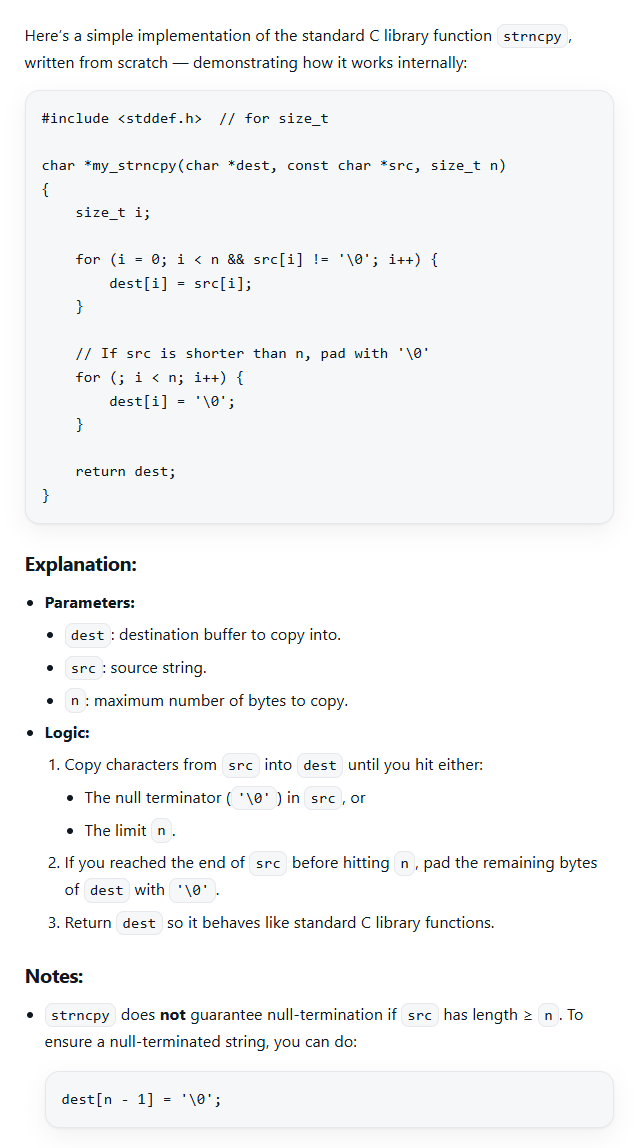
Demonstrates how to convert a complete Markdown document to HTML using the pre-defined "ChatGPT" theme. The "ChatGPT" theme produces a full HTML document including:
- Document Type Declaration (e.g. <!DOCTYPE html>)
- Root Element (e.g., <html> )
- Head Section
- Enclosing <body> and </body> elements
- Closing </html> element
The Head Section includes style definitions that display the HTML in a style similar to the ChatGPT app. (How did Chilkat do it? We simply asked ChatGPT to generate CSS that is similar in style to the HTML displayed in the ChatGPT app.)
Chilkat PowerBuilder Downloads
integer li_rc
long li_Success
oleobject loo_Options
oleobject loo_SbMarkdown
oleobject loo_SbHtml
li_Success = 0
// Select the pre-defined "ChatGPT" style.
loo_Options = create oleobject
li_rc = loo_Options.ConnectToNewObject("Chilkat.JsonObject")
if li_rc < 0 then
destroy loo_Options
MessageBox("Error","Connecting to COM object failed")
return
end if
loo_Options.UpdateString("theme","ChatGPT")
// We can also set an option for the max-width, which by default is "72ch".
loo_Options.UpdateString("ChatGPT.max-width","120ch")
loo_SbMarkdown = create oleobject
li_rc = loo_SbMarkdown.ConnectToNewObject("Chilkat.StringBuilder")
loo_SbHtml = create oleobject
li_rc = loo_SbHtml.ConnectToNewObject("Chilkat.StringBuilder")
li_Success = loo_SbMarkdown.LoadFile("qa_data/markdown/test1.md","utf-8")
if li_Success = 0 then
Write-Debug loo_SbMarkdown.LastErrorText
destroy loo_Options
destroy loo_SbMarkdown
destroy loo_SbHtml
return
end if
loo_SbMarkdown.MarkdownToHtml(loo_Options,loo_SbHtml)
loo_SbHtml.ToCRLF()
Write-Debug loo_SbHtml.GetAsString()
// The sample markdown input for this example is identical to the one at Markdown to HTML - Full Document, Raw, where you can view it.
// Sample HTML output as viewed in a browser:
//
// To add code syntax highlighting, see the example at Markdown to HTML - Full Document, ChatGPT Theme with Code Syntax Highlighting
//  destroy loo_Options
destroy loo_SbMarkdown
destroy loo_SbHtml
destroy loo_Options
destroy loo_SbMarkdown
destroy loo_SbHtml