PHP Extension
PHP Extension
PDF Signatures with Built-in SVG Graphics
See more PDF Signatures Examples
This example demonstrates the built-in SVG graphics that can be applied to the appearance when signing a PDF.Note: This example requires Chilkat v9.5.0.85 or greater.
Chilkat PHP Extension Downloads
<?php
include("chilkat.php");
$success = false;
// This example requires the Chilkat API to have been previously unlocked.
// See Global Unlock Sample for sample code.
$pdf = new CkPdf();
// Load a PDF to be signed.
// The "hello.pdf" is available at https://chilkatsoft.com/hello.pdf
$success = $pdf->LoadFile('qa_data/pdf/hello.pdf');
if ($success == false) {
print $pdf->lastErrorText() . "\n";
exit;
}
// Options for signing are specified in JSON.
$json = new CkJsonObject();
// In most cases, the signingCertificateV2 and signingTime attributes are required.
$json->UpdateInt('signingCertificateV2',1);
$json->UpdateInt('signingTime',1);
// Specify the location/position, scale, and content of the signature's appearance.
$json->UpdateInt('page',1);
$json->UpdateString('appearance.y','top');
$json->UpdateString('appearance.x','left');
$json->UpdateString('appearance.fontScale','10.0');
$json->UpdateString('appearance.text[0]','Digitally signed by: cert_cn');
$json->UpdateString('appearance.text[1]','current_dt');
$json->UpdateString('appearance.text[2]','The crazy brown fox jumps over the lazy dog.');
// In addition to the above, this example adds a built-in SVG graphic to the appearance.
// The built-in SVG graphic is specified by a name, such as "green-check-grey-circle".
// The full list of graphic names and images are shown below.
$json->UpdateString('appearance.image','green-check-grey-circle');
// The graphic can be placed "left", "center", or "right".
// If "center", then the graphic is displayed behind the text.
$json->UpdateString('appearance.imagePlacement','left');
// The graphic's opacity can range from 1 to 100.
// Centered graphics look best with less opacity (50 or less).
// In this example, we'll keep the opacity at 100.
$json->UpdateString('appearance.imageOpacity','100');
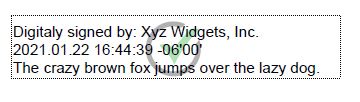
// Here's an example of the signature's appearance if we centered the SVG graphic with an opacity of 40%
//  // Load the signing certificate. (Use your own certificate.)
$cert = new CkCert();
$success = $cert->LoadPfxFile('qa_data/pfx/myPdfSigningCert.pfx','secret');
if ($success == false) {
print $cert->lastErrorText() . "\n";
exit;
}
// Tell the pdf object to use the certificate for signing.
$success = $pdf->SetSigningCert($cert);
if ($success == false) {
print $pdf->lastErrorText() . "\n";
exit;
}
$success = $pdf->SignPdf($json,'qa_output/hello_signed.pdf');
if ($success == false) {
print $pdf->lastErrorText() . "\n";
exit;
}
print 'The PDF has been successfully cryptographically signed.' . "\n";
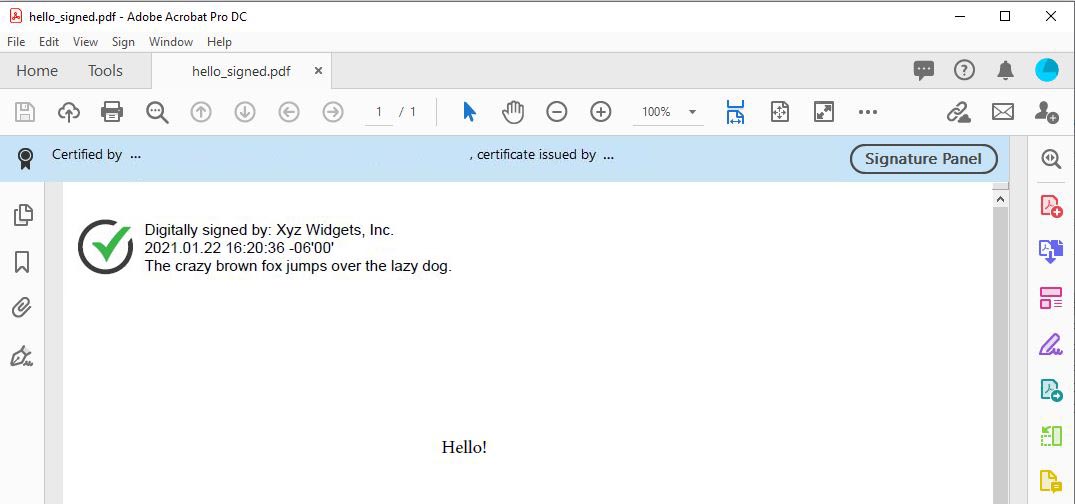
// The appearance of the signature appears in Adobe Acrobat as shown here:
//
// Load the signing certificate. (Use your own certificate.)
$cert = new CkCert();
$success = $cert->LoadPfxFile('qa_data/pfx/myPdfSigningCert.pfx','secret');
if ($success == false) {
print $cert->lastErrorText() . "\n";
exit;
}
// Tell the pdf object to use the certificate for signing.
$success = $pdf->SetSigningCert($cert);
if ($success == false) {
print $pdf->lastErrorText() . "\n";
exit;
}
$success = $pdf->SignPdf($json,'qa_output/hello_signed.pdf');
if ($success == false) {
print $pdf->lastErrorText() . "\n";
exit;
}
print 'The PDF has been successfully cryptographically signed.' . "\n";
// The appearance of the signature appears in Adobe Acrobat as shown here:
//  // The SVG icon graphics are embedded within the Chilkat library,
// and were graciously provided by uxwing - Free SVG Icons
//
// The uxwing licensing terms are reproduced here and can be verified at uxwing licensing
// Icons from uxwing.com are free (see https://uxwing.com/license/)
// - All icons on UXWing free to download, and use personal, commercial projects.
// - Attribution and Credit is NOT required, however, any credit will be much appreciated.
// - There is no limit to the number of times you can use.
// - You may modify the resources according to your requirements.
// The set of SVG names and the corresponding graphics are shown below.
//
// For example, if we specify "green-check-green-circle"
$json->UpdateString('appearance.image','green-check-green-circle');
// We get:
//
// The SVG icon graphics are embedded within the Chilkat library,
// and were graciously provided by uxwing - Free SVG Icons
//
// The uxwing licensing terms are reproduced here and can be verified at uxwing licensing
// Icons from uxwing.com are free (see https://uxwing.com/license/)
// - All icons on UXWing free to download, and use personal, commercial projects.
// - Attribution and Credit is NOT required, however, any credit will be much appreciated.
// - There is no limit to the number of times you can use.
// - You may modify the resources according to your requirements.
// The set of SVG names and the corresponding graphics are shown below.
//
// For example, if we specify "green-check-green-circle"
$json->UpdateString('appearance.image','green-check-green-circle');
// We get:
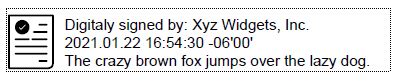
//  // "application-approved"
//
// "application-approved"
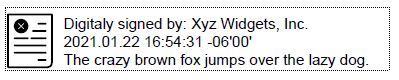
//  // "application-rejected"
//
// "application-rejected"
//  // "document-accepted"
//
// "document-accepted"
//  // "approved"
//
// "approved"
//  // "blue-check-mark"
//
// "blue-check-mark"
//  // "green-check-mark"
//
// "green-check-mark"
//  // "green-check-grey-circle"
//
// "green-check-grey-circle"
//  // "red-x-red-circle"
//
// "red-x-red-circle"
//  // "rejected"
//
// "rejected"
//  // "result-failure"
//
// "result-failure"
// 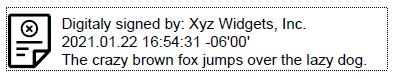 // "result-pass"
//
// "result-pass"
//  // "signature"
//
// "signature"
//  // "document-check"
//
// "document-check"
//  // "document-x"
//
// "document-x"
//  // "red-x-grey-circle"
//
// "red-x-grey-circle"
//  ?>
?>