PHP Extension
PHP Extension
PDF Sign Unsigned Signature Field
See more PDF Signatures Examples
Demonstrates how to sign a PDF's unsigned signature field.Note: This example requires Chilkat v9.5.0.85 or greater.
Chilkat PHP Extension Downloads
<?php
include("chilkat.php");
$success = false;
// This example requires the Chilkat API to have been previously unlocked.
// See Global Unlock Sample for sample code.
$pdf = new CkPdf();
// Load a PDF containing an unsigned signature field.
$success = $pdf->LoadFile('qa_data/pdf/unsigned_sig_field/due_diligence.pdf');
if ($success == false) {
print $pdf->lastErrorText() . "\n";
exit;
}
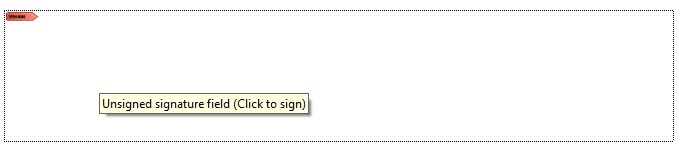
// A PDF with an unsigned signature field appears in Adobe Acrobat as shown below.
// (When the mouse pointer is hovered over the field, a tooltip will likely show a message
// such as "Unsigned signature field (Click to sign)".
// This example code will automatically find the unsigned signature field,
// and signs using your certificate. It automatically sizes the text to the space alotted
// for the signature.
//  // Options for signing are specified in JSON.
$json = new CkJsonObject();
// In most cases, the signingCertificateV2 and signingTime attributes are required.
$json->UpdateInt('signingCertificateV2',1);
$json->UpdateInt('signingTime',1);
// We don't specify the page or a specific location because Chilkat will automatically
// find the unsigned signature field and use its location and size and will scale the
// signatures visual appearance (text + graphics) to the correct size required to fit.
// We only need to indicate the desire to fill the unsigned signature field.
$json->UpdateBool('appearance.fillUnsignedSignatureField',true);
// Starting in Chilkat v9.5.0.90, if a PDF contains multiple unsigned signature fields,
// the field to be signed can be chosen by name:
// To list unsigned signature fields, see this example: List PDF Unsigned Signature Fields
$json->UpdateString('unsignedSignatureField','doctor_signature');
// Note: If the PDF document contains multiple unsigned signature fields, Chilkat will
// sign the 1st one found.
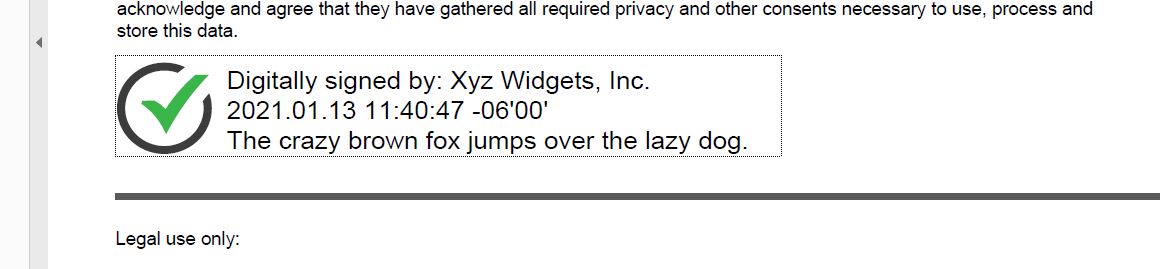
// In this example, the appearance of the digital signature will contain three lines:
// 1) The signing certificate's common name
// 2) The current date/time
// 3) Some arbitrary text.
// The keyword "cert_cn" is replaced with the Certificate's Subject Common Name.
// The keyword "current_dt" is replaced with the current date/time.
// Any number of appearance text lines can be added.
$json->UpdateString('appearance.text[0]','Digitally signed by: cert_cn');
$json->UpdateString('appearance.text[1]','current_dt');
$json->UpdateString('appearance.text[2]','The crazy brown fox jumps over the lazy dog.');
// This signature will include one of the built-in SVG graphics (green-check-grey-circle).
$json->UpdateString('appearance.image','green-check-grey-circle');
$json->UpdateString('appearance.imagePlacement','left');
// Load the signing certificate. (Use your own certificate.)
$cert = new CkCert();
$success = $cert->LoadPfxFile('qa_data/pfx/myPdfSigningCert.pfx','secret');
if ($success == false) {
print $cert->lastErrorText() . "\n";
exit;
}
// Tell the pdf object to use the certificate for signing.
$success = $pdf->SetSigningCert($cert);
if ($success == false) {
print $pdf->lastErrorText() . "\n";
exit;
}
$success = $pdf->SignPdf($json,'qa_output/due_diligence_signed.pdf');
if ($success == false) {
print $pdf->lastErrorText() . "\n";
exit;
}
print 'The PDF has been successfully cryptographically signed.' . "\n";
// The appearance of the signature appears in Adobe Acrobat as shown below.
//
// Options for signing are specified in JSON.
$json = new CkJsonObject();
// In most cases, the signingCertificateV2 and signingTime attributes are required.
$json->UpdateInt('signingCertificateV2',1);
$json->UpdateInt('signingTime',1);
// We don't specify the page or a specific location because Chilkat will automatically
// find the unsigned signature field and use its location and size and will scale the
// signatures visual appearance (text + graphics) to the correct size required to fit.
// We only need to indicate the desire to fill the unsigned signature field.
$json->UpdateBool('appearance.fillUnsignedSignatureField',true);
// Starting in Chilkat v9.5.0.90, if a PDF contains multiple unsigned signature fields,
// the field to be signed can be chosen by name:
// To list unsigned signature fields, see this example: List PDF Unsigned Signature Fields
$json->UpdateString('unsignedSignatureField','doctor_signature');
// Note: If the PDF document contains multiple unsigned signature fields, Chilkat will
// sign the 1st one found.
// In this example, the appearance of the digital signature will contain three lines:
// 1) The signing certificate's common name
// 2) The current date/time
// 3) Some arbitrary text.
// The keyword "cert_cn" is replaced with the Certificate's Subject Common Name.
// The keyword "current_dt" is replaced with the current date/time.
// Any number of appearance text lines can be added.
$json->UpdateString('appearance.text[0]','Digitally signed by: cert_cn');
$json->UpdateString('appearance.text[1]','current_dt');
$json->UpdateString('appearance.text[2]','The crazy brown fox jumps over the lazy dog.');
// This signature will include one of the built-in SVG graphics (green-check-grey-circle).
$json->UpdateString('appearance.image','green-check-grey-circle');
$json->UpdateString('appearance.imagePlacement','left');
// Load the signing certificate. (Use your own certificate.)
$cert = new CkCert();
$success = $cert->LoadPfxFile('qa_data/pfx/myPdfSigningCert.pfx','secret');
if ($success == false) {
print $cert->lastErrorText() . "\n";
exit;
}
// Tell the pdf object to use the certificate for signing.
$success = $pdf->SetSigningCert($cert);
if ($success == false) {
print $pdf->lastErrorText() . "\n";
exit;
}
$success = $pdf->SignPdf($json,'qa_output/due_diligence_signed.pdf');
if ($success == false) {
print $pdf->lastErrorText() . "\n";
exit;
}
print 'The PDF has been successfully cryptographically signed.' . "\n";
// The appearance of the signature appears in Adobe Acrobat as shown below.
//  ?>
?>