PHP Extension
PHP Extension
Sign PDF with Long-Term Validation (LTV Enabled)
See more PDF Signatures Examples
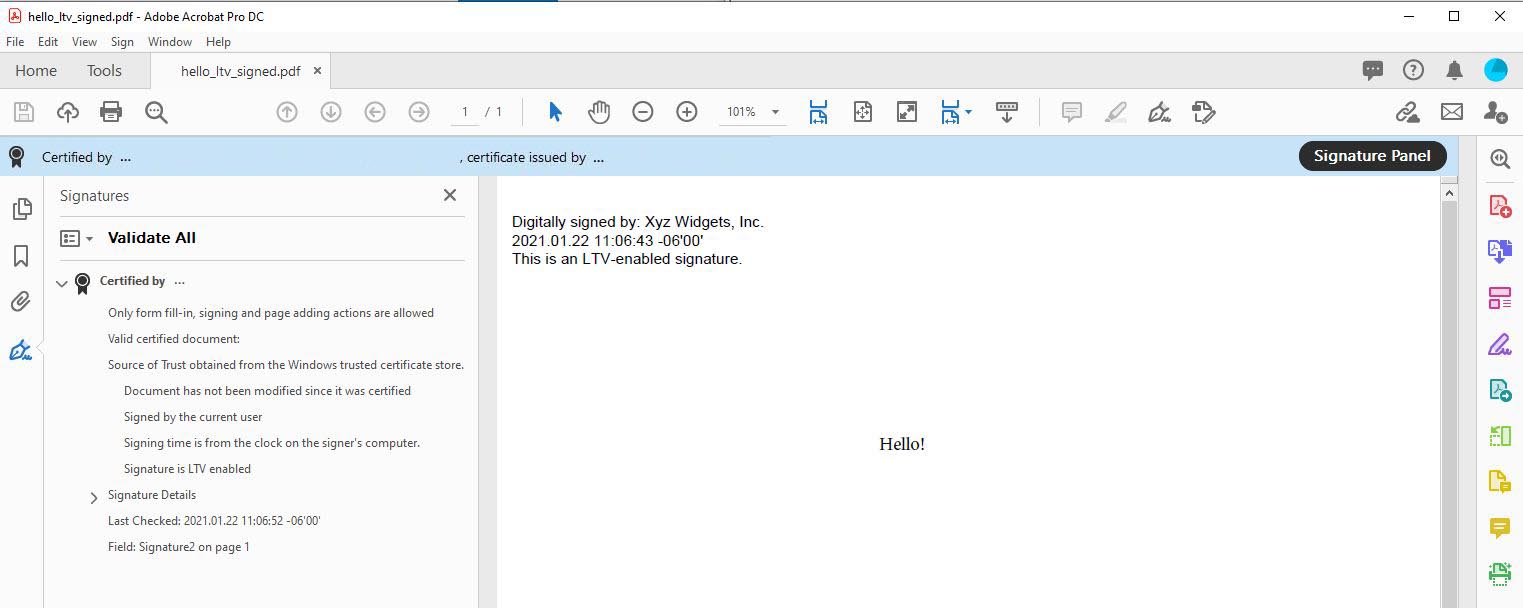
This example demonstrates how to a sign a PDF with long-term validation (LTV) enabled.Note: This example requires Chilkat v9.5.0.85 or greater.
Chilkat PHP Extension Downloads
<?php
include("chilkat.php");
$success = false;
// This example requires the Chilkat API to have been previously unlocked.
// See Global Unlock Sample for sample code.
$pdf = new CkPdf();
// Load a PDF to be signed.
// The "hello.pdf" is available at https://chilkatsoft.com/hello.pdf
$success = $pdf->LoadFile('qa_data/pdf/hello.pdf');
if ($success == false) {
print $pdf->lastErrorText() . "\n";
exit;
}
// Options for signing are specified in JSON.
$json = new CkJsonObject();
// In most cases, the signingCertificateV2 and signingTime attributes are required.
$json->UpdateInt('signingCertificateV2',1);
$json->UpdateInt('signingTime',1);
// Add the "ltvOcsp" instruction to the JSON passed to SignPdf.
// This is what causes Chilkat to create an LTV-enabled signature.
//
// If we are signing a PDF that already has signatures, then the existing signatures
// are automatically verified, and Chilkat will do OCSP certificate status checking (if possible)
// for those certs in existing signatures (including certs in the certificate chains)
// that do not yet have a valid OCSP response in the DSS (Document Security Store).
// Chilkat will add the OCSP responses to the /OCSPs in the Document Security Store (/DSS).
// Also, and certificates from existing signatures not yet in the DSS are added to the /Certs
// in the DSS.
//
// Also, the "ltvOcsp" causes Chilkat to add the pdfRevocationInfoArchival authenticated attribute
// to the CMS signature. The pdfRevocationInfoArchival attribute (1.2.840.113583.1.1.8)
// contains OCSP responses and the CRL for the issuer of the signing certificate.
// Therefore, Chilkat will send an OCSP request to the signing certificate's OCSP URl (if one exists)
// and will download the CRL from the issuer certificate's CRL Distribution Point (if one exists).
$json->UpdateBool('ltvOcsp',true);
// -----------------------------------------------------------------------------------
// Note: If Chilkat produces a signed PDF, but the signature is not LTV-enabled,
// the cause might be related to a failure to download CRL's or OCSP requests.
// See Possible Solution for Failure to Produce LTV-enabled PDF Signature
// -----------------------------------------------------------------------------------
// You can add the following to UncommonOptions to get detailed information about the CRL and OCSP requests
// You shouldn't set the following logging options unless there is a need, because it adds a large amount of information to the LastErrorText.
$pdf->put_UncommonOptions('LOG_OCSP_HTTP,LOG_CRL_HTTP');
// Define the appearance of the signature.
$json->UpdateInt('page',1);
$json->UpdateString('appearance.y','top');
$json->UpdateString('appearance.x','left');
$json->UpdateString('appearance.fontScale','10.0');
$json->UpdateString('appearance.text[0]','Digitally signed by: cert_cn');
$json->UpdateString('appearance.text[1]','current_dt');
$json->UpdateString('appearance.text[2]','This is an LTV-enabled signature.');
// Load the signing certificate. (Use your own certificate.)
$cert = new CkCert();
$success = $cert->LoadPfxFile('qa_data/pfx/myPdfSigningCert.pfx','pfxPassword');
if ($success == false) {
print $cert->lastErrorText() . "\n";
exit;
}
// Tell the pdf object to use the certificate for signing.
$success = $pdf->SetSigningCert($cert);
if ($success == false) {
print $pdf->lastErrorText() . "\n";
exit;
}
$success = $pdf->SignPdf($json,'qa_output/hello_ltv_signed.pdf');
if ($success == false) {
print $pdf->lastErrorText() . "\n";
exit;
}
print 'The PDF has been successfully cryptographically signed with long-term validation.' . "\n";
// If you open the Signature Panel in Adobe Acrobat, it will indicate that the signature is LTV enabled
// as shown here:
//  ?>
?>