PHP ActiveX
PHP ActiveX
PDF Signature with Background Image (Seal/Stamp/etc.)
See more PDF Signatures Examples
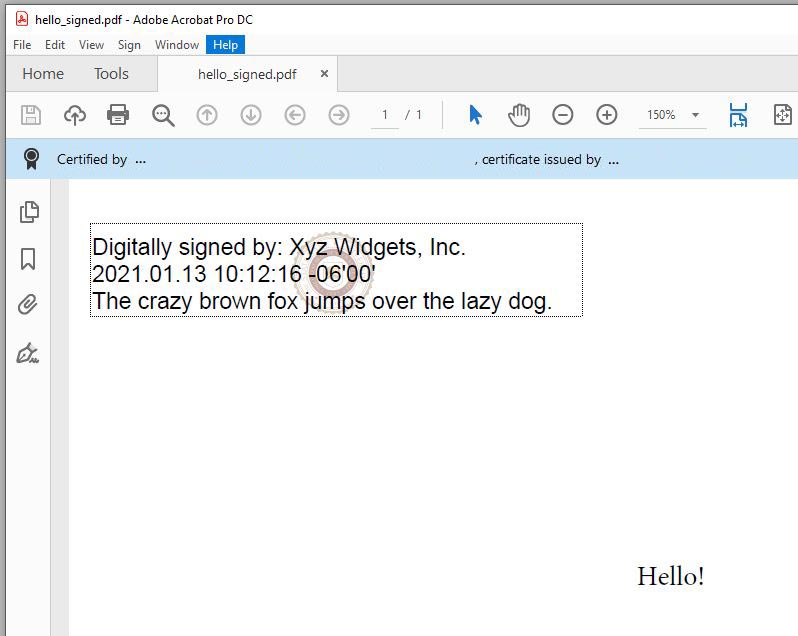
Demonstrates how to sign a PDF with an appearance that includes a background image, such as a seal, stamp, etc.Note: This example requires Chilkat v9.5.0.85 or greater.
Chilkat PHP ActiveX Downloads
<?php
$success = 0;
// This example requires the Chilkat API to have been previously unlocked.
// See Global Unlock Sample for sample code.
$pdf = new COM("Chilkat.Pdf");
// Load a PDF to be signed.
// The "hello.pdf" is available at https://chilkatsoft.com/hello.pdf
$success = $pdf->LoadFile('qa_data/pdf/hello.pdf');
if ($success == 0) {
print $pdf->LastErrorText . "\n";
exit;
}
// Options for signing are specified in JSON.
$json = new COM("Chilkat.JsonObject");
// In most cases, the signingCertificateV2 and signingTime attributes are required.
$json->UpdateInt('signingCertificateV2',1);
$json->UpdateInt('signingTime',1);
// Put the signature on page 1, top left
$json->UpdateInt('page',1);
$json->UpdateString('appearance.y','top');
$json->UpdateString('appearance.x','left');
// Use a font scale of 10.0
$json->UpdateString('appearance.fontScale','10.0');
// In this example, the appearance of the digital signature will contain three lines:
// 1) The signing certificate's common name
// 2) The current date/time
// 3) Some arbitrary text.
// The keyword "cert_cn" is replaced with the Certificate's Subject Common Name.
// The keyword "current_dt" is replaced with the current date/time.
// Any number of appearance text lines can be added.
$json->UpdateString('appearance.text[0]','Digitally signed by: cert_cn');
$json->UpdateString('appearance.text[1]','current_dt');
$json->UpdateString('appearance.text[2]','The crazy brown fox jumps over the lazy dog.');
// Load a JPG image to be shown with 30% opacity in the background.
// (the image must be in the JPG format)
// The sample university.jpb is available at https://example-code.com/images/university.jpg
$jpgData = new COM("Chilkat.BinData");
$success = $jpgData->LoadFile('qa_data/jpg/university.jpg');
if ($success == 0) {
print 'Failed to load the JPG image.' . "\n";
exit;
}
$success = $pdf->SetSignatureJpeg($jpgData);
if ($success == 0) {
print $pdf->LastErrorText . "\n";
exit;
}
// Specify that we want to display the JPG image in the center with 30% opacity.
$json->UpdateString('appearance.image','custom-jpg');
$json->UpdateString('appearance.imagePlacement','center');
$json->UpdateString('appearance.imageOpacity','30');
// Load the signing certificate. (Use your own certificate.)
$cert = new COM("Chilkat.Cert");
$success = $cert->LoadPfxFile('qa_data/pfx/myPdfSigningCert.pfx','secret');
if ($success == 0) {
print $cert->LastErrorText . "\n";
exit;
}
// Tell the pdf object to use the certificate for signing.
$success = $pdf->SetSigningCert($cert);
if ($success == 0) {
print $pdf->LastErrorText . "\n";
exit;
}
$success = $pdf->SignPdf($json,'qa_output/hello_signed.pdf');
if ($success == 0) {
print $pdf->LastErrorText . "\n";
exit;
}
print 'The PDF has been successfully cryptographically signed.' . "\n";
// The appearance of the signature appears in Adobe Acrobat as shown below.
// The JPG is automatically scaled to the size of the signature based on the signature's font scale
// and number of text lines.
//  ?>
?>