PHP ActiveX Requires Chilkat v10.1.2+
PHP ActiveX
X.com OAuth 2.0 Authorization Code with PKCE
See more X Examples
Demonstrates how to get an X.com OAuth2 access token from a desktop application or script.Chilkat PHP ActiveX Downloads
<?php
$success = 0;
// For more information about the OAuth2, see OAuth 2.0 Authorization Flow
$oauth2 = new COM("Chilkat.OAuth2");
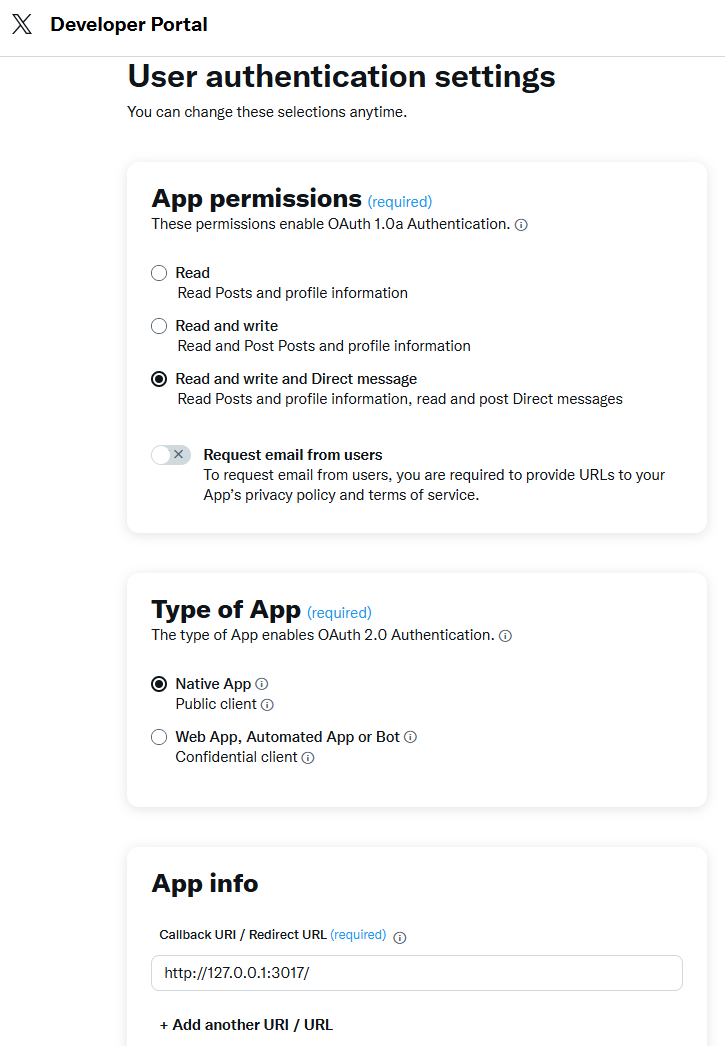
// The port should match the Authorized Redirect URL in your X.com app,
// which would look like "http://127.0.0.1:3017/"
// See the screenshot below of the App Settings in the X Developer Portal
$oauth2->LocalHost = '127.0.0.1';
$oauth2->ListenPort = 3017;
$oauth2->AuthorizationEndpoint = 'https://x.com/i/oauth2/authorize';
$oauth2->TokenEndpoint = 'https://api.x.com/2/oauth2/token';
// Replace this with your actual X.com OAuth2 Client ID and Client Secret
$oauth2->ClientId = 'OAUTH2_CLIENT_ID';
$oauth2->ClientSecret = 'OAUTH2_CLIENT_SECRET';
// This is for Require Proof Key for Code Exchange (PKCE)
// See OAuth2 PKCE Explained
$oauth2->CodeChallenge = 1;
$oauth2->CodeChallengeMethod = 'S256';
// Space separated scopes...
$oauth2->Scope = 'tweet.read tweet.write users.read follows.read follows.write offline.access like.read like.write block.read block.write';
// Begin the OAuth2 Authorization code flow. This returns a URL that should be loaded in a browser.
$url = $oauth2->startAuth();
if ($oauth2->LastMethodSuccess != 1) {
print $oauth2->LastErrorText . "\n";
exit;
}
print 'url = ' . $url . "\n";
// Launch the default browser on the system and navigate to the url.
// The LaunchBrowser method was added in Chilkat v10.1.2.
$success = $oauth2->LaunchBrowser($url);
if ($success == 0) {
print $oauth2->LastErrorText . "\n";
exit;
}
// Wait for the user to approve or deny authorization in the browser.
$numMsWaited = 0;
while (($numMsWaited < 10000) and ($oauth2->AuthFlowState < 3)) {
$oauth2->SleepMs(100);
$numMsWaited = $numMsWaited + 100;
}
// If the browser does not respond within the specified time, AuthFlowState will be:
//
// 1: Waiting for Redirect - The OAuth2 background thread is waiting for the browser's redirect request.
// 2: Waiting for Final Response - The thread is awaiting the final access token response.
// In either case, cancel the background task initiated by StartAuth.
if ($oauth2->AuthFlowState < 3) {
$oauth2->Cancel();
print 'No response from the browser!' . "\n";
exit;
}
// Check AuthFlowState to determine if authorization was granted, denied, or failed:
//
// 3: Success - OAuth2 flow completed, the background thread exited, and the successful response is in AccessTokenResponse.
// 4: Access Denied - OAuth2 flow completed, the background thread exited, and the error response is in AccessTokenResponse.
// 5: Failure - OAuth2 flow failed before completion, the background thread exited, and error details are in FailureInfo.
if ($oauth2->AuthFlowState == 5) {
print 'OAuth2 failed to complete.' . "\n";
print $oauth2->FailureInfo . "\n";
exit;
}
if ($oauth2->AuthFlowState == 4) {
print 'OAuth2 authorization was denied.' . "\n";
print $oauth2->AccessTokenResponse . "\n";
exit;
}
if ($oauth2->AuthFlowState != 3) {
print 'Unexpected AuthFlowState:' . $oauth2->AuthFlowState . "\n";
exit;
}
print 'OAuth2 authorization granted!' . "\n";
$json = new COM("Chilkat.JsonObject");
$json->Load($oauth2->AccessTokenResponse);
$json->EmitCompact = 0;
// If an "expires_on" member does not exist, then add the JSON member by
// getting the current system date/time and adding the "expires_in" seconds.
// This way we'll know when the token expires.
if ($json->HasMember('expires_on') == 0) {
$dtExpire = new COM("Chilkat.CkDateTime");
$dtExpire->SetFromCurrentSystemTime();
$dtExpire->AddSeconds($json->IntOf('expires_in'));
$json->AppendString('expires_on',$dtExpire->getAsUnixTimeStr(0));
}
print 'Access Token Response = ' . $json->emit() . "\n";
// A sample access token response:
// {
// "token_type": "bearer",
// "expires_in": 7200,
// "access_token": "VmNDLVZiYUZwejY5Mkx3RblFTmo3ek1leTRGclMuZFVOUTVUTWpNbVZKb1N5OjE3NDAxNjk4MDVxNTE6MToxOaF0OjE",
// "scope": "block.read follows.read offline.access tweet.write block.write like.write like.read users.read tweet.read follows.write",
// "refresh_token": "eThOWVVFSTRqdVp3QTFndGsxM2ZGZmFyNWVrU0phM1JKbGdrbGNWRGJzb1loOjE3NDAwMjk4MDUxNTI6MTowOnJ0OjE"
// }
print 'Access Token = ' . $oauth2->AccessToken . "\n";
print 'Refresh Token = ' . $oauth2->RefreshToken . "\n";
// Save the JSON access token response to a file for subsequent use..
$json->WriteFile('qa_data/tokens/x.json');
//  ?>
?>