Perl
Perl
IBM Cloud Secrets - Create or Update a JSON Secret
See more Secrets Examples
Demonstrates how to create or update a JSON secret stored in the IBM Cloud Secrets.Note: This example requires Chilkat v10.1.0 or later.
Chilkat Perl Downloads
use chilkat();

$success = 0;

# This example requires the Chilkat API to have been previously unlocked.
# See Global Unlock Sample for sample code.

# The bootstrap secret will contain the following information:

# IBM Cloud API Key

# See following examples for setting up a bootstrap secret in memory,
# or in the local manager (Windows Credentials Manager or Apple Keychain)
# Setup Bootstrap Secret in Local Manager
# Setup Bootstrap Secret in Memory
$bootstrap = chilkat::CkSecrets->new();

# Set the location of the bootstrap secret.
# Can be "local_manager" or "memory", depending on how you setup the bootstrap secret.
# ---------------------------------------------------------------------------------------------
# If your operating system is NOT Windows or MacOS/iOS, then change "local_manager" to "memory"
# You can also, if desired, use "memory" on Windows and MacOS/iOS if your bootstrap secret was previously setup in memory.
# ---------------------------------------------------------------------------------------------
$bootstrap->put_Location("local_manager");

# Specify the bootstrap secret to be used.
$bsId = chilkat::CkJsonObject->new();
$bsId->UpdateString("appName","ibm_bs");
$bsId->UpdateString("service","Example");
$bsId->UpdateString("username","Joe");

# ----------------------------------------------------
$secrets = chilkat::CkSecrets->new();

# Setup for the IBM Cloud Secrets
$secrets->put_Location("ibm_cloud");
$success = $secrets->SetBootstrapSecret($bsId,$bootstrap);
if ($success == 0) {
    print $secrets->lastErrorText() . "\r\n";
    exit;
}

# ----
# Specify the name of the secret.
# service and username are required.
# appName and domain are optional.
# Note: The values are arbitrary and can be anything you want.
$json = chilkat::CkJsonObject->new();
$json->UpdateString("appName","MyApp");
$json->UpdateString("service","OAuth2");
$json->UpdateString("domain","onedrive");
$json->UpdateString("username","matt");

# You'll also need to specify your IBM Cloud instance ID and region for each API call.
$json->UpdateString("instance_id","a88a0c56-50a6-4461-9911-345b173e1171");
$json->UpdateString("region","us-south");

# Get the secret to be stored.
$jsonSecret = chilkat::CkJsonObject->new();
$success = $jsonSecret->LoadFile("qa_data/tokens/oneDrive.json");
if ($success == 0) {
    print $jsonSecret->lastErrorText() . "\r\n";
    exit;
}

# Create or update the secret.
$success = $secrets->UpdateSecretJson($json,$jsonSecret);
if ($success == 0) {
    print $secrets->lastErrorText() . "\r\n";
    exit;
}

print "Success." . "\r\n";

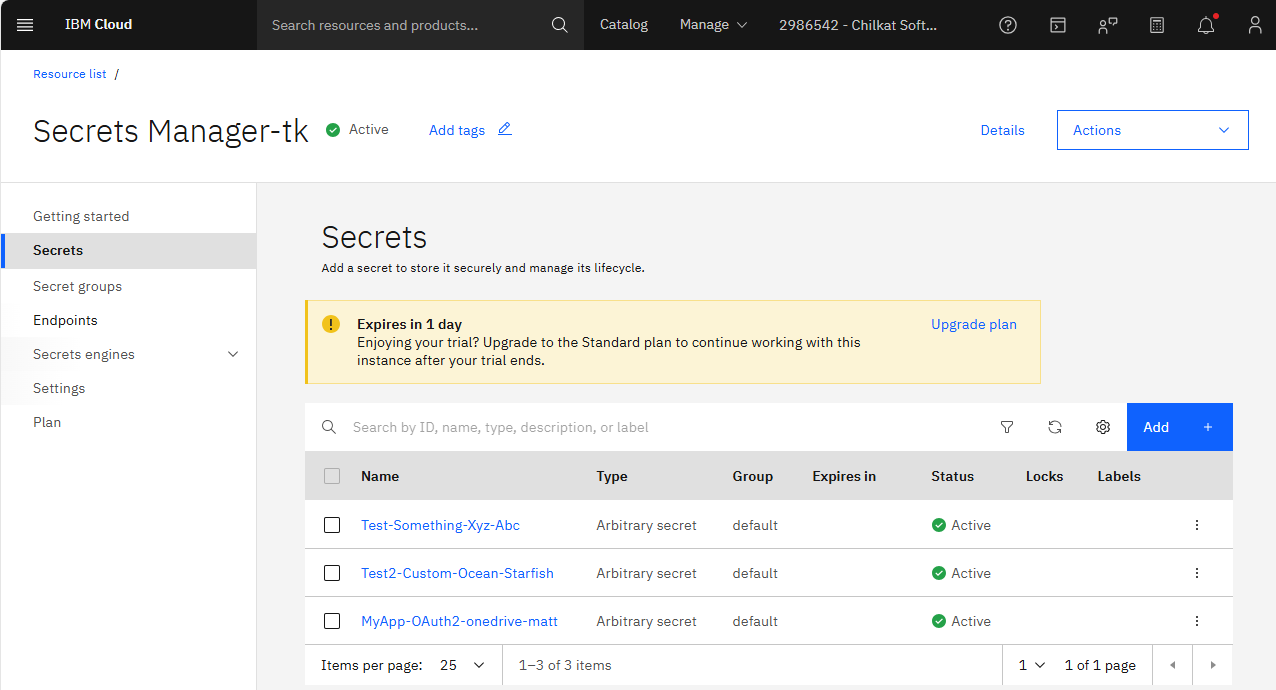
# Here you can see the secret that was created:

#