Perl
Perl
Apple Keychain - Import ECDSA Private Key
See more Apple Keychain Examples
Imports an ECDSA private key to the Apple Keychain.Note: This example requires Chilkat v10.0.0 or greater.
Chilkat Perl Downloads
use chilkat();

$success = 0;

$pemPath = "/Users/chilkat/qa_data/ecc/prime256v1-privKey.pem";
# Provide a password if your PEM is encrypted. Otherwise pass the empty string.
$pemPassword = "";

$privKey = chilkat::CkPrivateKey->new();
$success = $privKey->LoadAnyFormatFile($pemPath,$pemPassword);
if ($success == 0) {
    print $privKey->lastErrorText() . "\r\n";
    exit;
}

# In Apple Keychain, the label for an item such as a private key is a user-friendly identifier that helps distinguish one item from
# another in the Keychain. It is typically a brief name or description associated with the item.
# The label is displayed in the Keychain Access application and is useful for quickly identifying the purpose
# or source of a specific key, certificate, or password entry.

# The label does not affect the functionality or security of the item; it is purely for organizational purposes.
# You can edit or assign labels to make your Keychain easier to navigate.

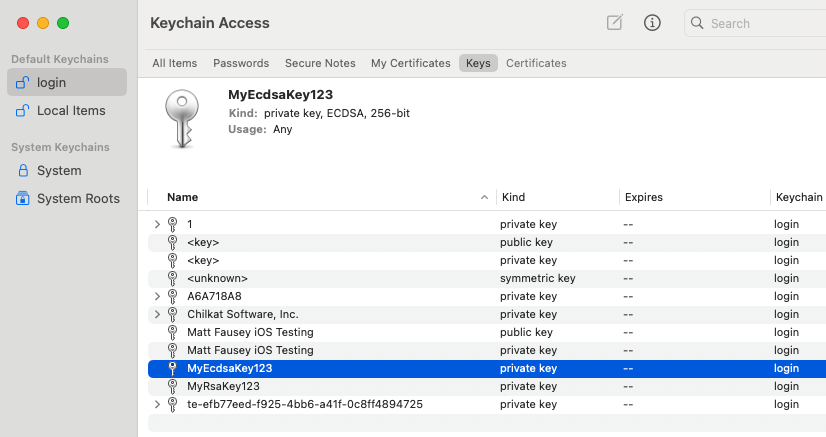
# On MacOS, you can save the private key to the Keychain by calling SavePkcs8File with a "filename" in the format"keychain:<label>"
$success = $privKey->SavePkcs8File("keychain:MyEcdsaKey123");
if ($success == 0) {
    print $privKey->lastErrorText() . "\r\n";
    exit;
}

print "Success." . "\r\n";

# Here you can see:
#
#