Objective-C
Objective-C
Auto-Refresh O365 Access Token when Sending Email
See more Office365 Examples
Demonstrates how to automatically recover from an expired access token when sending email from smtp.office365.com using OAuth2 authentication. If the server responds with an error indicating that the access token is expired, then we refresh the access token and retry.Chilkat Objective-C Downloads
#import <CkoJsonObject.h>
#import <CkoMailMan.h>
#import <CkoEmail.h>
#import <CkoOAuth2.h>
#import <CkoStringBuilder.h>

BOOL success = NO;

//  This example requires the Chilkat API to have been previously unlocked.
//  See Global Unlock Sample for sample code.

//  An Office365 OAuth2 access token must first be obtained prior
//  to running this code.

//  First get our previously obtained OAuth2 access token.
CkoJsonObject *jsonToken = [[CkoJsonObject alloc] init];
success = [jsonToken LoadFile: @"qa_data/tokens/office365.json"];

CkoMailMan *mailman = [[CkoMailMan alloc] init];

mailman.SmtpHost = @"smtp.office365.com";
mailman.SmtpPort = [NSNumber numberWithInt:587];
mailman.StartTLS = YES;

//  Use your Office365 email address for the SmtpUsername.
mailman.SmtpUsername = @"OFFICE365_EMAIL_ADDRESS";
mailman.OAuth2AccessToken = [jsonToken StringOf: @"access_token"];

//  Create a new email object
CkoEmail *email = [[CkoEmail alloc] init];

email.Subject = @"This is a test";
email.Body = @"This is a test";
email.From = @"MY_NAME <OFFICE365_EMAIL_ADDRESS>";
success = [email AddTo: @"John Doe" emailAddress: @"somebody@example.com"];

//  Call SendEmail to connect to the SMTP server and send.
//  The connection (i.e. session) to the SMTP server remains
//  open so that subsequent SendEmail calls may use the
//  same connection.
success = [mailman SendEmail: email];
if (success == YES) {
    NSLog(@"%@",@"Mail Sent!");
    return;
}

//  If we fall through to here, it means something failed.
//  If we failed because of an invalid or expired access token, we should get this SMTP status code and error message:
//     response: 535 5.7.3 Authentication unsuccessful [CH2PR19CA0023.namprd19.prod.outlook.com]
//     status code: 535
if ([mailman.LastSmtpStatus intValue] != 535) {
    NSLog(@"%@",mailman.LastErrorText);
    return;
}

//  If we get here, it means the SMTP status code equaled 535, which is an authentication failure.
//  Let's refresh the access token, and then retry..

CkoOAuth2 *oauth2 = [[CkoOAuth2 alloc] init];

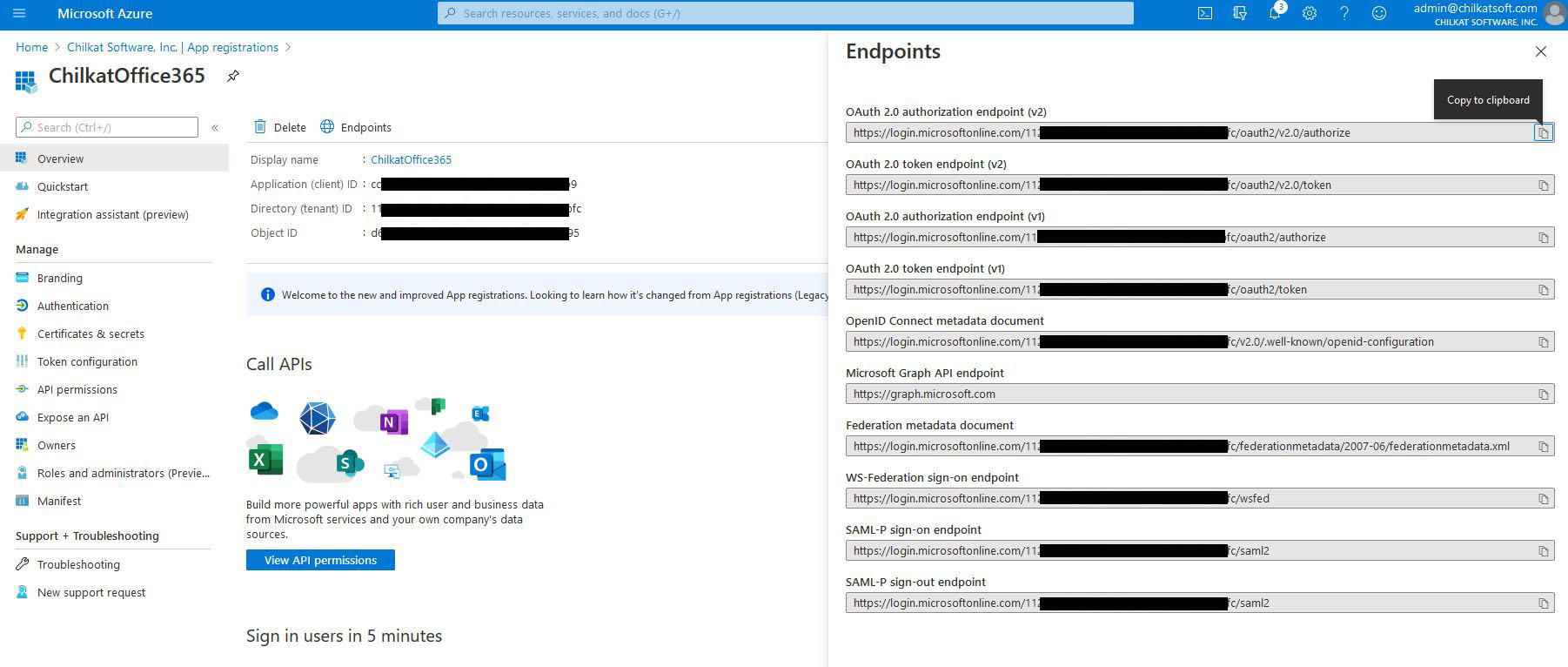
//  Update to use your token endpoint.
//  In the Azure Portal, in "App registrations", go to "Endpoints" (located to the right of the "+ New registration" link.)
//     Find your endpoint for the "OAuth 2.0 token endpoint (v2)"
//     See Office365 OAuth2 Endpoints

oauth2.TokenEndpoint = @"https://login.microsoftonline.com/xxxxxxxxxx-71bf-4ebe-a866-738364321bf2/oauth2/v2.0/token";

//  Replace these with actual values.
oauth2.ClientId = @"CLIENT_ID";
oauth2.ClientSecret = @"CLIENT_SECRET";

//  Get the "refresh_token"
oauth2.RefreshToken = [jsonToken StringOf: @"refresh_token"];

//  Send the HTTP POST to refresh the access token..
success = [oauth2 RefreshAccessToken];
if (success != YES) {
    NSLog(@"%@",oauth2.LastErrorText);
    return;
}

NSLog(@"%@%@",@"New access token: ",oauth2.AccessToken);
NSLog(@"%@%@",@"New refresh token: ",oauth2.RefreshToken);

//  Update the JSON with the new tokens.
[jsonToken UpdateString: @"access_token" value: oauth2.AccessToken];
[jsonToken UpdateString: @"refresh_token" value: oauth2.RefreshToken];

//  Save the new JSON access token response to a file.
CkoStringBuilder *sbJson = [[CkoStringBuilder alloc] init];
jsonToken.EmitCompact = NO;
[jsonToken EmitSb: sbJson];
[sbJson WriteFile: @"qa_data/tokens/office365.json" charset: @"utf-8" emitBom: NO];

NSLog(@"%@",@"OAuth2 authorization granted!");
NSLog(@"%@%@",@"New Access Token = ",oauth2.AccessToken);

//  -------------------------------------------------
//  Retry the SMTP send using the refreshed access token.

NSLog(@"%@",@"Retrying the send using the refreshed access token.");

mailman.OAuth2AccessToken = oauth2.AccessToken;

success = [mailman SendEmail: email];
if (success == NO) {
    NSLog(@"%@",mailman.LastErrorText);
    return;
}

success = [mailman CloseSmtpConnection];
if (success != YES) {
    NSLog(@"%@",@"Connection to SMTP server not closed cleanly.");
}

NSLog(@"%@",@"Email sent!");