Lianja Requires Chilkat v11.2.0+
Lianja
Markdown to HTML - Full Document, ChatGPT Theme with Code Syntax Highlighting
See more Markdown Examples
Demonstrates how to convert a complete Markdown document to HTML using the pre-defined "ChatGPT" theme but also with Cloudfare Prism's code syntax highlighting.Chilkat Lianja Downloads
llSuccess = .F.
llSuccess = .F.
// Select the pre-defined "ChatGPT" style.
loOptions = createobject("CkJsonObject")
loOptions.UpdateString("theme","ChatGPT")
// We can also set an option for the max-width, which by default is "72ch".
loOptions.UpdateString("ChatGPT.max-width","120ch")
// We can add extra content to the bottom of the HTML head and body sections like this:
// Here we are using the "tomorrow" theme.
loOptions.UpdateString("extraHead",'<link rel="stylesheet" href="https://cdnjs.cloudflare.com/ajax/libs/prism/1.29.0/themes/prism-tomorrow.min.css" />')
loOptions.UpdateString("extraBody",'<script src="https://cdnjs.cloudflare.com/ajax/libs/prism/1.29.0/prism.min.js"></script><script src ="https://cdnjs.cloudflare.com/ajax/libs/prism/1.29.0/plugins/autoloader/prism-autoloader.min.js"></script>')
loSbMarkdown = createobject("CkStringBuilder")
loSbHtml = createobject("CkStringBuilder")
llSuccess = loSbMarkdown.LoadFile("qa_data/markdown/test1.md","utf-8")
if (llSuccess = .F.) then
? loSbMarkdown.LastErrorText
release loOptions
release loSbMarkdown
release loSbHtml
return
endif
loSbMarkdown.MarkdownToHtml(loOptions,loSbHtml)
loSbHtml.ToCRLF()
? loSbHtml.GetAsString()
// The sample markdown input for this example is identical to the one at Markdown to HTML - Full Document, Raw, where you can view it.
// Sample HTML output as viewed in a browser:
// 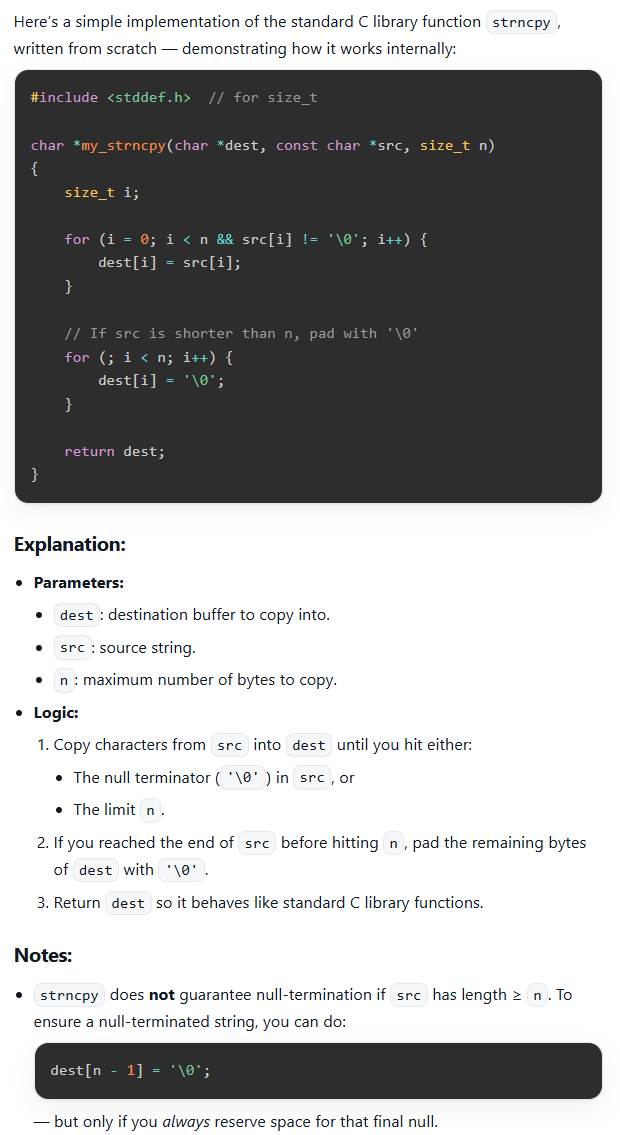 release loOptions
release loSbMarkdown
release loSbHtml
release loOptions
release loSbMarkdown
release loSbHtml