JavaScript
JavaScript
Shopware 6 - List Categories
See more Shopware 6 Examples
Get a list of categories.
Note
This example is intended for running within a Chilkat.Js embedded JavaScript engine. All Chilkat JavaScript examples require Chilkat
v11.4.0 or greater.
var success = false;
// This example assumes the Chilkat API to have been previously unlocked.
// See Global Unlock Sample for sample code.
var http = new CkHttp();
// Sends the following POST
// POST /store-api/v3/category
// {
// "includes": {
// "category": ["id", "name"]
// }
// }
// Use this online tool to generate code from sample JSON:
// Generate Code to Create JSON
var json = new CkJsonObject();
json.UpdateString("includes.category[0]","id");
json.UpdateString("includes.category[1]","name");
// This request simply authenticate with the sw-access-key you can interactively copy from your
// sales channel in the Shopware 6 administration web portal.
// 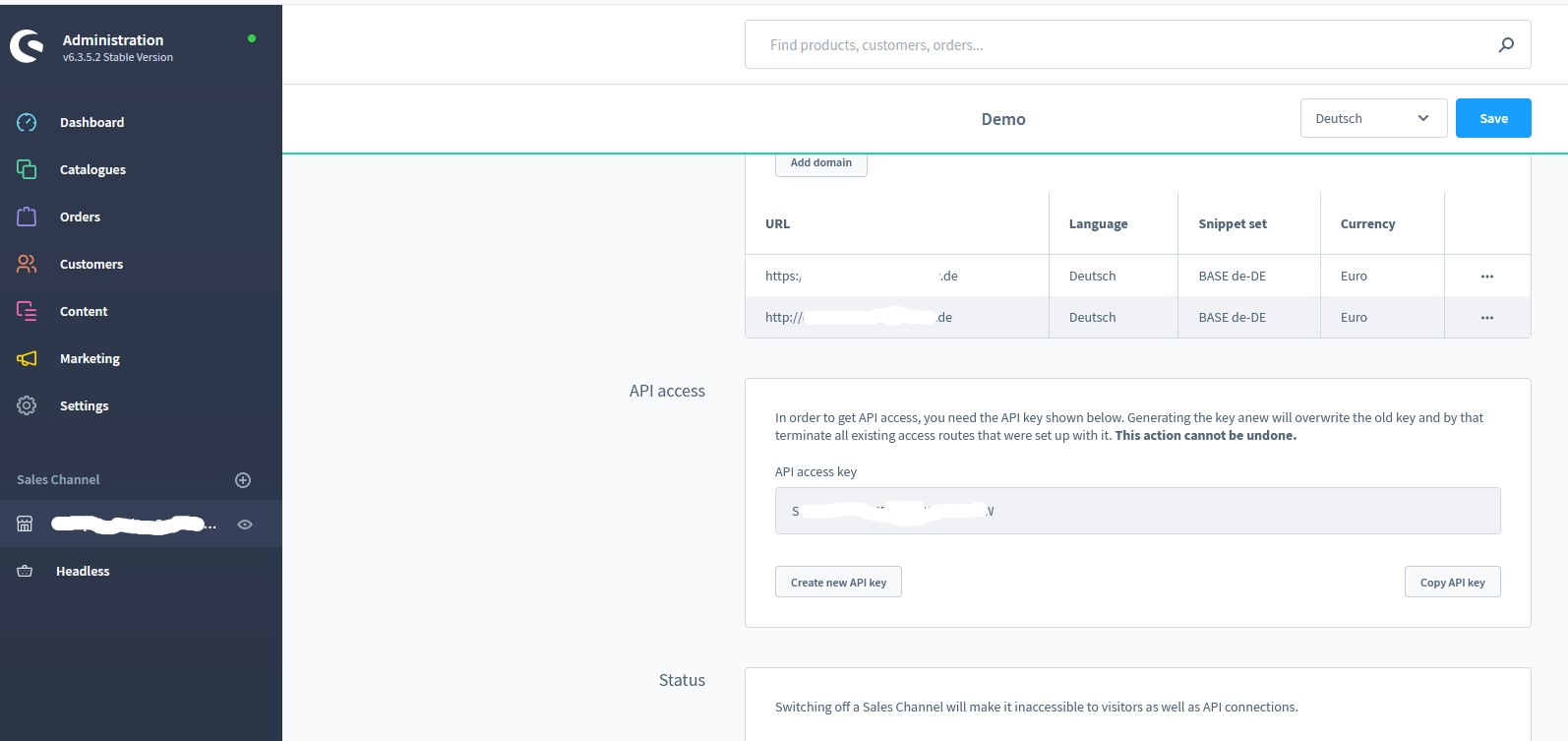 // We do NOT use OAuth2 for Store API requests.
http.SetRequestHeader("sw-access-key","<sales-channel-api-access-key>");
var resp = new CkHttpResponse();
success = http.HttpJson("POST","https://my-shopware-6-shop.de/store-api/v3/category",json,"application/json",resp);
if (success == false) {
console.log(http.LastErrorText);
return;
}
var sbResponseBody = new CkStringBuilder();
resp.GetBodySb(sbResponseBody);
var jResp = new CkJsonObject();
jResp.LoadSb(sbResponseBody);
jResp.EmitCompact = false;
console.log("Response Body:");
console.log(jResp.Emit());
// If we get a 401 response, it may be that our access token expired and we need to fetch a new one.
var respStatusCode = resp.StatusCode;
console.log("Response Status Code = " + respStatusCode);
if (respStatusCode >= 400) {
console.log("Response Header:");
console.log(resp.Header);
console.log("Failed.");
return;
}
// Sample JSON response:
// (Sample code for parsing the JSON response is shown below)
// {
// "total": 2,
// "aggregations": [],
// "elements": [
// {
// "id": "00a284072bcb42ed8fee31e26ea53b60",
// "name": "Home",
// "apiAlias": "category"
// },
// {
// "id": "bd835e75afa14b09b7da156d095a9a30",
// "name": "Outdoors",
// "apiAlias": "category"
// }
// ],
// "apiAlias": "dal_entity_search_result"
// }
// Sample code for parsing the JSON response...
// Use the following online tool to generate parsing code from sample JSON:
// Generate Parsing Code from JSON
var id;
var name;
var total = jResp.IntOf("total");
var apiAlias = jResp.StringOf("apiAlias");
var i = 0;
var count_i = jResp.SizeOfArray("elements");
while (i < count_i) {
jResp.I = i;
id = jResp.StringOf("elements[i].id");
name = jResp.StringOf("elements[i].name");
apiAlias = jResp.StringOf("elements[i].apiAlias");
i = i+1;
}
// We do NOT use OAuth2 for Store API requests.
http.SetRequestHeader("sw-access-key","<sales-channel-api-access-key>");
var resp = new CkHttpResponse();
success = http.HttpJson("POST","https://my-shopware-6-shop.de/store-api/v3/category",json,"application/json",resp);
if (success == false) {
console.log(http.LastErrorText);
return;
}
var sbResponseBody = new CkStringBuilder();
resp.GetBodySb(sbResponseBody);
var jResp = new CkJsonObject();
jResp.LoadSb(sbResponseBody);
jResp.EmitCompact = false;
console.log("Response Body:");
console.log(jResp.Emit());
// If we get a 401 response, it may be that our access token expired and we need to fetch a new one.
var respStatusCode = resp.StatusCode;
console.log("Response Status Code = " + respStatusCode);
if (respStatusCode >= 400) {
console.log("Response Header:");
console.log(resp.Header);
console.log("Failed.");
return;
}
// Sample JSON response:
// (Sample code for parsing the JSON response is shown below)
// {
// "total": 2,
// "aggregations": [],
// "elements": [
// {
// "id": "00a284072bcb42ed8fee31e26ea53b60",
// "name": "Home",
// "apiAlias": "category"
// },
// {
// "id": "bd835e75afa14b09b7da156d095a9a30",
// "name": "Outdoors",
// "apiAlias": "category"
// }
// ],
// "apiAlias": "dal_entity_search_result"
// }
// Sample code for parsing the JSON response...
// Use the following online tool to generate parsing code from sample JSON:
// Generate Parsing Code from JSON
var id;
var name;
var total = jResp.IntOf("total");
var apiAlias = jResp.StringOf("apiAlias");
var i = 0;
var count_i = jResp.SizeOfArray("elements");
while (i < count_i) {
jResp.I = i;
id = jResp.StringOf("elements[i].id");
name = jResp.StringOf("elements[i].name");
apiAlias = jResp.StringOf("elements[i].apiAlias");
i = i+1;
}