Visual FoxPro
Visual FoxPro
AWS Secrets Manager - Create or Update a Binary Secret
See more Secrets Examples
Demonstrates how to create or update a binary secret stored in the AWS Secrets Manager.Note: This example requires Chilkat v10.1.0 or later.
Chilkat Visual FoxPro Downloads
LOCAL lnSuccess
LOCAL loBootstrap
LOCAL loBsId
LOCAL loSecrets
LOCAL loJson
LOCAL lcUrl
LOCAL loHttp
LOCAL loBd
lnSuccess = 0
* This example requires the Chilkat API to have been previously unlocked.
* See Global Unlock Sample for sample code.
* The bootstrap secret will contain the following information:
* AWS Region
* AWS Access Key
* AWS Secret Key
* See following examples for setting up a bootstrap secret in memory,
* or in the local manager (Windows Credentials Manager or Apple Keychain)
* Setup Bootstrap Secret in Local Manager
* Setup Bootstrap Secret in Memory
loBootstrap = CreateObject('Chilkat.Secrets')
* Set the location of the bootstrap secret.
* Can be "local_manager" or "memory", depending on how you setup the bootstrap secret.
* ---------------------------------------------------------------------------------------------
* If your operating system is NOT Windows or MacOS/iOS, then change "local_manager" to "memory"
* You can also, if desired, use "memory" on Windows and MacOS/iOS if your bootstrap secret was previously setup in memory.
* ---------------------------------------------------------------------------------------------
loBootstrap.Location = "local_manager"
* Specify the bootstrap secret to be used.
loBsId = CreateObject('Chilkat.JsonObject')
loBsId.UpdateString("appName","AWS")
loBsId.UpdateString("service","Example")
loBsId.UpdateString("username","Joe")
* ----------------------------------------------------
loSecrets = CreateObject('Chilkat.Secrets')
* Setup for the AWS Secrets Manager
loSecrets.Location = "aws_secrets_manager"
lnSuccess = loSecrets.SetBootstrapSecret(loBsId,loBootstrap)
IF (lnSuccess = 0) THEN
? loSecrets.LastErrorText
RELEASE loBootstrap
RELEASE loBsId
RELEASE loSecrets
CANCEL
ENDIF
* Specify the name of the secret.
* service and username are required.
* appName and domain are optional.
* Note: The values are arbitrary and can be anything you want.
loJson = CreateObject('Chilkat.JsonObject')
loJson.UpdateString("appName","Test2")
loJson.UpdateString("service","Custom")
loJson.UpdateString("domain","Ocean")
loJson.UpdateString("username","Starfish")
* The purpose of this example is to show how arbitrary binary data
* can be stored as a secret.
* We'll use a small JPG image that is approximately 6KB in size.
* You can test using this same JPG at this URL:
lcUrl = "https://chilkatdownload.com/sample_data/starfish.jpg"
loHttp = CreateObject('Chilkat.Http')
loBd = CreateObject('Chilkat.BinData')
lnSuccess = loHttp.DownloadBd(lcUrl,loBd)
IF (lnSuccess = 0) THEN
? loHttp.LastErrorText
RELEASE loBootstrap
RELEASE loBsId
RELEASE loSecrets
RELEASE loJson
RELEASE loHttp
RELEASE loBd
CANCEL
ENDIF
* Create or update the binary secret.
lnSuccess = loSecrets.UpdateSecretBd(loJson,loBd)
IF (lnSuccess = 0) THEN
? loSecrets.LastErrorText
RELEASE loBootstrap
RELEASE loBsId
RELEASE loSecrets
RELEASE loJson
RELEASE loHttp
RELEASE loBd
CANCEL
ENDIF
? "Success."
* Here you can see the secret that was created in the AWS Secrets Manager:
* 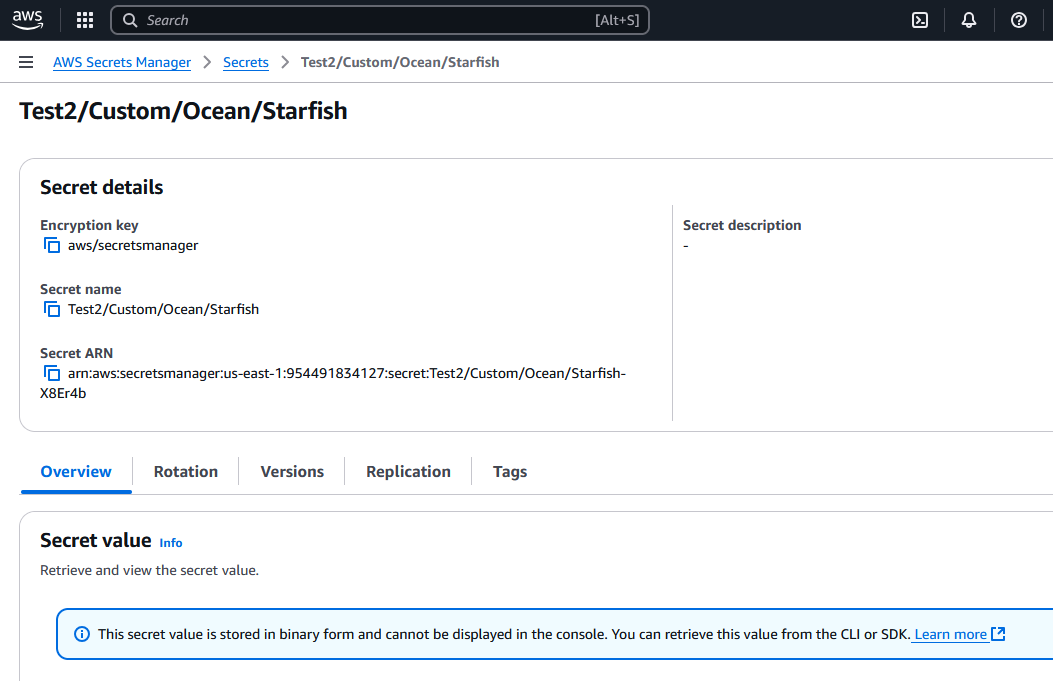 RELEASE loBootstrap
RELEASE loBsId
RELEASE loSecrets
RELEASE loJson
RELEASE loHttp
RELEASE loBd
RELEASE loBootstrap
RELEASE loBsId
RELEASE loSecrets
RELEASE loJson
RELEASE loHttp
RELEASE loBd