Delphi ActiveX
Delphi ActiveX
Test HotMail POP3 (pop3.live.com or pop-mail.outlook.com)
See more POP3 Examples
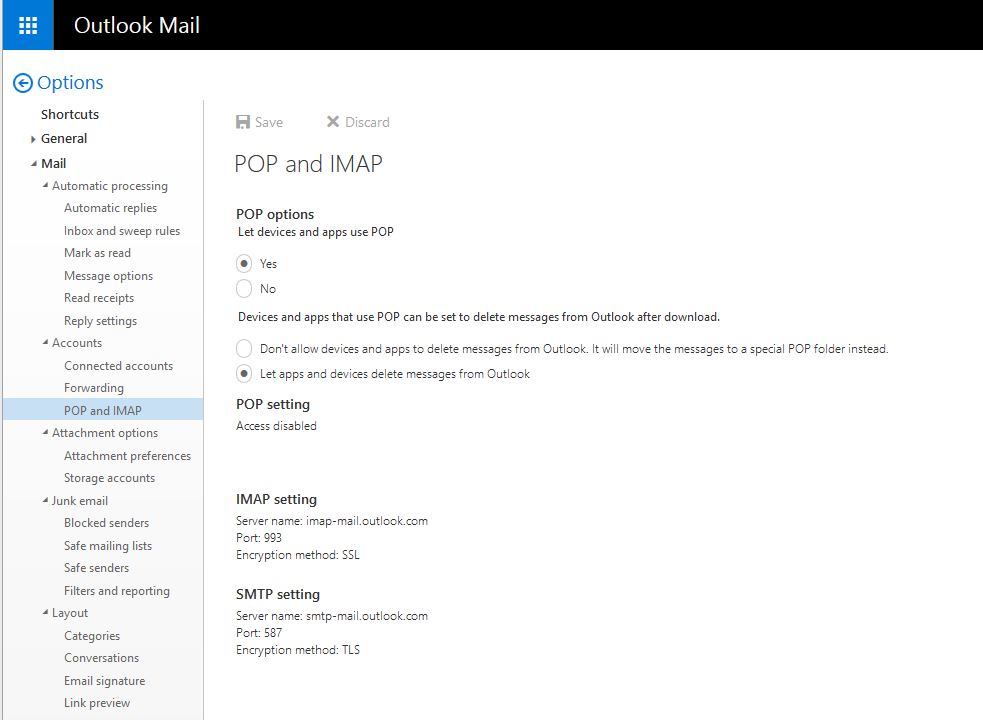
Demonstrates connecting and authenticating to pop3.live.com. Make sure to enable POP3 access, as shown here:
Chilkat Delphi ActiveX Downloads
uses
    Winapi.Windows, Winapi.Messages, System.SysUtils, System.Variants, System.Classes, Vcl.Graphics,
    Vcl.Controls, Vcl.Forms, Vcl.Dialogs, Vcl.StdCtrls, Chilkat_TLB;

...

procedure TForm1.Button1Click(Sender: TObject);
var
success: Integer;
mailman: TChilkatMailMan;
numEmails: Integer;

begin
success := 0;

// This example requires the Chilkat API to have been previously unlocked.
// See Global Unlock Sample for sample code.

mailman := TChilkatMailMan.Create(Self);

// Connection settings for pop3.live.com (or pop-mail.outlook.com, both should work)
mailman.MailHost := 'pop-mail.outlook.com';
mailman.MailHost := 'pop3.live.com';

mailman.PopUsername := 'my_account@live.com';
mailman.PopPassword := 'my_live.com_password';
mailman.MailPort := 995;
mailman.PopSsl := 1;

// Make the TLS connection to the POP3 server.
success := mailman.Pop3Connect();
if (success <> 1) then
  begin
    Memo1.Lines.Add(mailman.LastErrorText);
    Exit;
  end;

// Authenticate..
success := mailman.Pop3Authenticate();
if (success <> 1) then
  begin
    Memo1.Lines.Add(mailman.LastErrorText);
    Exit;
  end;

// Find out how many emails are on the server..
numEmails := mailman.CheckMail();
if (numEmails < 0) then
  begin
    Memo1.Lines.Add(mailman.LastErrorText);
    Exit;
  end;

// Examine the POP3 session log:
Memo1.Lines.Add(mailman.Pop3SessionLog);

// End the POP3 session and close the connection to the POP3 server.
success := mailman.Pop3EndSession();
if (success <> 1) then
  begin
    Memo1.Lines.Add(mailman.LastErrorText);
    Exit;
  end;

Memo1.Lines.Add('-- Finished.');

// The output of this program:

// 	**** Connected to pop3.live.com:995
// 	< +OK DUB006-POP206 POP3 server ready
// 	> USER chilkat@live.com
// 	< +OK password required
// 	> PASS ****
// 	< +OK User successfully authenticated. [AuthResult=0 Proxy=CY1PR17MB0630.namprd17.prod.outlook.com:1995:SSL]
// 	> STAT
// 	< +OK 46 3980488
//
// 	-- Finished.
//
end;