DataFlex Requires Chilkat v10.1.2+
DataFlex
Salesforce OAuth2 Access Token
See more OAuth2 Examples
Demonstrates how to get a Salesforce OAuth2 access token from a desktop application or script.Chilkat DataFlex Downloads
Use ChilkatAx-win32.pkg
Procedure Test
Boolean iSuccess
Handle hoOauth2
String sUrl
Integer iNumMsWaited
Handle hoSbJson
String sTemp1
Integer iTemp1
Boolean bTemp1
Move False To iSuccess
// To further clarify, see OAuth 2.0 Authorization Flow
Get Create (RefClass(cComChilkatOAuth2)) To hoOauth2
If (Not(IsComObjectCreated(hoOauth2))) Begin
Send CreateComObject of hoOauth2
End
// This should be the port in the localhost callback URL for your connected app.
// The callback URL would look like "http://localhost:3017/" if the port number is 3017.
Set ComListenPort Of hoOauth2 To 3017
Set ComAuthorizationEndpoint Of hoOauth2 To "https://login.salesforce.com/services/oauth2/authorize"
Set ComTokenEndpoint Of hoOauth2 To "https://login.salesforce.com/services/oauth2/token"
// Replace this with your actual client ID (Consumer Key)
Set ComClientId Of hoOauth2 To "CLIENT_ID"
// We don't have to include the client secret.
// See the screenshot of our Connected App below..
// This is for Require Proof Key for Code Exchange (PKCE)
// See OAuth2 PKCE Explained
Set ComCodeChallenge Of hoOauth2 To True
Set ComCodeChallengeMethod Of hoOauth2 To "S256"
// To force the OAuth consent screen to reappear (even if previously granted), use:
Get ComAddAuthQueryParam Of hoOauth2 "prompt" "consent" To iSuccess
// Begin the OAuth2 authorization flow. This returns a URL that should be loaded in a browser.
Get ComStartAuth Of hoOauth2 To sUrl
Get ComLastMethodSuccess Of hoOauth2 To bTemp1
If (bTemp1 <> True) Begin
Get ComLastErrorText Of hoOauth2 To sTemp1
Showln sTemp1
Procedure_Return
End
// Launch the default browser on the system and navigate to the url.
// The LaunchBrowser method was added in Chilkat v10.1.2.
Get ComLaunchBrowser Of hoOauth2 sUrl To iSuccess
If (iSuccess = False) Begin
Get ComLastErrorText Of hoOauth2 To sTemp1
Showln sTemp1
Procedure_Return
End
// Wait for the user to approve or deny authorization in the browser.
Move 0 To iNumMsWaited
While ((iNumMsWaited < 90000) And ((ComAuthFlowState(hoOauth2)) < 3))
Send ComSleepMs To hoOauth2 100
Move (iNumMsWaited + 100) To iNumMsWaited
Loop
// If the browser does not respond within the specified time, AuthFlowState will be:
//
// 1: Waiting for Redirect – The OAuth2 background thread is waiting for the browser's redirect request.
// 2: Waiting for Final Response – The thread is awaiting the final access token response.
// In either case, cancel the background task initiated by StartAuth.
Get ComAuthFlowState Of hoOauth2 To iTemp1
If (iTemp1 < 3) Begin
Get ComCancel Of hoOauth2 To iSuccess
Showln "No response from the browser!"
Procedure_Return
End
// Check AuthFlowState to determine if authorization was granted, denied, or failed:
//
// 3: Success – OAuth2 flow completed, the background thread exited, and the successful response is in AccessTokenResponse.
// 4: Access Denied – OAuth2 flow completed, the background thread exited, and the error response is in AccessTokenResponse.
// 5: Failure – OAuth2 flow failed before completion, the background thread exited, and error details are in FailureInfo.
Get ComAuthFlowState Of hoOauth2 To iTemp1
If (iTemp1 = 5) Begin
Showln "OAuth2 failed to complete."
Get ComFailureInfo Of hoOauth2 To sTemp1
Showln sTemp1
Procedure_Return
End
Get ComAuthFlowState Of hoOauth2 To iTemp1
If (iTemp1 = 4) Begin
Showln "OAuth2 authorization was denied."
Get ComAccessTokenResponse Of hoOauth2 To sTemp1
Showln sTemp1
Procedure_Return
End
Get ComAuthFlowState Of hoOauth2 To iTemp1
If (iTemp1 <> 3) Begin
Get ComAuthFlowState Of hoOauth2 To iTemp1
Showln "Unexpected AuthFlowState:" iTemp1
Procedure_Return
End
Showln "OAuth2 authorization granted!"
Get ComAccessToken Of hoOauth2 To sTemp1
Showln "Access Token = " sTemp1
// Save the full JSON access token response to a file.
Get Create (RefClass(cComChilkatStringBuilder)) To hoSbJson
If (Not(IsComObjectCreated(hoSbJson))) Begin
Send CreateComObject of hoSbJson
End
Get ComAccessTokenResponse Of hoOauth2 To sTemp1
Get ComAppend Of hoSbJson sTemp1 To iSuccess
Get ComWriteFile Of hoSbJson "qa_data/tokens/_salesforce.json" "utf-8" False To iSuccess
// The saved JSON response looks like this:
// {
// "access_token": "00D41000....uLZBpT6",
// "refresh_token": "5Aep....25xdGgkrV",
// "signature": "cjTbSc5DvcKpaMoRTzuQTJLb1tcMw8LEO01flq4aMD4=",
// "scope": "refresh_token id",
// "instance_url": "https://d41000000f8a0eak-dev-ed.my.salesforce.com",
// "id": "https://login.salesforce.com/id/00D41000000F8A0EAK/005410000....xAAE",
// "token_type": "Bearer",
// "issued_at": "1738348388166"
// }
// --------------------------------------------------------------------------
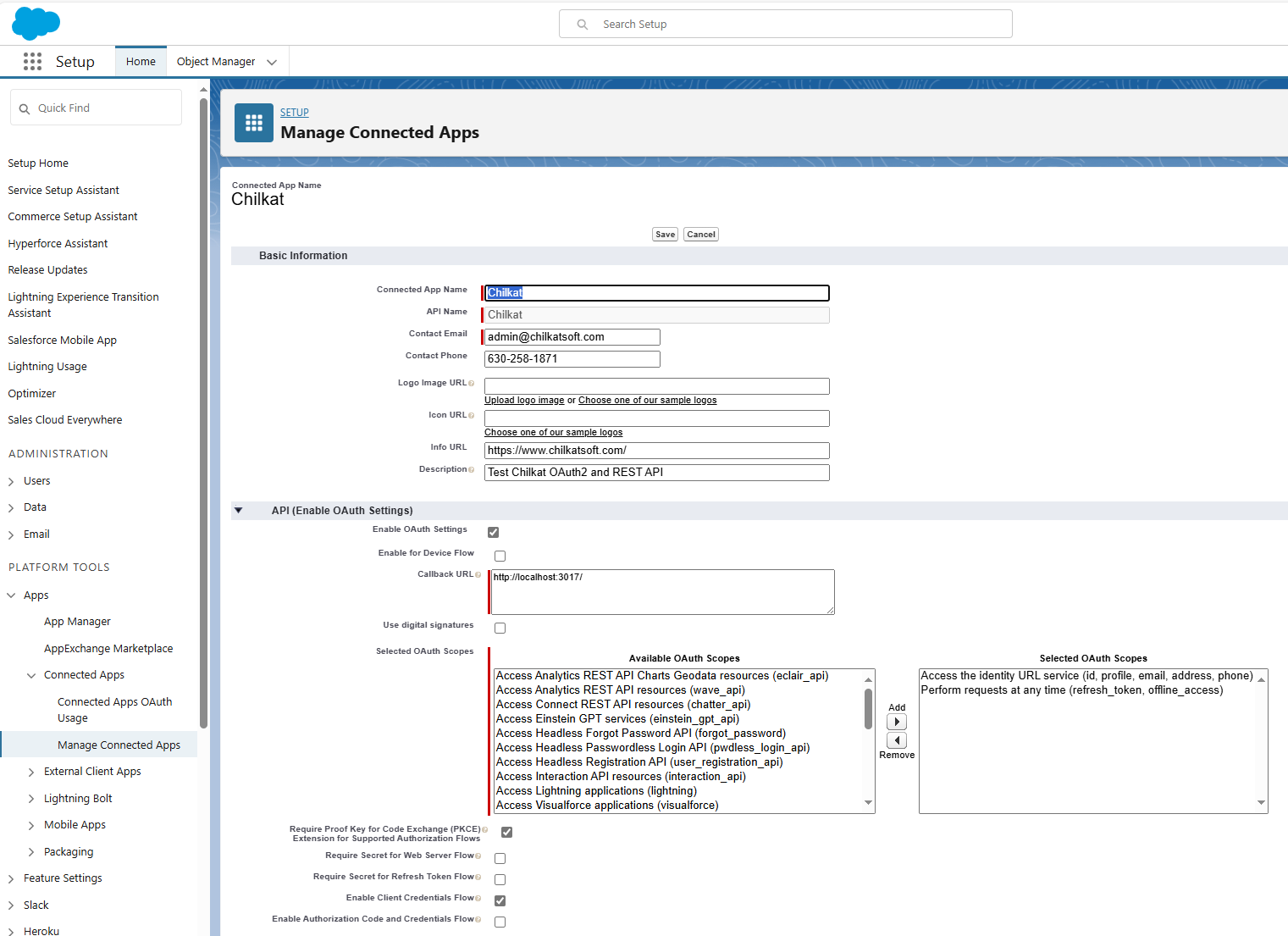
// Here's a screenshot of a Salesforce Connected App
// with the correct Callback URL for this example,
// and also selects "Require Proof Key for Code Exchange (PKCE)"
// and does not requires the secret for the authorization or refresh flow,
// and also allows for the Client Credentials flow.
//  End_Procedure