DataFlex
DataFlex
Create CAdES p7m using AWS KMS to Sign in the Cloud
See more Signing in the Cloud Examples
Demonstrates how to create a CAdES p7m, using AWS KMS. The signing of the hash happens in the Cloud on AWS KMS. Everything else regarding the creation of CAdES happens locally within Chilkat.Note: This example requires Chilkat v9.5.0.96 or greater.
Chilkat DataFlex Downloads
Use ChilkatAx-win32.pkg
Procedure Test
Boolean iSuccess
Variant vCert
Handle hoCert
Variant vJsonAwsKms
Handle hoJsonAwsKms
Handle hoCrypt
Handle hoSignedAttrs
String sInputXmlPath
String sOutputP7mPath
String sTemp1
Move False To iSuccess
// This example assumes the Chilkat API to have been previously unlocked.
// See Global Unlock Sample for sample code.
// Load the certificate used for signing. The certificate's private key is stored in AWS KMS
// However, we still need the certificate locally (without private key).
Get Create (RefClass(cComChilkatCert)) To hoCert
If (Not(IsComObjectCreated(hoCert))) Begin
Send CreateComObject of hoCert
End
Get ComLoadFromFile Of hoCert "qa_data/certs/myCert.cer" To iSuccess
If (iSuccess = False) Begin
Get ComLastErrorText Of hoCert To sTemp1
Showln sTemp1
Procedure_Return
End
// Here's a screenshot showing the key ID of a private key in AWS KMS:
// 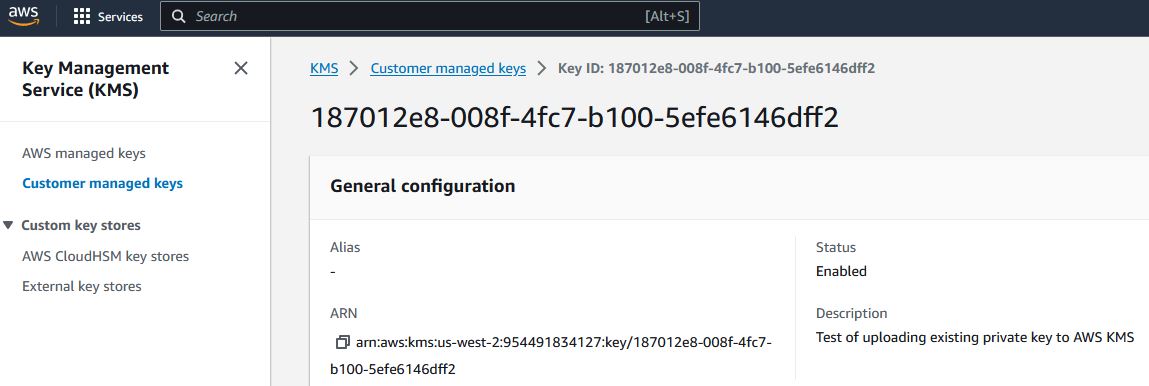 // To sign using AWS KMS,
// add the following lines of code to specify your AWS authentication credentials,
// and the ID of the KMS private key.
Get Create (RefClass(cComChilkatJsonObject)) To hoJsonAwsKms
If (Not(IsComObjectCreated(hoJsonAwsKms))) Begin
Send CreateComObject of hoJsonAwsKms
End
// Set the "service" equal to "aws_kms" to tell Chilkat to use AWS KMS for signing.
Get ComUpdateString Of hoJsonAwsKms "service" "aws_kms" To iSuccess
Get ComUpdateString Of hoJsonAwsKms "access_key" "ACCESS_KEY" To iSuccess
Get ComUpdateString Of hoJsonAwsKms "secret_key" "SECRET_KEY" To iSuccess
// Make sure to specify the correct region for your case.
Get ComUpdateString Of hoJsonAwsKms "region" "us-west-2" To iSuccess
// In the above screenshot, our key ID is "187012e8-008f-4fc7-b100-5efe6146dff2". You will use your key ID.
Get ComUpdateString Of hoJsonAwsKms "key_id" "187012e8-008f-4fc7-b100-5efe6146dff2" To iSuccess
Get pvComObject of hoJsonAwsKms to vJsonAwsKms
Get ComSetCloudSigner Of hoCert vJsonAwsKms To iSuccess
Get Create (RefClass(cComChilkatCrypt2)) To hoCrypt
If (Not(IsComObjectCreated(hoCrypt))) Begin
Send CreateComObject of hoCrypt
End
Get pvComObject of hoCert to vCert
Get ComSetSigningCert Of hoCrypt vCert To iSuccess
If (iSuccess = False) Begin
Get ComLastErrorText Of hoCrypt To sTemp1
Showln sTemp1
Procedure_Return
End
// The CadesEnabled property applies to all methods that create PKCS7 signatures.
// To create a CAdES-BES signature, set this property equal to true.
Set ComCadesEnabled Of hoCrypt To True
Set ComHashAlgorithm Of hoCrypt To "sha256"
Get Create (RefClass(cComChilkatJsonObject)) To hoSignedAttrs
If (Not(IsComObjectCreated(hoSignedAttrs))) Begin
Send CreateComObject of hoSignedAttrs
End
Get ComUpdateInt Of hoSignedAttrs "contentType" 1 To iSuccess
Get ComUpdateInt Of hoSignedAttrs "signingTime" 1 To iSuccess
Get ComUpdateInt Of hoSignedAttrs "messageDigest" 1 To iSuccess
Get ComUpdateInt Of hoSignedAttrs "signingCertificateV2" 1 To iSuccess
Get ComEmit Of hoSignedAttrs To sTemp1
Set ComSigningAttributes Of hoCrypt To sTemp1
// You can sign any type of file..
Move "qa_data/e-Invoice.xml" To sInputXmlPath
Move "qa_output/signed.p7m" To sOutputP7mPath
// Create the CAdES-BES attached signature, which contains the original data.
// Chilkat will build the .p7m locally, but will (internally) use ARSS
// to do the RSA signing remotely.
Get ComCreateP7M Of hoCrypt sInputXmlPath sOutputP7mPath To iSuccess
If (iSuccess = False) Begin
Get ComLastErrorText Of hoCrypt To sTemp1
Showln sTemp1
Procedure_Return
End
Showln "Success."
End_Procedure
// To sign using AWS KMS,
// add the following lines of code to specify your AWS authentication credentials,
// and the ID of the KMS private key.
Get Create (RefClass(cComChilkatJsonObject)) To hoJsonAwsKms
If (Not(IsComObjectCreated(hoJsonAwsKms))) Begin
Send CreateComObject of hoJsonAwsKms
End
// Set the "service" equal to "aws_kms" to tell Chilkat to use AWS KMS for signing.
Get ComUpdateString Of hoJsonAwsKms "service" "aws_kms" To iSuccess
Get ComUpdateString Of hoJsonAwsKms "access_key" "ACCESS_KEY" To iSuccess
Get ComUpdateString Of hoJsonAwsKms "secret_key" "SECRET_KEY" To iSuccess
// Make sure to specify the correct region for your case.
Get ComUpdateString Of hoJsonAwsKms "region" "us-west-2" To iSuccess
// In the above screenshot, our key ID is "187012e8-008f-4fc7-b100-5efe6146dff2". You will use your key ID.
Get ComUpdateString Of hoJsonAwsKms "key_id" "187012e8-008f-4fc7-b100-5efe6146dff2" To iSuccess
Get pvComObject of hoJsonAwsKms to vJsonAwsKms
Get ComSetCloudSigner Of hoCert vJsonAwsKms To iSuccess
Get Create (RefClass(cComChilkatCrypt2)) To hoCrypt
If (Not(IsComObjectCreated(hoCrypt))) Begin
Send CreateComObject of hoCrypt
End
Get pvComObject of hoCert to vCert
Get ComSetSigningCert Of hoCrypt vCert To iSuccess
If (iSuccess = False) Begin
Get ComLastErrorText Of hoCrypt To sTemp1
Showln sTemp1
Procedure_Return
End
// The CadesEnabled property applies to all methods that create PKCS7 signatures.
// To create a CAdES-BES signature, set this property equal to true.
Set ComCadesEnabled Of hoCrypt To True
Set ComHashAlgorithm Of hoCrypt To "sha256"
Get Create (RefClass(cComChilkatJsonObject)) To hoSignedAttrs
If (Not(IsComObjectCreated(hoSignedAttrs))) Begin
Send CreateComObject of hoSignedAttrs
End
Get ComUpdateInt Of hoSignedAttrs "contentType" 1 To iSuccess
Get ComUpdateInt Of hoSignedAttrs "signingTime" 1 To iSuccess
Get ComUpdateInt Of hoSignedAttrs "messageDigest" 1 To iSuccess
Get ComUpdateInt Of hoSignedAttrs "signingCertificateV2" 1 To iSuccess
Get ComEmit Of hoSignedAttrs To sTemp1
Set ComSigningAttributes Of hoCrypt To sTemp1
// You can sign any type of file..
Move "qa_data/e-Invoice.xml" To sInputXmlPath
Move "qa_output/signed.p7m" To sOutputP7mPath
// Create the CAdES-BES attached signature, which contains the original data.
// Chilkat will build the .p7m locally, but will (internally) use ARSS
// to do the RSA signing remotely.
Get ComCreateP7M Of hoCrypt sInputXmlPath sOutputP7mPath To iSuccess
If (iSuccess = False) Begin
Get ComLastErrorText Of hoCrypt To sTemp1
Showln sTemp1
Procedure_Return
End
Showln "Success."
End_Procedure