DataFlex Requires Chilkat v10.1.2+
DataFlex
X.com OAuth 2.0 Authorization Code with PKCE
See more X Examples
Demonstrates how to get an X.com OAuth2 access token from a desktop application or script.Chilkat DataFlex Downloads
Use ChilkatAx-win32.pkg
Procedure Test
Boolean iSuccess
Handle hoOauth2
String sUrl
Integer iNumMsWaited
Handle hoJson
Handle hoDtExpire
String sTemp1
Integer iTemp1
Boolean bTemp1
Move False To iSuccess
// For more information about the OAuth2, see OAuth 2.0 Authorization Flow
Get Create (RefClass(cComChilkatOAuth2)) To hoOauth2
If (Not(IsComObjectCreated(hoOauth2))) Begin
Send CreateComObject of hoOauth2
End
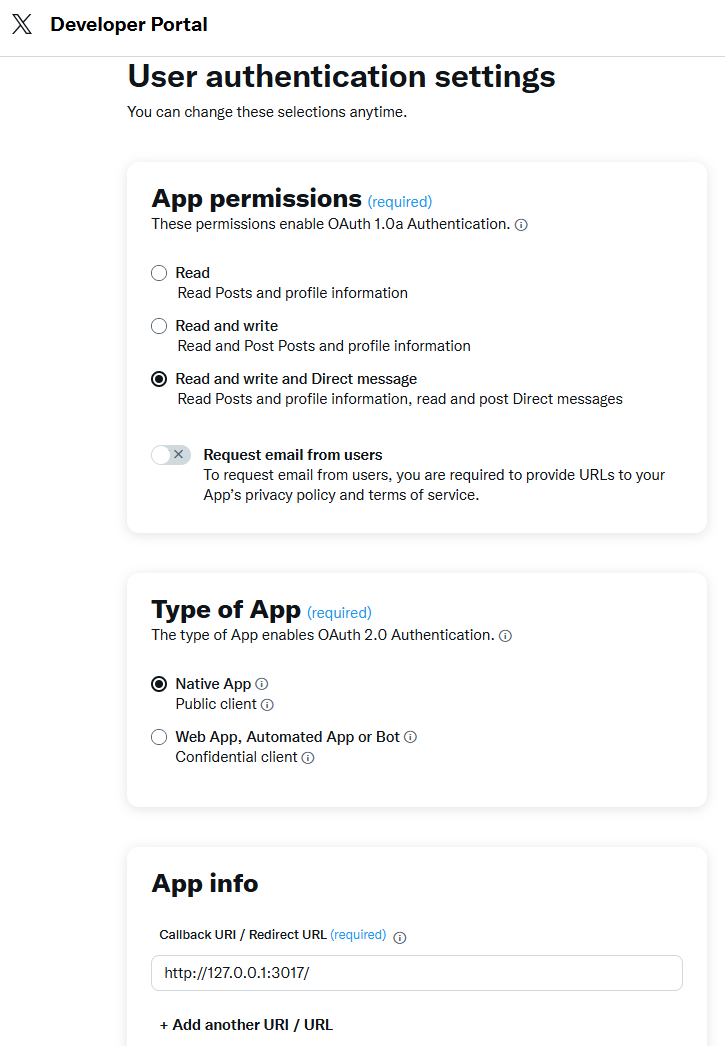
// The port should match the Authorized Redirect URL in your X.com app,
// which would look like "http://127.0.0.1:3017/"
// See the screenshot below of the App Settings in the X Developer Portal
Set ComLocalHost Of hoOauth2 To "127.0.0.1"
Set ComListenPort Of hoOauth2 To 3017
Set ComAuthorizationEndpoint Of hoOauth2 To "https://x.com/i/oauth2/authorize"
Set ComTokenEndpoint Of hoOauth2 To "https://api.x.com/2/oauth2/token"
// Replace this with your actual X.com OAuth2 Client ID and Client Secret
Set ComClientId Of hoOauth2 To "OAUTH2_CLIENT_ID"
Set ComClientSecret Of hoOauth2 To "OAUTH2_CLIENT_SECRET"
// This is for Require Proof Key for Code Exchange (PKCE)
// See OAuth2 PKCE Explained
Set ComCodeChallenge Of hoOauth2 To True
Set ComCodeChallengeMethod Of hoOauth2 To "S256"
// Space separated scopes...
Set ComScope Of hoOauth2 To "tweet.read tweet.write users.read follows.read follows.write offline.access like.read like.write block.read block.write"
// Begin the OAuth2 Authorization code flow. This returns a URL that should be loaded in a browser.
Get ComStartAuth Of hoOauth2 To sUrl
Get ComLastMethodSuccess Of hoOauth2 To bTemp1
If (bTemp1 <> True) Begin
Get ComLastErrorText Of hoOauth2 To sTemp1
Showln sTemp1
Procedure_Return
End
Showln "url = " sUrl
// Launch the default browser on the system and navigate to the url.
// The LaunchBrowser method was added in Chilkat v10.1.2.
Get ComLaunchBrowser Of hoOauth2 sUrl To iSuccess
If (iSuccess = False) Begin
Get ComLastErrorText Of hoOauth2 To sTemp1
Showln sTemp1
Procedure_Return
End
// Wait for the user to approve or deny authorization in the browser.
Move 0 To iNumMsWaited
While ((iNumMsWaited < 10000) And ((ComAuthFlowState(hoOauth2)) < 3))
Send ComSleepMs To hoOauth2 100
Move (iNumMsWaited + 100) To iNumMsWaited
Loop
// If the browser does not respond within the specified time, AuthFlowState will be:
//
// 1: Waiting for Redirect - The OAuth2 background thread is waiting for the browser's redirect request.
// 2: Waiting for Final Response - The thread is awaiting the final access token response.
// In either case, cancel the background task initiated by StartAuth.
Get ComAuthFlowState Of hoOauth2 To iTemp1
If (iTemp1 < 3) Begin
Get ComCancel Of hoOauth2 To iSuccess
Showln "No response from the browser!"
Procedure_Return
End
// Check AuthFlowState to determine if authorization was granted, denied, or failed:
//
// 3: Success - OAuth2 flow completed, the background thread exited, and the successful response is in AccessTokenResponse.
// 4: Access Denied - OAuth2 flow completed, the background thread exited, and the error response is in AccessTokenResponse.
// 5: Failure - OAuth2 flow failed before completion, the background thread exited, and error details are in FailureInfo.
Get ComAuthFlowState Of hoOauth2 To iTemp1
If (iTemp1 = 5) Begin
Showln "OAuth2 failed to complete."
Get ComFailureInfo Of hoOauth2 To sTemp1
Showln sTemp1
Procedure_Return
End
Get ComAuthFlowState Of hoOauth2 To iTemp1
If (iTemp1 = 4) Begin
Showln "OAuth2 authorization was denied."
Get ComAccessTokenResponse Of hoOauth2 To sTemp1
Showln sTemp1
Procedure_Return
End
Get ComAuthFlowState Of hoOauth2 To iTemp1
If (iTemp1 <> 3) Begin
Get ComAuthFlowState Of hoOauth2 To iTemp1
Showln "Unexpected AuthFlowState:" iTemp1
Procedure_Return
End
Showln "OAuth2 authorization granted!"
Get Create (RefClass(cComChilkatJsonObject)) To hoJson
If (Not(IsComObjectCreated(hoJson))) Begin
Send CreateComObject of hoJson
End
Get ComAccessTokenResponse Of hoOauth2 To sTemp1
Get ComLoad Of hoJson sTemp1 To iSuccess
Set ComEmitCompact Of hoJson To False
// If an "expires_on" member does not exist, then add the JSON member by
// getting the current system date/time and adding the "expires_in" seconds.
// This way we'll know when the token expires.
Get ComHasMember Of hoJson "expires_on" To bTemp1
If (bTemp1 = False) Begin
Get Create (RefClass(cComCkDateTime)) To hoDtExpire
If (Not(IsComObjectCreated(hoDtExpire))) Begin
Send CreateComObject of hoDtExpire
End
Get ComSetFromCurrentSystemTime Of hoDtExpire To iSuccess
Get ComIntOf Of hoJson "expires_in" To iTemp1
Get ComAddSeconds Of hoDtExpire iTemp1 To iSuccess
Get ComGetAsUnixTimeStr Of hoDtExpire False To sTemp1
Get ComAppendString Of hoJson "expires_on" sTemp1 To iSuccess
End
Get ComEmit Of hoJson To sTemp1
Showln "Access Token Response = " sTemp1
// A sample access token response:
// {
// "token_type": "bearer",
// "expires_in": 7200,
// "access_token": "VmNDLVZiYUZwejY5Mkx3RblFTmo3ek1leTRGclMuZFVOUTVUTWpNbVZKb1N5OjE3NDAxNjk4MDVxNTE6MToxOaF0OjE",
// "scope": "block.read follows.read offline.access tweet.write block.write like.write like.read users.read tweet.read follows.write",
// "refresh_token": "eThOWVVFSTRqdVp3QTFndGsxM2ZGZmFyNWVrU0phM1JKbGdrbGNWRGJzb1loOjE3NDAwMjk4MDUxNTI6MTowOnJ0OjE"
// }
Get ComAccessToken Of hoOauth2 To sTemp1
Showln "Access Token = " sTemp1
Get ComRefreshToken Of hoOauth2 To sTemp1
Showln "Refresh Token = " sTemp1
// Save the JSON access token response to a file for subsequent use..
Get ComWriteFile Of hoJson "qa_data/tokens/x.json" To iSuccess
//  End_Procedure