Dart
Dart
ScMinidriver - Get Public Keys from Smart Card Key Container
See more ScMinidriver Examples
Demonstrates how to query a key container on a smart card (or USB token) to get the public part of the private keys that are present. A key container can hold two separate private keys -- one in the "signature" position, and the other in the "key exchange" position.Chilkat Dart Downloads
import 'package:chilkat/chilkat.dart';
void main() {
// This example requires the Chilkat API to have been previously unlocked.
// See Global Unlock Sample for sample code.
// Chilkat recommends the following free tool for interactively examining the contents of your smart card
// through the ScMinidriver interface: MGTEK Tool for Minidriver enabled Smart Cards
// Let's first look at our smart card..
// Here's the view of our Gemalto (Thales) IDPrime MD T=0 smart card in the MGTEK tool:
// 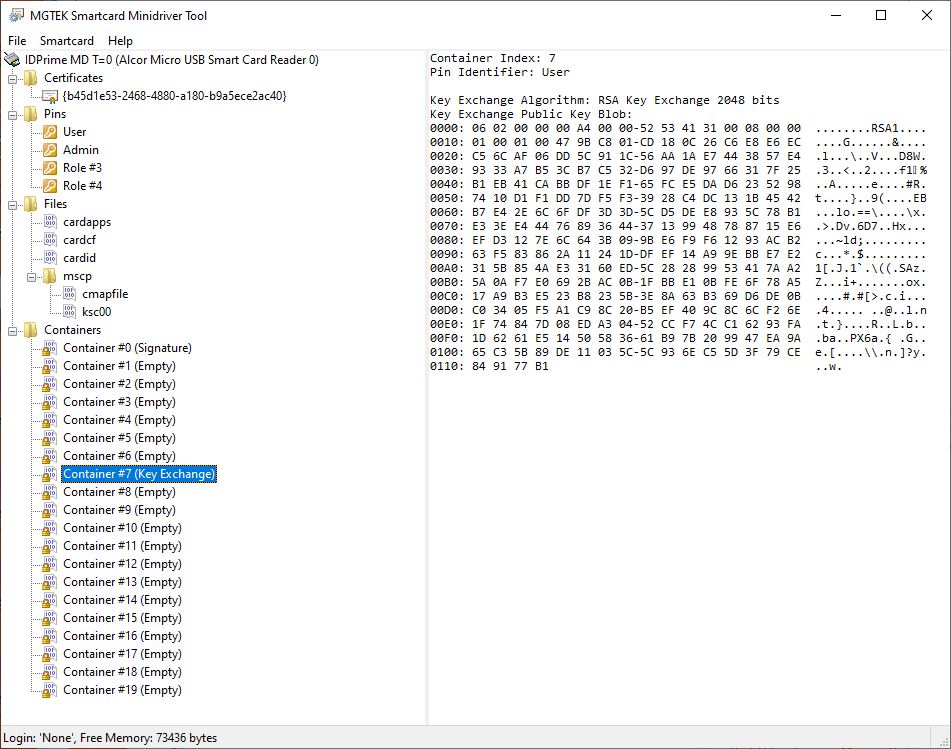 final scmd = CkScMinidriver();
// First we need to acquire a context to the smart card in the reader where it is inserted.
// Reader names (smart card readers or USB tokens) can be discovered
// via List Readers or Find Smart Cards
final readerName = 'Alcor Micro USB Smart Card Reader 0';
try {
scmd.acquireContext(readerName);
} on ChilkatException catch (e) {
print(e.lastErrorText);
return;
}
// If successful, the name of the currently inserted smart card is available:
print('Card name: ${scmd.cardName}');
// We likely shouldn't need to authenticate with the smart card (use a PIN) to simply get a public key,
// so we can skip the PIN authenticatin step..
// Let's get the key(s) present in Container #7.
// In our case (shown in the image above), there is a private key in the "key exchange" position, but no key in the "signature" position.
final pubkeySig = CkPublicKey();
final pubkeyKex = CkPublicKey();
try {
scmd.getContainerKeys(7, pubkeySig, pubkeyKex);
} on ChilkatException catch (e) {
print(e.lastErrorText);
return;
}
if (pubkeySig.empty) {
print('No signature key is present.');
} else {
print('Signature key:');
print(pubkeySig.getPem(true));
}
if (pubkeyKex.empty) {
print('No Key Exchange key is present.');
} else {
print('Key Exchange key:');
print(pubkeyKex.getPem(true));
}
scmd.deleteContext();
print('Success.');
// Here's the output of the above sample code:
// Card name: IDPrime MD T=0
// No signature key is present.
// Key Exchange key:
// -----BEGIN RSA PUBLIC KEY-----
// MIIBCgKCAQEAsXeRhM55P13FbpNcXAMR3olbw2Wa6keZIHu5YTZYUBTlYWId+pNi
// wUz3zFIEo+0IfYR0H27ybIycQO+1IIzJofUFNMAL3tZps2OKPlsjuCPls6kXpXhv
// /gvhux8LrCtp4PcKWqJ6QVOZKChc7WAx40qFWzHi57ueqRTv3x0kESqGg/VjsqyT
// Evb55psJO2RsfhLT7+YVh3hImRM3RDaJdkTkPuOxeFyT6N7VXD09329sLuS3QkUb
// E9zEKDnz9X3d8dEQdJhSI9ba5fxl8R7fu8pB67ElfzFml96X1jLFtzy1pzOT5Fc4
// ROcaqlYckVzdBq9sxezm6MYmDBjNAcibRwIDAQAB
// -----END RSA PUBLIC KEY-----
}
final scmd = CkScMinidriver();
// First we need to acquire a context to the smart card in the reader where it is inserted.
// Reader names (smart card readers or USB tokens) can be discovered
// via List Readers or Find Smart Cards
final readerName = 'Alcor Micro USB Smart Card Reader 0';
try {
scmd.acquireContext(readerName);
} on ChilkatException catch (e) {
print(e.lastErrorText);
return;
}
// If successful, the name of the currently inserted smart card is available:
print('Card name: ${scmd.cardName}');
// We likely shouldn't need to authenticate with the smart card (use a PIN) to simply get a public key,
// so we can skip the PIN authenticatin step..
// Let's get the key(s) present in Container #7.
// In our case (shown in the image above), there is a private key in the "key exchange" position, but no key in the "signature" position.
final pubkeySig = CkPublicKey();
final pubkeyKex = CkPublicKey();
try {
scmd.getContainerKeys(7, pubkeySig, pubkeyKex);
} on ChilkatException catch (e) {
print(e.lastErrorText);
return;
}
if (pubkeySig.empty) {
print('No signature key is present.');
} else {
print('Signature key:');
print(pubkeySig.getPem(true));
}
if (pubkeyKex.empty) {
print('No Key Exchange key is present.');
} else {
print('Key Exchange key:');
print(pubkeyKex.getPem(true));
}
scmd.deleteContext();
print('Success.');
// Here's the output of the above sample code:
// Card name: IDPrime MD T=0
// No signature key is present.
// Key Exchange key:
// -----BEGIN RSA PUBLIC KEY-----
// MIIBCgKCAQEAsXeRhM55P13FbpNcXAMR3olbw2Wa6keZIHu5YTZYUBTlYWId+pNi
// wUz3zFIEo+0IfYR0H27ybIycQO+1IIzJofUFNMAL3tZps2OKPlsjuCPls6kXpXhv
// /gvhux8LrCtp4PcKWqJ6QVOZKChc7WAx40qFWzHi57ueqRTv3x0kESqGg/VjsqyT
// Evb55psJO2RsfhLT7+YVh3hImRM3RDaJdkTkPuOxeFyT6N7VXD09329sLuS3QkUb
// E9zEKDnz9X3d8dEQdJhSI9ba5fxl8R7fu8pB67ElfzFml96X1jLFtzy1pzOT5Fc4
// ROcaqlYckVzdBq9sxezm6MYmDBjNAcibRwIDAQAB
// -----END RSA PUBLIC KEY-----
}