Dart Requires Chilkat v10.1.2+
Dart
Salesforce OAuth2 Access Token
See more OAuth2 Examples
Demonstrates how to get a Salesforce OAuth2 access token from a desktop application or script.Chilkat Dart Downloads
import 'package:chilkat/chilkat.dart';
void main() {
// To further clarify, see OAuth 2.0 Authorization Flow
final oauth2 = CkOAuth2();
// This should be the port in the localhost callback URL for your connected app.
// The callback URL would look like "http://localhost:3017/" if the port number is 3017.
oauth2.listenPort = 3017;
oauth2.authorizationEndpoint = 'https://login.salesforce.com/services/oauth2/authorize';
oauth2.tokenEndpoint = 'https://login.salesforce.com/services/oauth2/token';
// Replace this with your actual client ID (Consumer Key)
oauth2.clientId = 'CLIENT_ID';
// We don't have to include the client secret.
// See the screenshot of our Connected App below..
// This is for Require Proof Key for Code Exchange (PKCE)
// See OAuth2 PKCE Explained
oauth2.codeChallenge = true;
oauth2.codeChallengeMethod = 'S256';
// To force the OAuth consent screen to reappear (even if previously granted), use:
oauth2.addAuthQueryParam('prompt', 'consent');
// Begin the OAuth2 authorization flow. This returns a URL that should be loaded in a browser.
final String url;
try {
url = oauth2.startAuth();
} on ChilkatException catch (e) {
print(e.lastErrorText);
return;
}
// Launch the default browser on the system and navigate to the url.
// The LaunchBrowser method was added in Chilkat v10.1.2.
try {
oauth2.launchBrowser(url);
} on ChilkatException catch (e) {
print(e.lastErrorText);
return;
}
// Wait for the user to approve or deny authorization in the browser.
var numMsWaited = 0;
while ((numMsWaited < 90000) && (oauth2.authFlowState < 3)) {
oauth2.sleepMs(100);
numMsWaited += 100;
}
// If the browser does not respond within the specified time, AuthFlowState will be:
//
// 1: Waiting for Redirect – The OAuth2 background thread is waiting for the browser's redirect request.
// 2: Waiting for Final Response – The thread is awaiting the final access token response.
// In either case, cancel the background task initiated by StartAuth.
if (oauth2.authFlowState < 3) {
oauth2.cancel();
print('No response from the browser!');
return;
}
// Check AuthFlowState to determine if authorization was granted, denied, or failed:
//
// 3: Success – OAuth2 flow completed, the background thread exited, and the successful response is in AccessTokenResponse.
// 4: Access Denied – OAuth2 flow completed, the background thread exited, and the error response is in AccessTokenResponse.
// 5: Failure – OAuth2 flow failed before completion, the background thread exited, and error details are in FailureInfo.
if (oauth2.authFlowState == 5) {
print('OAuth2 failed to complete.');
print(oauth2.failureInfo);
return;
}
if (oauth2.authFlowState == 4) {
print('OAuth2 authorization was denied.');
print(oauth2.accessTokenResponse);
return;
}
if (oauth2.authFlowState != 3) {
print('Unexpected AuthFlowState:${oauth2.authFlowState}');
return;
}
print('OAuth2 authorization granted!');
print('Access Token = ${oauth2.accessToken}');
// Save the full JSON access token response to a file.
final sbJson = CkStringBuilder();
sbJson.append(oauth2.accessTokenResponse);
sbJson.writeFile('qa_data/tokens/_salesforce.json', 'utf-8', false);
// The saved JSON response looks like this:
// {
// "access_token": "00D41000....uLZBpT6",
// "refresh_token": "5Aep....25xdGgkrV",
// "signature": "cjTbSc5DvcKpaMoRTzuQTJLb1tcMw8LEO01flq4aMD4=",
// "scope": "refresh_token id",
// "instance_url": "https://d41000000f8a0eak-dev-ed.my.salesforce.com",
// "id": "https://login.salesforce.com/id/00D41000000F8A0EAK/005410000....xAAE",
// "token_type": "Bearer",
// "issued_at": "1738348388166"
// }
// --------------------------------------------------------------------------
// Here's a screenshot of a Salesforce Connected App
// with the correct Callback URL for this example,
// and also selects "Require Proof Key for Code Exchange (PKCE)"
// and does not requires the secret for the authorization or refresh flow,
// and also allows for the Client Credentials flow.
// 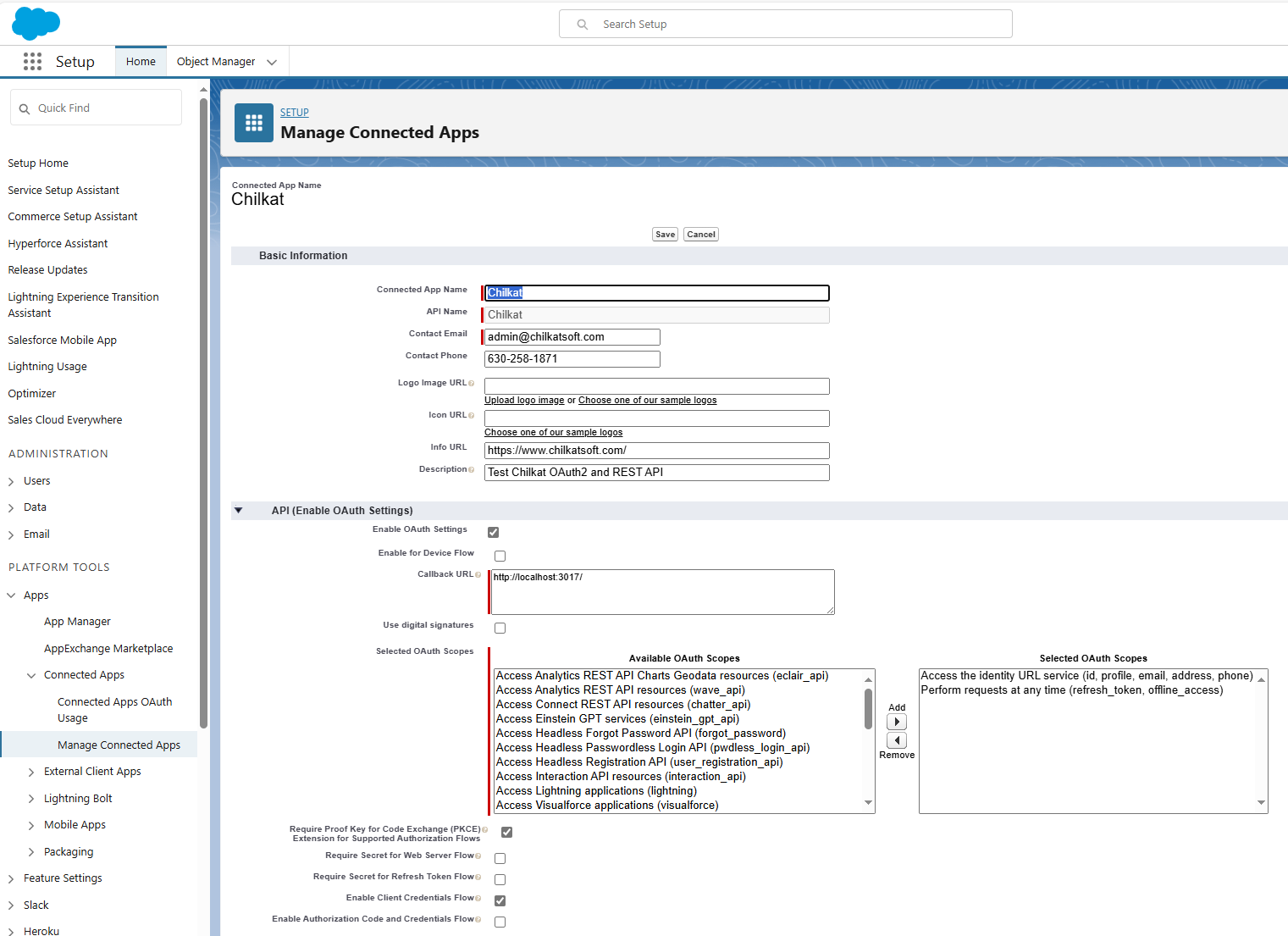 }
}