Dart Requires Chilkat v9.5.0.85+
Dart
Sign PDF with Timestamp from TSA (Timestamp Server Authority)
See more PDF Signatures Examples
This example demonstrates how to a sign a PDF that is both long-term validation (LTV) enabled and includes a validating timestamp from a TSA (Timestamp Server Authority).Chilkat Dart Downloads
import 'package:chilkat/chilkat.dart';
void main() {
// This example requires the Chilkat API to have been previously unlocked.
// See Global Unlock Sample for sample code.
final pdf = CkPdf();
// Load a PDF to be signed.
// The "hello.pdf" is available at https://chilkatsoft.com/hello.pdf
try {
pdf.loadFile('qa_data/pdf/hello.pdf');
} on ChilkatException catch (e) {
print(e.lastErrorText);
return;
}
// Options for signing are specified in JSON.
final json = CkJsonObject();
// In most cases, the signingCertificateV2 and signingTime attributes are required.
json.updateInt('signingCertificateV2', 1);
json.updateInt('signingTime', 1);
// Tell Chilkat to create an LTV-enabled (long term validation) signature.
// See PDF Long-Term Validation (LTV) Signature Example for more detailed comments about "ltvOcsp".
json.updateBool('ltvOcsp', true);
// Tell Chilkat to request a timestamp from a TSA server and include the timestamp token (1.2.840.113549.1.9.16.2.14)
// in the CMS signature's authentication attributes
json.updateBool('timestampToken.enabled', true);
// In this example, we'll use a free TSA server (timestamp.digicert.com), but you may want to use your own timestamp authority server.
json.updateString('timestampToken.tsaUrl', 'http://timestamp.digicert.com');
// If the timestamp server requires a username/password, do the following. Otherwise omit the following few lines of code.
json.updateString('timestampToken.tsaUsername', 'the_tsa_username');
json.updateString('timestampToken.tsaPassword', 'the_tsa_password');
// When requesting the timestamp token, ask the server to include its certificate in the timestamp token response.
// This allows for the timestamp server's certificate to be included in the LTV validation (i.e. if the timestamp server
// has an OCSP URL, then Chilkat will also do the OCSP request for the timestamp server's certificate.)
json.updateBool('timestampToken.requestTsaCert', true);
// Define the appearance of the signature.
json.updateInt('page', 1);
json.updateString('appearance.y', 'top');
json.updateString('appearance.x', 'left');
json.updateString('appearance.fontScale', '10.0');
json.updateString('appearance.text[0]', 'Digitally signed by: cert_cn');
json.updateString('appearance.text[1]', 'current_dt');
json.updateString('appearance.text[2]', 'This is an LTV-enabled signature with a TSA timestamp.');
// Load the signing certificate. (Use your own certificate.)
final cert = CkCert();
try {
cert.loadPfxFile('qa_data/pfx/myPdfSigningCert.pfx', 'pfxPassword');
} on ChilkatException catch (e) {
print(e.lastErrorText);
return;
}
// Tell the pdf object to use the certificate for signing.
try {
pdf.setSigningCert(cert);
} on ChilkatException catch (e) {
print(e.lastErrorText);
return;
}
try {
pdf.signPdf(json, 'qa_output/hello_ltv_signed_with_timestamp.pdf');
} on ChilkatException catch (e) {
print(e.lastErrorText);
return;
}
print('The PDF has been successfully cryptographically signed with TSA timestamp and long-term validation.');
// If you open the Signature Panel in Adobe Acrobat, it will indicate that the signature is LTV enabled
// and contains an embedded timestamp:
// 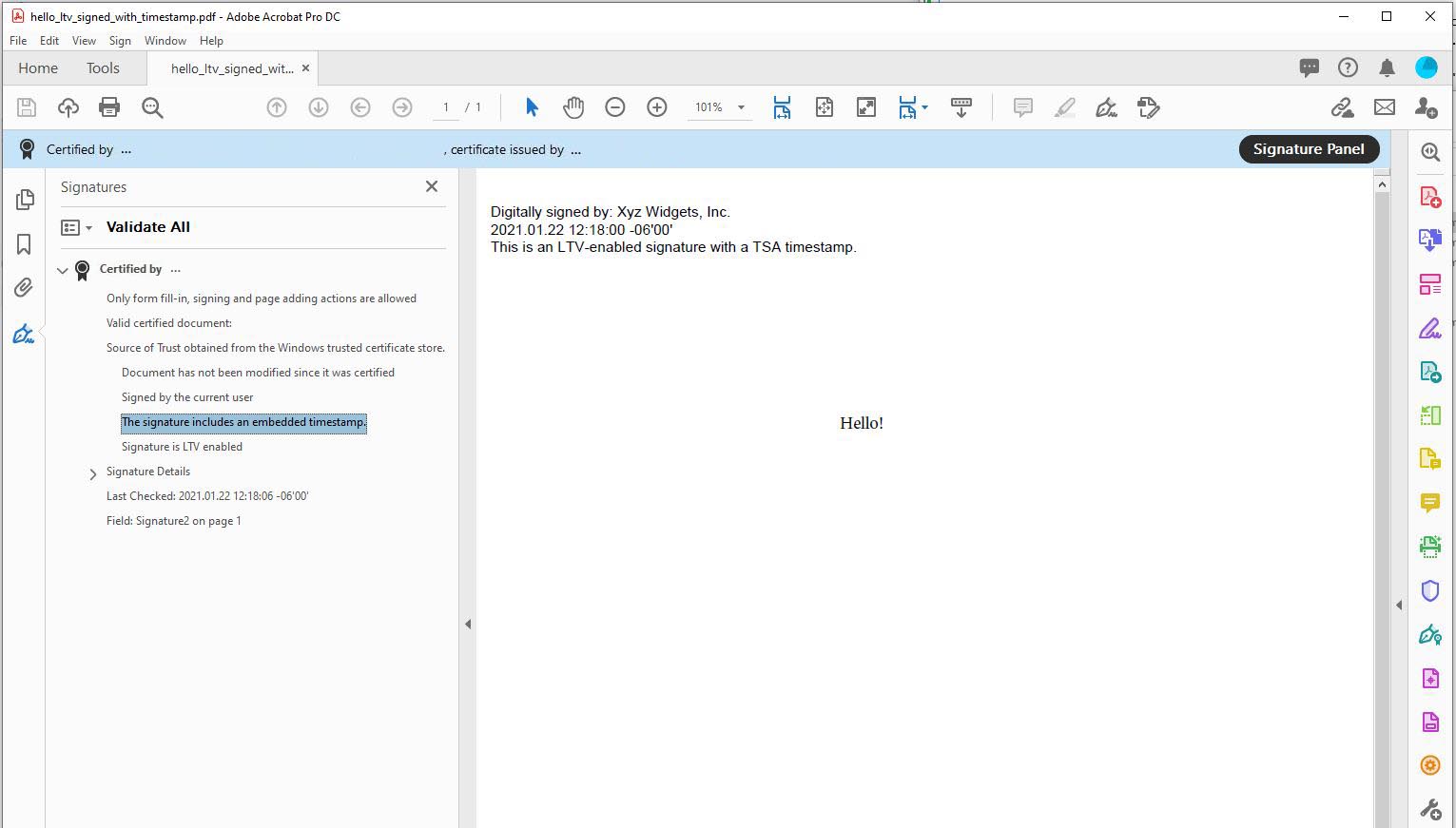 }
}