Dart
Dart
PDF Sign Unsigned Signature Field
See more PDF Signatures Examples
Demonstrates how to sign a PDF's unsigned signature field.Note: This example requires Chilkat v9.5.0.85 or greater.
Chilkat Dart Downloads
import 'package:chilkat/chilkat.dart';
void main() {
// This example requires the Chilkat API to have been previously unlocked.
// See Global Unlock Sample for sample code.
final pdf = CkPdf();
// Load a PDF containing an unsigned signature field.
try {
pdf.loadFile('qa_data/pdf/unsigned_sig_field/due_diligence.pdf');
} on ChilkatException catch (e) {
print(e.lastErrorText);
return;
}
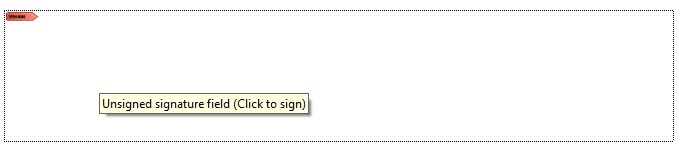
// A PDF with an unsigned signature field appears in Adobe Acrobat as shown below.
// (When the mouse pointer is hovered over the field, a tooltip will likely show a message
// such as "Unsigned signature field (Click to sign)".
// This example code will automatically find the unsigned signature field,
// and signs using your certificate. It automatically sizes the text to the space alotted
// for the signature.
//  // Options for signing are specified in JSON.
final json = CkJsonObject();
// In most cases, the signingCertificateV2 and signingTime attributes are required.
json.updateInt('signingCertificateV2', 1);
json.updateInt('signingTime', 1);
// We don't specify the page or a specific location because Chilkat will automatically
// find the unsigned signature field and use its location and size and will scale the
// signatures visual appearance (text + graphics) to the correct size required to fit.
// We only need to indicate the desire to fill the unsigned signature field.
json.updateBool('appearance.fillUnsignedSignatureField', true);
// Starting in Chilkat v9.5.0.90, if a PDF contains multiple unsigned signature fields,
// the field to be signed can be chosen by name:
// To list unsigned signature fields, see this example: List PDF Unsigned Signature Fields
json.updateString('unsignedSignatureField', 'doctor_signature');
// Note: If the PDF document contains multiple unsigned signature fields, Chilkat will
// sign the 1st one found.
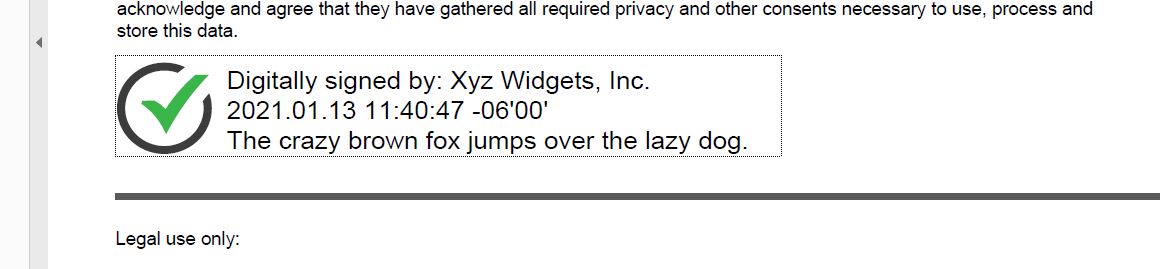
// In this example, the appearance of the digital signature will contain three lines:
// 1) The signing certificate's common name
// 2) The current date/time
// 3) Some arbitrary text.
// The keyword "cert_cn" is replaced with the Certificate's Subject Common Name.
// The keyword "current_dt" is replaced with the current date/time.
// Any number of appearance text lines can be added.
json.updateString('appearance.text[0]', 'Digitally signed by: cert_cn');
json.updateString('appearance.text[1]', 'current_dt');
json.updateString('appearance.text[2]', 'The crazy brown fox jumps over the lazy dog.');
// This signature will include one of the built-in SVG graphics (green-check-grey-circle).
json.updateString('appearance.image', 'green-check-grey-circle');
json.updateString('appearance.imagePlacement', 'left');
// Load the signing certificate. (Use your own certificate.)
final cert = CkCert();
try {
cert.loadPfxFile('qa_data/pfx/myPdfSigningCert.pfx', 'secret');
} on ChilkatException catch (e) {
print(e.lastErrorText);
return;
}
// Tell the pdf object to use the certificate for signing.
try {
pdf.setSigningCert(cert);
} on ChilkatException catch (e) {
print(e.lastErrorText);
return;
}
try {
pdf.signPdf(json, 'qa_output/due_diligence_signed.pdf');
} on ChilkatException catch (e) {
print(e.lastErrorText);
return;
}
print('The PDF has been successfully cryptographically signed.');
// The appearance of the signature appears in Adobe Acrobat as shown below.
//
// Options for signing are specified in JSON.
final json = CkJsonObject();
// In most cases, the signingCertificateV2 and signingTime attributes are required.
json.updateInt('signingCertificateV2', 1);
json.updateInt('signingTime', 1);
// We don't specify the page or a specific location because Chilkat will automatically
// find the unsigned signature field and use its location and size and will scale the
// signatures visual appearance (text + graphics) to the correct size required to fit.
// We only need to indicate the desire to fill the unsigned signature field.
json.updateBool('appearance.fillUnsignedSignatureField', true);
// Starting in Chilkat v9.5.0.90, if a PDF contains multiple unsigned signature fields,
// the field to be signed can be chosen by name:
// To list unsigned signature fields, see this example: List PDF Unsigned Signature Fields
json.updateString('unsignedSignatureField', 'doctor_signature');
// Note: If the PDF document contains multiple unsigned signature fields, Chilkat will
// sign the 1st one found.
// In this example, the appearance of the digital signature will contain three lines:
// 1) The signing certificate's common name
// 2) The current date/time
// 3) Some arbitrary text.
// The keyword "cert_cn" is replaced with the Certificate's Subject Common Name.
// The keyword "current_dt" is replaced with the current date/time.
// Any number of appearance text lines can be added.
json.updateString('appearance.text[0]', 'Digitally signed by: cert_cn');
json.updateString('appearance.text[1]', 'current_dt');
json.updateString('appearance.text[2]', 'The crazy brown fox jumps over the lazy dog.');
// This signature will include one of the built-in SVG graphics (green-check-grey-circle).
json.updateString('appearance.image', 'green-check-grey-circle');
json.updateString('appearance.imagePlacement', 'left');
// Load the signing certificate. (Use your own certificate.)
final cert = CkCert();
try {
cert.loadPfxFile('qa_data/pfx/myPdfSigningCert.pfx', 'secret');
} on ChilkatException catch (e) {
print(e.lastErrorText);
return;
}
// Tell the pdf object to use the certificate for signing.
try {
pdf.setSigningCert(cert);
} on ChilkatException catch (e) {
print(e.lastErrorText);
return;
}
try {
pdf.signPdf(json, 'qa_output/due_diligence_signed.pdf');
} on ChilkatException catch (e) {
print(e.lastErrorText);
return;
}
print('The PDF has been successfully cryptographically signed.');
// The appearance of the signature appears in Adobe Acrobat as shown below.
//  }
}