Dart
Dart
PDF Sign Under Existing Signature
See more PDF Signatures Examples
This example explains how sign a previously-signed PDF and place the signature appearance below the existing signature.Note: This example requires Chilkat v9.5.0.85 or greater.
Chilkat Dart Downloads
import 'package:chilkat/chilkat.dart';
void main() {
// This example requires the Chilkat API to have been previously unlocked.
// See Global Unlock Sample for sample code.
final pdf = CkPdf();
// Load a PDF to be signed.
try {
pdf.loadFile('qa_data/pdf/sign_testing_4/hello_signed.pdf');
} on ChilkatException catch (e) {
print(e.lastErrorText);
return;
}
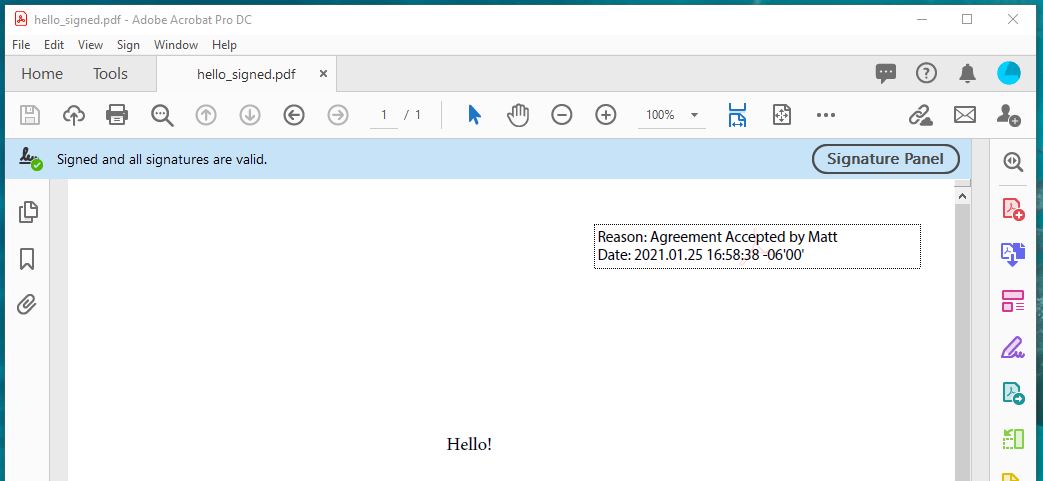
// The PDF we'll be signing already has a signature added in Adobe Acrobat DC.
// It looks like this:
// (Notice the Adobe background logo, which is commonly what you'll see when a signature
// is created by Adobe Acrobat. Chilkat (obviously) does not create signatures using the Adobe
// logo because it would be a copyright violation.)
//  // Options for signing are specified in JSON.
final json = CkJsonObject();
// In most cases, the signingCertificateV2 and signingTime attributes are required.
json.updateInt('signingCertificateV2', 1);
json.updateInt('signingTime', 1);
// To put our new signature underneath the existing signature, we have to specify the page
// where the existing signature is found, and then we can specify "under" for the "appearance.y"
json.updateInt('page', 1);
json.updateString('appearance.y', 'under');
json.updateString('appearance.fontScale', '10.0');
json.updateString('appearance.text[0]', 'Reason: Agreement Accepted by John');
json.updateString('appearance.text[1]', 'Date: current_dt');
// Load the signing certificate. (Use your own certificate.)
final cert = CkCert();
try {
cert.loadPfxFile('qa_data/pfx/myPdfSigningCert.pfx', 'secret');
} on ChilkatException catch (e) {
print(e.lastErrorText);
return;
}
// Tell the pdf object to use the certificate for signing.
try {
pdf.setSigningCert(cert);
} on ChilkatException catch (e) {
print(e.lastErrorText);
return;
}
// Note: When adding an additional signature to a PDF, the existing signatures
// are validated, and this includes validating the certificates previously used to
// create the existing signatures. (A signature typically embeds the signing certs.)
// In some cases, the certificates and/or certs in the chain of authentication for
// existing signatures are not present, and are not available on the current system.
// In this case, you can skip the validation by setting this keyword in UncommonOptions:
pdf.uncommonOptions = 'NO_VERIFY_CERT_SIGNATURES';
try {
pdf.signPdf(json, 'qa_output/hello_signed.pdf');
} on ChilkatException catch (e) {
print(e.lastErrorText);
return;
}
print('The PDF has been successfully cryptographically signed.');
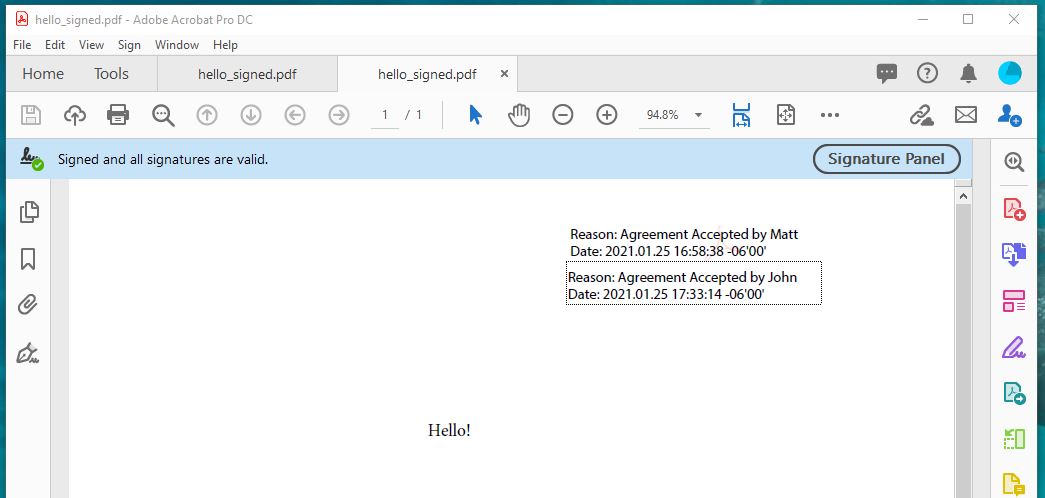
// Here's a screenshot of the 2nd signature positioned under the 1st in Adobe Acrobat:
//
// Options for signing are specified in JSON.
final json = CkJsonObject();
// In most cases, the signingCertificateV2 and signingTime attributes are required.
json.updateInt('signingCertificateV2', 1);
json.updateInt('signingTime', 1);
// To put our new signature underneath the existing signature, we have to specify the page
// where the existing signature is found, and then we can specify "under" for the "appearance.y"
json.updateInt('page', 1);
json.updateString('appearance.y', 'under');
json.updateString('appearance.fontScale', '10.0');
json.updateString('appearance.text[0]', 'Reason: Agreement Accepted by John');
json.updateString('appearance.text[1]', 'Date: current_dt');
// Load the signing certificate. (Use your own certificate.)
final cert = CkCert();
try {
cert.loadPfxFile('qa_data/pfx/myPdfSigningCert.pfx', 'secret');
} on ChilkatException catch (e) {
print(e.lastErrorText);
return;
}
// Tell the pdf object to use the certificate for signing.
try {
pdf.setSigningCert(cert);
} on ChilkatException catch (e) {
print(e.lastErrorText);
return;
}
// Note: When adding an additional signature to a PDF, the existing signatures
// are validated, and this includes validating the certificates previously used to
// create the existing signatures. (A signature typically embeds the signing certs.)
// In some cases, the certificates and/or certs in the chain of authentication for
// existing signatures are not present, and are not available on the current system.
// In this case, you can skip the validation by setting this keyword in UncommonOptions:
pdf.uncommonOptions = 'NO_VERIFY_CERT_SIGNATURES';
try {
pdf.signPdf(json, 'qa_output/hello_signed.pdf');
} on ChilkatException catch (e) {
print(e.lastErrorText);
return;
}
print('The PDF has been successfully cryptographically signed.');
// Here's a screenshot of the 2nd signature positioned under the 1st in Adobe Acrobat:
//  }
}