Dart
Dart
Google Sheets - Append Values to an Existing Spreadsheet
See more Google Sheets Examples
Appends values to an existing Google spreadsheet.Chilkat Dart Downloads
import 'package:chilkat/chilkat.dart';
void main() {
// This example requires the Chilkat API to have been previously unlocked.
// See Global Unlock Sample for sample code.
// This example uses a previously obtained access token having permission for the
// Google Sheets scope.
// In this example, Get Google Sheets OAuth2 Access Token, the access
// token was saved to a JSON file. This example fetches the access token from the file..
final jsonToken = CkJsonObject();
jsonToken.loadFile('qa_data/tokens/googleSheets.json');
if (!jsonToken.hasMember('access_token')) {
print('No access token found.');
return;
}
final http = CkHttp();
http.authToken = jsonToken.stringOf('access_token');
// To append values to an existing spreadsheet, our HTTP request body will
// contain JSON in the format of a "ValueRange". For example, the spreadsheet we'll be
// adding to in this example looks like this:
// 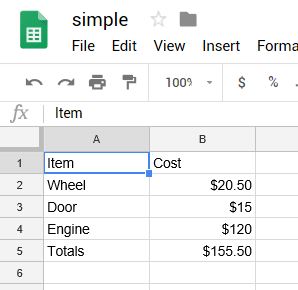 // The JSON ValueRange for the cells in the above spreadsheet is:
// {
// "range": "Sheet1!A1:B5",
// "majorDimension": "ROWS",
// "values": [
// [
// "Item",
// "Cost"
// ],
// [
// "Wheel",
// "$20.50"
// ],
// [
// "Door",
// "$15"
// ],
// [
// "Engine",
// "$100"
// ],
// [
// "Totals",
// "$135.50"
// ]
// ]
// }
// This example will append 6 cells (3 rows / 2 columns).
// We'll be appending the following:
//
// "Paint", "$100"
// "Brakes", "$100"
// "New Total", "$335.50"
//
// The range of cells we'll be appending is A1:B5
// Therefore, the ValueRange JSON we'll be sending in our POST body is:
// {
// "range": "Sheet1!A1:B5",
// "majorDimension": "ROWS",
// "values": [
// [
// "Paint",
// "$100"
// ],
// [
// "Brakes",
// "$100"
// ],
// [
// "New Total",
// "$335.50"
// ]
// ]
// }
final json = CkJsonObject();
json.updateString('range', 'Sheet1!A1:B5');
json.updateString('majorDimension', 'ROWS');
json.i = 0;
json.j = 1;
json.updateString('values[i][j]', 'Paint');
json.j = 1;
json.updateString('values[i][j]', '\$100');
json.i = 1;
json.j = 0;
json.updateString('values[i][j]', 'Brakes');
json.j = 1;
json.updateString('values[i][j]', '\$100');
json.i = 2;
json.j = 0;
json.updateString('values[i][j]', 'Totals');
json.j = 1;
json.updateString('values[i][j]', '\$335.50');
json.emitCompact = false;
print(json.emit());
// Send the POST to:
// https://sheets.googleapis.com/v4/spreadsheets/{spreadsheetId}/values/{range}:append?valueInputOption=USER_ENTERED
http.setUrlVar('spreadsheetId', '1_SO2L-Y6nCayNpNppJLF0r9yHB2UnaCleGCKeE4O0SA');
http.setUrlVar('range', 'Sheet1!A1:B5');
final resp = CkHttpResponse();
try {
http.httpJson('POST', 'https://sheets.googleapis.com/v4/spreadsheets/{\$spreadsheetId}/values/{\$range}:append?valueInputOption=USER_ENTERED', json, 'application/json', resp);
} on ChilkatException catch (e) {
print(e.lastErrorText);
return;
}
print('response status code = ${resp.statusCode}');
print('response JSON = ${resp.bodyStr}');
// Sample output:
//
// response status code = 200
// response JSON = {
// "spreadsheetId": "1_SO2L-Y6nCayNpNppJLF0r9yHB2UnaCleGCKeE4O0SA",
// "tableRange": "Sheet1!A1:B5",
// "updates": {
// "spreadsheetId": "1_SO2L-Y6nCayNpNppJLF0r9yHB2UnaCleGCKeE4O0SA",
// "updatedRange": "Sheet1!A6:B8",
// "updatedRows": 3,
// "updatedColumns": 2,
// "updatedCells": 6
// }
// }
//
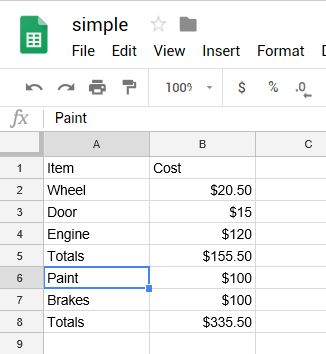
// Our Google Spreadsheet now looks like this:
//
// The JSON ValueRange for the cells in the above spreadsheet is:
// {
// "range": "Sheet1!A1:B5",
// "majorDimension": "ROWS",
// "values": [
// [
// "Item",
// "Cost"
// ],
// [
// "Wheel",
// "$20.50"
// ],
// [
// "Door",
// "$15"
// ],
// [
// "Engine",
// "$100"
// ],
// [
// "Totals",
// "$135.50"
// ]
// ]
// }
// This example will append 6 cells (3 rows / 2 columns).
// We'll be appending the following:
//
// "Paint", "$100"
// "Brakes", "$100"
// "New Total", "$335.50"
//
// The range of cells we'll be appending is A1:B5
// Therefore, the ValueRange JSON we'll be sending in our POST body is:
// {
// "range": "Sheet1!A1:B5",
// "majorDimension": "ROWS",
// "values": [
// [
// "Paint",
// "$100"
// ],
// [
// "Brakes",
// "$100"
// ],
// [
// "New Total",
// "$335.50"
// ]
// ]
// }
final json = CkJsonObject();
json.updateString('range', 'Sheet1!A1:B5');
json.updateString('majorDimension', 'ROWS');
json.i = 0;
json.j = 1;
json.updateString('values[i][j]', 'Paint');
json.j = 1;
json.updateString('values[i][j]', '\$100');
json.i = 1;
json.j = 0;
json.updateString('values[i][j]', 'Brakes');
json.j = 1;
json.updateString('values[i][j]', '\$100');
json.i = 2;
json.j = 0;
json.updateString('values[i][j]', 'Totals');
json.j = 1;
json.updateString('values[i][j]', '\$335.50');
json.emitCompact = false;
print(json.emit());
// Send the POST to:
// https://sheets.googleapis.com/v4/spreadsheets/{spreadsheetId}/values/{range}:append?valueInputOption=USER_ENTERED
http.setUrlVar('spreadsheetId', '1_SO2L-Y6nCayNpNppJLF0r9yHB2UnaCleGCKeE4O0SA');
http.setUrlVar('range', 'Sheet1!A1:B5');
final resp = CkHttpResponse();
try {
http.httpJson('POST', 'https://sheets.googleapis.com/v4/spreadsheets/{\$spreadsheetId}/values/{\$range}:append?valueInputOption=USER_ENTERED', json, 'application/json', resp);
} on ChilkatException catch (e) {
print(e.lastErrorText);
return;
}
print('response status code = ${resp.statusCode}');
print('response JSON = ${resp.bodyStr}');
// Sample output:
//
// response status code = 200
// response JSON = {
// "spreadsheetId": "1_SO2L-Y6nCayNpNppJLF0r9yHB2UnaCleGCKeE4O0SA",
// "tableRange": "Sheet1!A1:B5",
// "updates": {
// "spreadsheetId": "1_SO2L-Y6nCayNpNppJLF0r9yHB2UnaCleGCKeE4O0SA",
// "updatedRange": "Sheet1!A6:B8",
// "updatedRows": 3,
// "updatedColumns": 2,
// "updatedCells": 6
// }
// }
//
// Our Google Spreadsheet now looks like this:
//  }
}